
Topic – Domain Registrars
Post Reading Time – 24 Minutes
When it comes to hosting, you’ve probably seen IONOS during your searches. It’s one of those hosting names you keep bumping into when you’re looking at the various options out there. This IONOS Hosting Review is for anyone who wants a straight answer before signing up, because hosting problems are the last thing you need once your website is live. Running a site is time consuming enough without having extra issues keep coming up.
IONOS has a long history and it’s popular in the US and Europe. In this review, I’m going to talk to you about what you really get on each plan, how pricing often changes after the first term, who tends to get the best value, and the common issues people keep bringing up.
One quick note before we get into it. I haven’t run my own websites on IONOS. This is based on their plan details and support pages, plus public customer feedback, so you can see the full picture before you commit to anything.
You can check the official IONOS site if you want to look at the latest plans and features as you read this. Any screenshots in this review are included to show what IONOS states on its own website.
United Kingdom
Canada
Germany
Summarize This Content Using AI
TL;DR
IONOS Hosting Review
This review tells you what you get with IONOS hosting, what the plans include, and what it’s like to run a site on it day to day. It goes through the main positives like the low first term deals and the range of add-ons, but it also points out the parts that catch people out, like renewals, plan limits, and how the control panel differs from cPanel. You will also see who IONOS is good for and who will probably be happier somewhere else. That way you can decide if it is worth signing up, or if you should keep looking.
A Quick Summary Of IONOS
To start off, here is a short summary of the main details about IONOS.
Service name – IONOS.
Company – IONOS SE, part of the United Internet Group.
Founded – 1988, originally known as 1&1.
What it is – A web hosting and cloud provider that also sells domains and email services.
Main focus – Web presence tools for small businesses and site owners, plus cloud and server options for bigger projects.
Hosting options – Shared hosting, WordPress hosting, VPS, cloud hosting, and dedicated servers.
Website builder – Available as a separate product for building a site without coding.
Domains and DNS – Domain registration and domain management are available inside the account area.
Email hosting – Available with many hosting plans and also as a separate email product depending on what you choose.
Server locations – IONOS runs its own data centers in the United States and Europe.
Security basics – SSL is included on web hosting plans, with additional security options available as add-ons depending on plan.
If you’re putting a new website together, IONOS covers the basics in one account, hosting, domains, email, and a few security extras.

Screenshot from the IONOS website showing the features it lists as included, such as domain and SSL, email, control panel, support, and traffic.
IONOS Hosting Overview
About IONOS and the name change
IONOS has been around since 1988. It originally traded under the 1&1 name, which is why you still see 1&1 mentioned in older hosting guides and reviews. The company changed its name to IONOS, mainly to bring everything under one brand and update how it presents itself.
Today, IONOS operates across Europe and North America, with large data centers in both regions. It’s a big hosting provider that handles a large number of domains and websites, and that’s why it comes up when people compare hosting options, especially if they want a provider with a strong presence outside the United States.
Who tends to get the best value with IONOS?
Based on plan details and customer feedback, these are the types of site owners who usually get the best value from IONOS.
- Small business owners who want to keep their costs low at the start, but still want room to move up later.
- Freelancers and small agencies who like having hosting, domains, and email in the same place for client sites.
- People running small to midsized websites, like simple business sites, blogs, and basic online stores.
- Anyone who wants to keep their first year costs low, then upgrade later if the site starts growing.
If you’re brand new and you need your host to guide you through everything, this probably isn’t the one for you. Same goes if you want full control on shared hosting. The plans are fairly simple, but the account area can take a bit of getting used to during the first few visits.
Pricing patterns and what renewal really means
IONOS runs a very low intro price when you sign up for your first term, and usually when you pay for a year up front. That’s why it gets chosen so much, especially when people are trying to keep their startup costs down.
The main thing to understand is that the renewal price is normally higher than the intro deal. So before you sign up, it’s worth checking what the standard rate is for year two, not just the first term price you see on the signup page. That way you know what you’re paying once the promo ends.
Some plans include a free domain for the first year, then the normal domain renewal applies after that. There’s also usually a 30 day refund window, which gives you time to test the service and decide if you want to keep it.
You can check the official IONOS site to see the latest prices and plan details while you read this.
Hosting plans and the limits to watch for
IONOS keeps the main hosting plans simple. On shared hosting, the difference usually comes down to how many websites you can run and how much storage you get. WordPress hosting is similar, but you’ll often see a few extra bits added in, like guided setup, updates, and caching.
Here are the limits that sometimes catch people out.
- Basic shared plans are often set up for one website with a fixed storage limit, which is fine for a simple blog or a basic business site.
- WordPress hosting is usually one site per plan, unless you move up to a higher package.
- Email is often limited on lower plans, sometimes one mailbox with a storage cap, and you pay extra if you want more.
- Database limits can be tight on the cheaper plans. Some only allow one database, which is fine for one WordPress site, but it makes extra installs harder.
- Some plans let you adjust PHP resources, which can help if your site gets busier and you want a bit more breathing room without upgrading straight away.
If you’re running one site and keeping everything simple, these limits might not bother you too much. If you like running a few projects under one plan, or you want to install extra apps alongside WordPress, it’s worth checking the plan limits before you sign up.
Using IONOS Hosting Day To Day
The dashboard and control panel experience
IONOS uses its own control panel instead of the cPanel setup a lot of other hosts use. So if you’re used to cPanel, the IONOS layout can feel a bit unfamiliar at first.
From what I’ve seen in screenshots, guides, and customer feedback, the dashboard is split into clear areas like domains, websites, hosting, billing, and support. Once you know where things are, it’s easy enough to move around. The first few visits are usually the part where people feel a bit lost and confused, because some settings are not always where you expect them to be.
It’s also worth knowing that cPanel access is not the standard setup on basic hosting plans. If you want cPanel, it’s usually tied to higher tier plans like VPS or dedicated plans, and it depends on the package you choose. So if cPanel is something you want, make sure you check what the plan includes before you sign up, rather than assuming it will be there.
Setup and website creation
Based on what I’ve read in guides and user feedback, getting a site online with IONOS is quite quick. The setup wizards handle most of the basic steps, and WordPress installs are done from inside the main dashboard.
If you choose a managed WordPress plan, it guides you through more of the setup, which is useful if you don’t want to mess around with settings right from the start.
It’s also worth knowing that IONOS shows extra add-ons during the checkout, like backups, security extras, or upgraded email. They’re usually presented as tick boxes or trial offers. If you’re trying to keep your costs down, it’s worth slowing down here so you only add what you actually want.
Another thing that comes up in feedback is SSL. Some people say it isn’t always switched on straight away for a brand new site, especially when a new domain and hosting are set up at the same time. If that happens, it’s normally handled in the dashboard by turning SSL on manually, but it’s something to check after the setup is complete rather than assuming it’s already active.
Domains, DNS, and transferring sites in
Based on what I’ve read in guides and customer feedback, domain management on IONOS is fairly straightforward, especially if you use them for your domain registration and your hosting. Many hosting plans include a free domain for the first year, although this can vary depending on the domain extension.
Domain privacy, sometimes called WHOIS privacy, is often included for a lot of extensions. That can help keep your personal details off public records when you register a domain.
Transfers are handled inside the account area, but some users say the verification step can take longer than they expected. If you plan to transfer a domain in, it’s worth allowing a bit of extra time and keeping an eye on any confirmation emails so nothing gets missed.
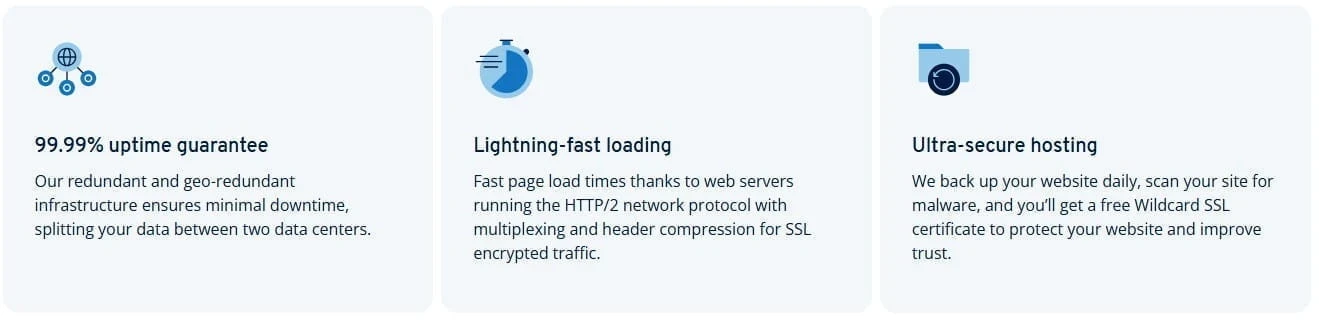
Screenshot from the IONOS website listing its uptime, loading speed, and security claims for web hosting.
Performance And Delivery
Performance, uptime, speed, and data centers
IONOS promotes uptime as one of its main selling points, usually around 99.9 percent. Based on public feedback, most small sites seem to stay online without many issues, and reports of long outages do not come up often.
Speed is a bit more mixed, because it depends on where your visitors are and where your site is hosted. Sites tend to load faster when visitors are close to the data center your plan is using. If your visitors are spread across different countries, the load times can vary a bit more.
IONOS also talks about geo redundancy on many of its plans, which means your site data can be mirrored across more than one location. The idea is to reduce downtime if there is a problem in one place. Even with that, if you care a lot about speed for visitors all around the world, you will still want to look at using a CDN, since that can help deliver content from locations closer to the visitor.
CDN and caching
Caching is often built in on managed WordPress plans, and on some shared plans too. The idea is to speed things up without you having to mess around with extra plugins or settings. On some WordPress plans you get simple caching controls inside the dashboard, while other plans just handle it in the background.
CDN is where people seem to get confused with IONOS. Some plans mention it, some do not, and it is not always clear what is included unless you look closely at the plan features. Based on plan descriptions and user comments, a CDN is more likely to be included on higher plans, or offered as an optional add-on.
If your plan does not include a CDN, you can still use a third party service like Cloudflare. It usually just means changing a few DNS settings, so it is not a big job, but it does require you to have a bit of experience with domain settings.
Backups Security And Site Moves
Backups and restore options
IONOS includes daily backups on many hosting plans, but the backup history is not usually very long. In a lot of cases, you only get a handful of recent restore points, so it’s more of a short safety net than a full archive.
Restore options also depend on the plan. Some restores can be done inside the dashboard, especially on shared hosting and managed WordPress plans. Other times, people say they had to contact support to get a restore done, or they used a paid backup tool because they wanted more control.
If your website is important to you, I’d still keep your own backups as well, either offsite or stored locally. That way you are not relying on one system if something goes wrong.
Security basics and what costs extra
Most IONOS hosting plans include SSL, and it is usually a wildcard SSL, so it can cover your main domain and any subdomains you add. You turn it on from inside the dashboard.
DDoS protection is included on most hosting plans. Malware scanning is usually tied to the higher plans or some managed packages. Cleanup is a separate point because that is not always included and may depend on the plan you choose.
Firewall controls are also limited on entry level hosting. If you want to set custom firewall rules, you will usually need a VPS or dedicated server, or you will need to use your own security tools.
Migration and moving a site to IONOS
If you are moving a site from another host to IONOS, you should expect to handle most of the migration yourself unless you pay for help. There is not a free, hands-on migration service included for everyone.
Some managed WordPress plans may include a bit more support, and IONOS has guides that walk you through common moves. In most cases though, people either migrate the files and database themselves, or they hire a third party to do it for them.
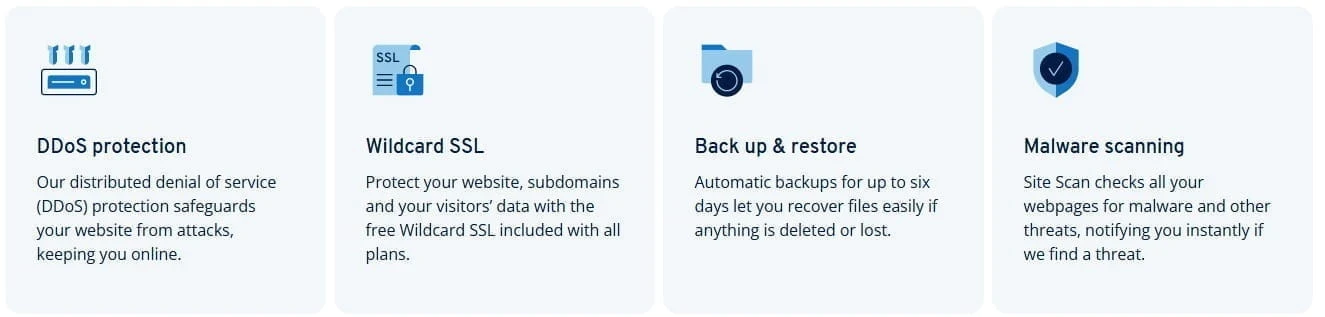
Screenshot from the IONOS website showing its security and backup features, including DDoS protection, wildcard SSL, backups, and malware scanning.
Support And User Feedback
Support and getting help
IONOS offers a few support options, and this is one area where feedback seems quite mixed.
The most consistent point I noticed is phone support. A lot of customers say they can reach someone quite quickly, even when things are busy.
Live chat is also available, but some people say it is harder to get through on chat, and that the first person you reach may be more focused on sales than technical support. For billing or account issues, IONOS also uses extra verification steps, like a PIN or other checks. It’s a little extra effort, but it’s there for account security.
IONOS also includes a personal consultant, which means you have a named contact you can reach directly when you need help. If that person is not available, support can route you to someone else on the same team, or arrange a callback.
The help center covers the basics, but because IONOS sells so many different services, it can take a bit of searching to land on the right support page for your exact product.
What users keep saying about IONOS
When you read through customer reviews and hosting forums, the same points come up again and again.
Positive points people mention
- Low first term pricing, especially for smaller sites
- Stable service for basic sites, with little downtime reported
- Phone support that many people say is quick and helpful
Negative points people mention
- Renewal pricing catching people off guard after the first term
- Billing and account verification feeling a bit fussy at times
- The dashboard feeling dated, and some settings being harder to find than expected
- Extra add-ons shown during signup pushing the cost up if you are not careful
- Occasional login or account access issues mentioned in reviews
Most of the happy feedback seems to come from people running a small business site or a simple WordPress site, once they get used to the dashboard. The main warnings are about renewal pricing, and the odd support ticket for things people expected to handle themselves, like restores.

Screenshot from the IONOS website showing its personal consultant and 24/7 support messaging.
The different IONOS plans in detail
Shared hosting plans
Shared hosting with IONOS is quite simple. Most of the difference comes down to how many websites you can run, how much storage you get, and what level of resources you are given.
The entry plan is aimed at one website, with limited storage and basic email. That’s enough for a simple blog or a small business site. The higher shared plans are normally for people who want to host more than one website and want more storage and resources.
Shared hosting plans usually include SSL, and many include a free domain for the first year. Email can be limited on entry plans, so if you need multiple business mailboxes you may need to add them or move up a plan. Database limits can also be tight on the cheaper options. One database is fine for a single WordPress site, but it can be limiting if you want to run more than one install or add other apps on the same hosting plan.
WordPress hosting plans
IONOS splits WordPress hosting into standard and managed plans.
Standard WordPress hosting is the basic setup. You get WordPress installed quickly, then you manage the site yourself, including updates and plugins.
Managed WordPress plans cost more, but they take more of the routine work away from you. These plans normally include things like managed updates, backups, and extra security features. Some plans also include staging, which lets you test changes on a copy of your site before putting them live.
WordPress plans are one site per plan unless you choose a higher package.
Caching and performance features are often stronger on managed plans, and you may get built in caching controls, depending on the plan.
VPS, cloud, and dedicated servers
If you outgrow shared hosting, IONOS also offers VPS, cloud hosting, and dedicated servers.
VPS is usually the next step up when you want more control and more resources, or when you want to run multiple apps on the same server. You get more freedom to change settings, but you also take on more responsibility for managing the server.
Cloud hosting is for projects where traffic can change a lot. The idea is that resources can be adjusted as needed, rather than being locked to one fixed server setup.
Dedicated servers are the top end option. You are renting the full machine, which is usually aimed at high traffic sites, serious ecommerce, or developers who want full control of the work environment.
What I like about IONOS hosting
IONOS is popular for a reason. If you choose the right plan and you know what the renewal cost is, it can be a good option for a simple website.
- Low first term pricing, which helps when you are trying to keep your startup costs down
- One account for hosting, domains, and email, so everything is in the same place
- Phone support that many customers say is fast to reach
- WordPress setup is straightforward, especially on the managed plans
- Basic security features like SSL and DDoS protection are included on hosting plans
Where IONOS could improve and what to look out for
Most complaints are about costs, limits, and account related annoyances.
- Renewal pricing can be a shock if you only looked at the intro deal
- Entry plans can feel tight on email and database limits
- The custom dashboard takes time to get used to if you are coming from cPanel
- Backup history and restore options can feel limited depending on the plan
- Checkout add-ons can push the total higher if you rush through the signup
Things to Consider Before Signing Up
Before you sign up, run through this list so you know exactly what you are getting.
| Renewal price | Check the standard price after the first term, not just the intro deal. |
| Email limits | Confirm how many mailboxes you get and how much storage each one has. |
| Database limits | Check how many databases your plan allows if you plan to run more than one website or app. |
| Backups and restore options | See how many days of backups you get and whether you can restore from the dashboard or need support. |
| Control panel and cPanel needs | Make sure you are happy using the IONOS dashboard. If you want cPanel, confirm which plans include it. |
| CDN needs for global visitors | If your visitors are spread across different countries, decide if you need a CDN and whether it is included or you will add your own. |
| Security features included | Confirm what security basics are included, like SSL and DDoS protection, and what costs extra. |
| Migration help included | Check if your plan includes any hands-on migration help or if you will be doing it yourself. |
| Add-ons during checkout | Look closely at any tick boxes or trials so you do not add paid extras by mistake. |
| Refund window and cancellation rules | Confirm the refund period and any conditions, so you know your options if you change your mind. |

Frequently Asked Questions – FAQs
The main downsides people mention are the renewal prices after the first term, tighter limits on entry plans, and the custom dashboard if you are used to cPanel. It’s the kind of host you need to buy with your eyes open, by checking plan limits and the standard renewal rate before you commit.
On shared hosting and WordPress hosting, you use the IONOS control panel. If cPanel is something you prefer, you need to check the exact plan before signing up, because cPanel is not the standard setup on the basic hosting plans.
Many IONOS web hosting plans include a free domain for the first year, and there is also a 30 day money back guarantee listed on the hosting plans page. Always check the plan features list to see what’s included with the package you’re buying.
IONOS is headquartered in Germany.
For a basic WordPress site, the setup is quick because IONOS includes one click installs in the hosting plans. A full migration from another host can take longer because it depends on what you are moving and how you plan to move it.
My experience with web hosting and how I reviewed IONOS
I have used a lot of different web hosts over the years, both for my own websites and for client projects. So I know what’s important once a website goes live. It is the pricing after the first term, plan limits, backups, support, and how easy it is to manage the basics without having to waste time.
For this IONOS review, I want you to know that I’m not writing from hands-on use. Instead, I reviewed the current plan details and support documentation, and I compared that with common customer feedback themes that keep coming up across review sites and forums.
My aim here is to give you a clear, practical view of what you are likely to run into, both the good points and the problems people mention, so you can decide if it is good for your website before you commit to it.
What I would like to see improved on IONOS
IONOS could make the control panel feel a bit more modern, and it would help if plan pages were clearer about what you get on each tier. Backups are a good example. A longer backup history and easier restores would help a lot, especially for people who just want the basics without having to open tickets.
Support is another one. Phone support gets good feedback, but it would help if chat and other support channels were as reliable as phone support.
I would also like to see the help center made easier to search, so you can find the right guide without clicking through a lot of menus. And on pricing, it would be better if the renewal costs were shown more clearly alongside the intro deal, so people know what they are agreeing to after the first term.
Comparing IONOS to other hosts
If you are comparing IONOS with other hosts, it helps to be clear on what you care about the most. IONOS is mainly chosen for the low first term price and the all-in-one account setup. This is a good deal for a small business website or a side project, as long as you check the renewal cost and any plan limits before you commit.
If support and speed are your top priorities, SiteGround is often the name people mention, but you will pay more for it.
If you want a longer refund window and more generous email on entry plans, DreamHost is also worth a look. I covered that in my DreamHost review.
If your main focus is domains and a simpler domain account experience, Namecheap is another option people consider.
Whatever host you choose, the best thing to do is to compare the plan features list side by side, not just the intro price. Look at the renewal pricing, email limits, backups, and what level of control you get with the dashboard.
Final thoughts on IONOS hosting
IONOS is a decent choice if you want low first term pricing, you are fine using a custom control panel, and you like the idea of keeping your hosting, domains, and email all in one account. It’s good for simple websites like small business sites, blogs, and side projects.
The main things to watch are the plan limits and renewal pricing. Do not sign up based on the intro deal alone. Check what the plan includes, what it renews at, and what the limits are for email, databases, and backups. Also be ready for a short learning curve if you are used to cPanel.
If you are happy with those points, IONOS can be a good provider. But if you want cPanel on shared hosting, lots of mailboxes on a basic plan, or more control without moving up to VPS, you will probably prefer another host.
If you want to take a look at what IONOS offers directly…
United Kingdom
Canada
Germany
Thank you for reading, and if you have questions about a specific plan, leave a comment and I will help you go through the plan features list before you buy.
Chris
Quick Summary
IONOS is a good choice if you want low first term pricing, you like keeping your hosting, domains, and email in one account, and you are fine using its own control panel instead of cPanel. It’s good for simple sites like small business websites, blogs, and smaller WordPress projects.
It’s less suitable if you want cPanel on shared hosting, lots of mailboxes on an entry plan, or more control without moving up to VPS or dedicated hosting.
My Overall Rating For IONOS Is 4 Out Of 5
Wealthy Affiliate
This is where my journey into the online world began, and it’s still the community I use for learning, tools, and support while working on my own projects.

About Chris Towers – Follow Me

My name is Chris Towers, and I run Affiliate Pro Solutions. I work with websites, content, and affiliate projects, and this website is where I share what I’ve learned from doing that work.
Most of what I write about comes from researching hosting companies, tools, and platforms that people use when building websites or trying to earn online. I look at how things are set up, what’s included, and where people often get caught out later.
I’m not connected to the companies I review beyond standard affiliate partnerships. This site does include affiliate links, but the aim here is to explain how the services work rather than push anyone into a decision.
You’ll find me on
Other Related Domain Registrar & Hosting Reviews
- DreamHost Review What You Should Know Before Signing Up

- IONOS Hosting Review Plans, Limits, And Renewal Costs

Just to be open with you, this page includes affiliate links. If you click on one of these links and make a purchase, I earn a small commission. There is no extra cost to you at all. This simply helps support the content I share here. Thank you for your support, it really is appreciated.
Hi Chris, thanks for this.
I hadn’t really looked into IONOS before, so it was good to see who it’s for and what to watch out for when it comes to the plan limits and renewals.
You have a detailed review here so it took me a bit to get through, but it was worth it. I’ll keep it in mind if I ever switch hosts.
Jeff
Hi Jeff, and thanks for the comment.
Glad it helped you out. With IONOS, I think the main thing is just checking the limits and what the plan renews at before paying, so there are no surprises later.
Appreciate you taking the time to read it.
Chris
Hi Chris, I’ve heard of IONOS before but never used it.
If I wanted a low cost host for a simple site, do you think it’s a decent option? I’m trying to keep the budget around $100 to $200 a year and I’m not too happy with my current hosting. What do you think?
Hi, and thanks for your question.
For a simple site yes, IONOS can be a good choice, but I’d only go for it if the plan limits suit what you need and you’re happy with the renewal price after the intro deal.
With a $100 to $200 a year budget, you’ve got a few options, so I’d compare a couple of hosts side by side and look closely at things like email, databases, backups, and what support you get.
If you tell me what kind of site you’re running and what you don’t like about your current hosting, I can help you a bit more. Let me know.
Chris