
Topic – Autoresponder Companies
Post Reading Time – 39 Minutes
So, you’ve spent time building your website, writing lots of articles and trying to get visitors. But what happens when someone reads your content and leaves? Unless they bookmark your site or remember to come back, there’s a good chance they won’t return.
That’s where building an email list comes in handy. It gives you a way to stay in contact with reader who are interested, share your latest content and bring people back to your website. But if you’re still working on getting traffic and haven’t earned your first affiliate commission, is it really worth paying for an email marketing service?
In this GetResponse Review, I’ll take a look at what the platform offers, how its main features work, what you get with the free and paid plans, and how it could help bloggers and affiliate marketers build an email list. I’ll also go over its advantages, disadvantages and limitations, so you can decide if it’s something worth using at this stage of your website.
Before getting into all the details, I want to make something clear. I haven’t personally used GetResponse, so this review is based on the company’s official documentation and feedback from people who have used the platform. I’ll explain what the software offers and point out anything I think you should keep in mind before signing up.
Summarize This Content Using AI
TL;DR
GetResponse Review
This review looks at how GetResponse works, what features it offers, and how it can help bloggers and affiliate marketers build an email list. It covers its email marketing tools, automation features, ease of use, pricing, and the limitations of its free plan. It also looks at its advantages and disadvantages, so you can decide if GetResponse is worth paying for or if the free plan is enough for your website.
A Quick Summary of GetResponse
Before we get into the main review, here’s a quick look at what GetResponse offers, who it’s for and what you can expect from the platform.
- Product name – GetResponse. An email marketing platform that helps businesses, bloggers and website owners collect subscribers, send newsletters and manage email campaigns.
- Type of service – Email marketing and marketing automation software with tools for managing contact lists, creating signup forms, sending emails and setting up automated messages.
- Who it’s for – Bloggers, affiliate marketers, small businesses, online stores and content creators who want to build an email list and keep in touch with their audience.
- Common uses – Collecting email subscribers, sending newsletters, delivering welcome emails, promoting new articles, creating landing pages and organising automated email campaigns.
- Free plan – GetResponse offers a free account that lets you start building an email list, create signup forms and send newsletters, although there are limits on contacts, email sends and available features. Autoresponders and marketing automation require a paid subscription once the initial trial ends. You can check the current allowances on the official GetResponse pricing page.
- Paid plans – Starter, Marketer and Creator plans offer different levels of email marketing, automation and additional tools. Enterprise packages are also available for larger businesses.
- Pricing setup – Subscription costs depend on your chosen plan and the number of contacts on your list. Prices increase as your subscriber list grows, with discounts available for longer billing periods.
- Additional features – Depending on your plan, GetResponse also offers AI writing tools, sales funnels, webinars, a website builder, ecommerce features and tools for creating and selling online courses.
- WordPress integration – GetResponse supports WordPress integration, allowing website owners to add signup forms and collect subscribers directly through their existing websites.
What Is GetResponse and How Does It Work?
GetResponse is an email marketing platform that helps website owners, bloggers and businesses to collect email addresses, manage subscriber lists and send out emails to people who have agreed to receive them.
The idea behind it is simple. Someone visits your website, finds your content helpful and decides they’d like to hear more from you. They enter their email address into a signup form, and GetResponse adds them to your subscriber list. You can then send newsletters, share your new articles, recommend products or keep your readers informed whenever you have something useful to tell them.
GetResponse has been around since 1998 and was originally for email marketing. Over the years though, it has added quite a few other tools, including landing pages, marketing automation, sales funnels, webinars and a website builder.
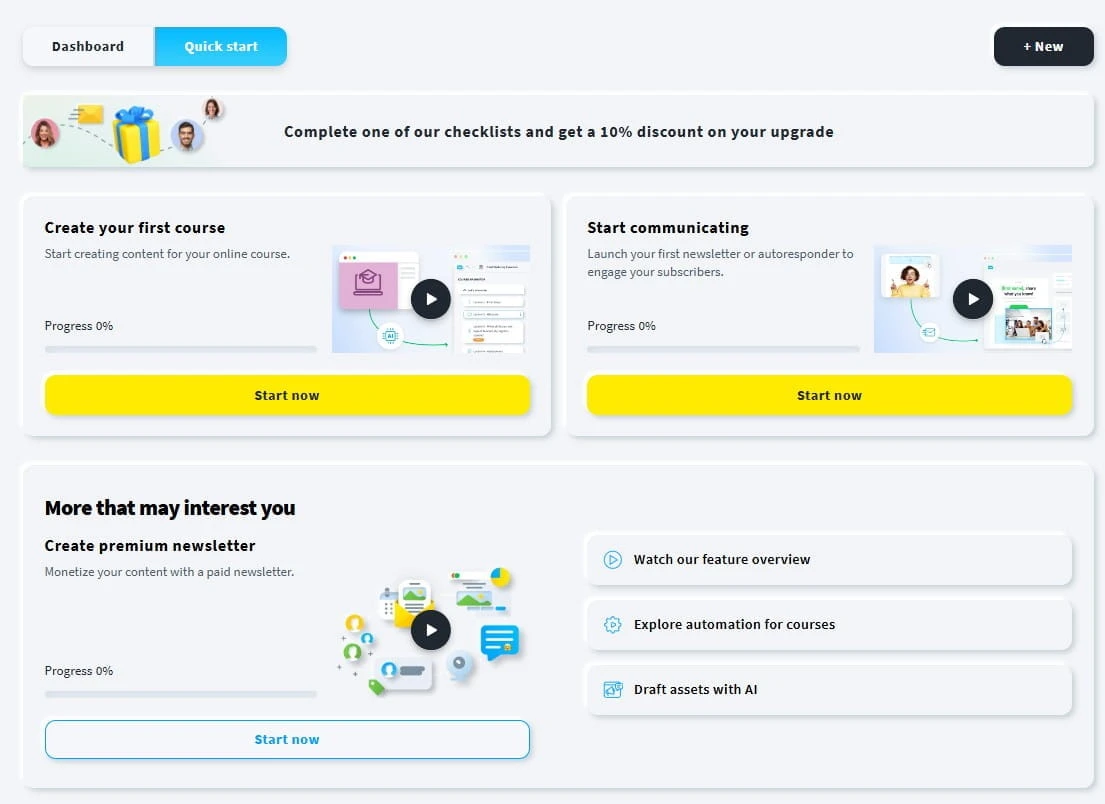
You don’t need to use all these features to get started. If you’re running a small affiliate website, collecting subscribers and sending occasional newsletters might be all you need. The more advanced tools become important when you want to do things like send different emails based on a subscriber’s interests or set up a series of messages that go out automatically.
How Does GetResponse Work in Practice?
Let’s say you’ve built a website that reviews home office equipment. You’ve published articles on office chairs, standing desks and other products, and you’re beginning to attract visitors from Google.
Now, imagine someone reads your article on choosing an office chair. They find it helpful, but they’re not ready to buy anything just yet. Rather than losing contact with that visitor, you could offer them the chance to subscribe to your email list for more advice on setting up a comfortable home office.
Here’s how you could set that up using GetResponse.
- Create your GetResponse account. Start by registering and setting up your email list. You’ll also need to configure your sender information so subscribers know who’s emailing them.
- Build a signup form. GetResponse provides tools for creating forms where visitors can enter their email addresses. You could offer a free checklist or simply invite readers to receive your latest articles and recommendations.
- Add the form to your website. If you’re using WordPress, you can connect GetResponse through its WordPress integration or add a form using the embed code provided. You could place it within an article, at the end of a post or somewhere else your visitors will notice it.
- Start collecting subscribers. When someone signs up, their details are added to the contact list you’ve selected. You can also enable an email confirmation process so visitors confirm that they want to subscribe.
- Send your first newsletter. Once you have subscribers, you can create an email using GetResponse’s editor. For example, you might share your latest home office guide, offer a few practical tips or direct readers to another useful article on your website.
- Set up automatic emails when you need them. With a suitable paid plan, you can also create an autoresponder that welcomes new subscribers and sends follow-up messages at intervals you choose. This means you don’t have to write and send each message individually.
There’s one important point I want to mention here. Although GetResponse offers a free plan for collecting subscribers and sending newsletters, autoresponders and automated welcome sequences require a paid subscription after the initial trial period.
What Happens After Someone Subscribes?
Once you’ve started building your email list, you have a way to contact people who’ve already shown an interest in your website.
For example, someone who subscribed after reading your office chair guide might be interested in an article explaining how to choose a standing desk. You could include that article in your next newsletter, along with a few tips that aren’t already covered on your website.
As your list grows, GetResponse also offers ways to organise subscribers into different groups. This becomes useful if your website covers several subjects and you want to send people information related to their interests.
Of course, building an email list doesn’t mean everyone will open your messages, return to your website or buy something through your affiliate links. You’ll still need to give subscribers a reason to read what you’re sending them.
And that’s really how GetResponse works. It provides the tools to collect subscribers, organise your contacts and communicate with them through email. How much you get from it depends on the people joining your list and the information you send out to them.
What Are the Main Features of GetResponse?
GetResponse comes with quite a few different tools for creating email campaigns, managing subscribers and keeping track of how people respond to your messages.
Some are useful from the moment you start collecting email addresses, while some of the others are designed for businesses that already have an established mailing list.
I’ve picked out the main features worth looking at, including what they do and how good they might be for someone running a blog or affiliate website.
Email Editor and Templates
One of the main features of GetResponse is its drag-and-drop email editor, which lets you create newsletters without needing to know HTML or write any code.
You can start with one of the available templates or create an email from scratch. The editor uses content blocks for things like text, images, buttons, dividers and other elements, which you can arrange to create your email.
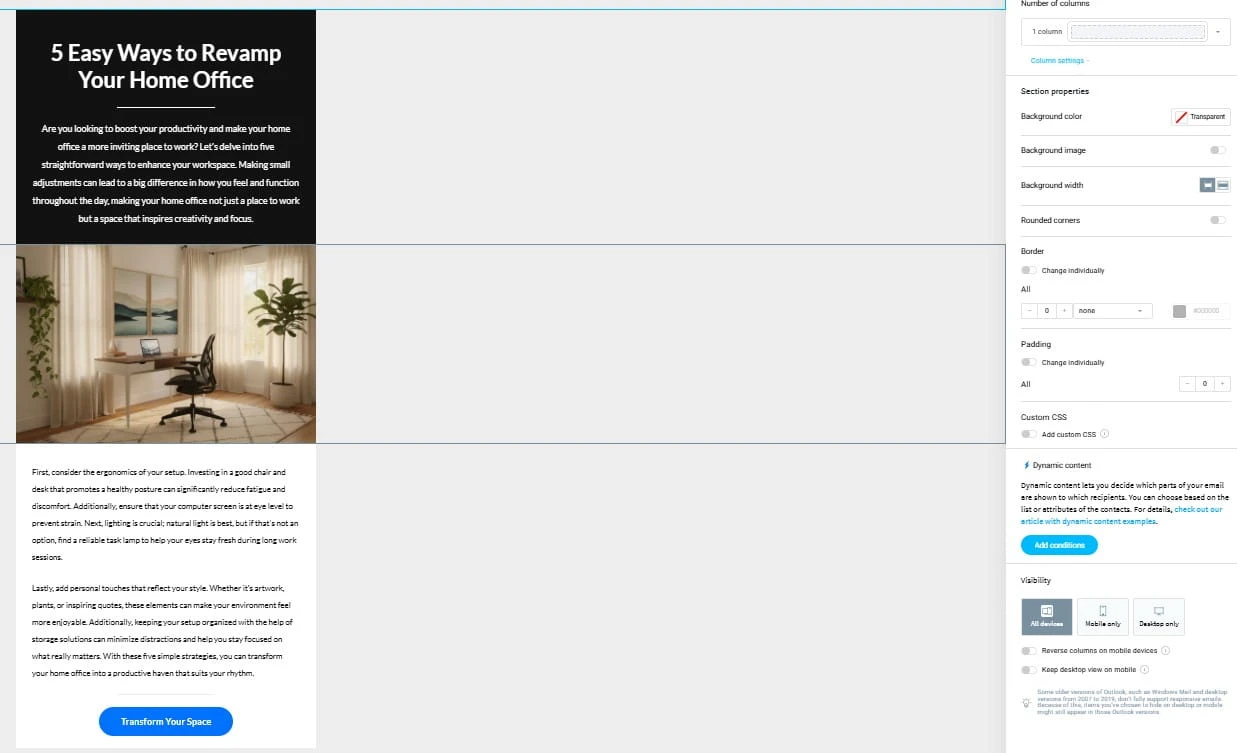
For example, if you wanted to send a newsletter announcing your latest blog post, you could add a heading, a short introduction, an image and a button linking your readers to the full article.
You can also change the colours, fonts and layout to keep your emails consistent with your website’s appearance.
Another nice feature is the ability to preview how your email will appear on different screen sizes. This is important because many subscribers will open your messages on their phones, and an email that looks good on a computer might be difficult to read on a smaller screen.
GetResponse also lets you send test messages before publishing a campaign, giving you an opportunity to check the formatting and make sure your links go where they’re supposed to go.
What I like about the editor’s features is the amount of control they give you when creating an email. However, having plenty of design options doesn’t mean you need to use them all. A newsletter with a clear message and a useful link can be perfectly effective without an overly elaborate design.
Signup Forms and Landing Pages
GetResponse includes a form builder with options for creating embedded forms and popups. You can change the wording, appearance and fields to suit the information you want to collect.
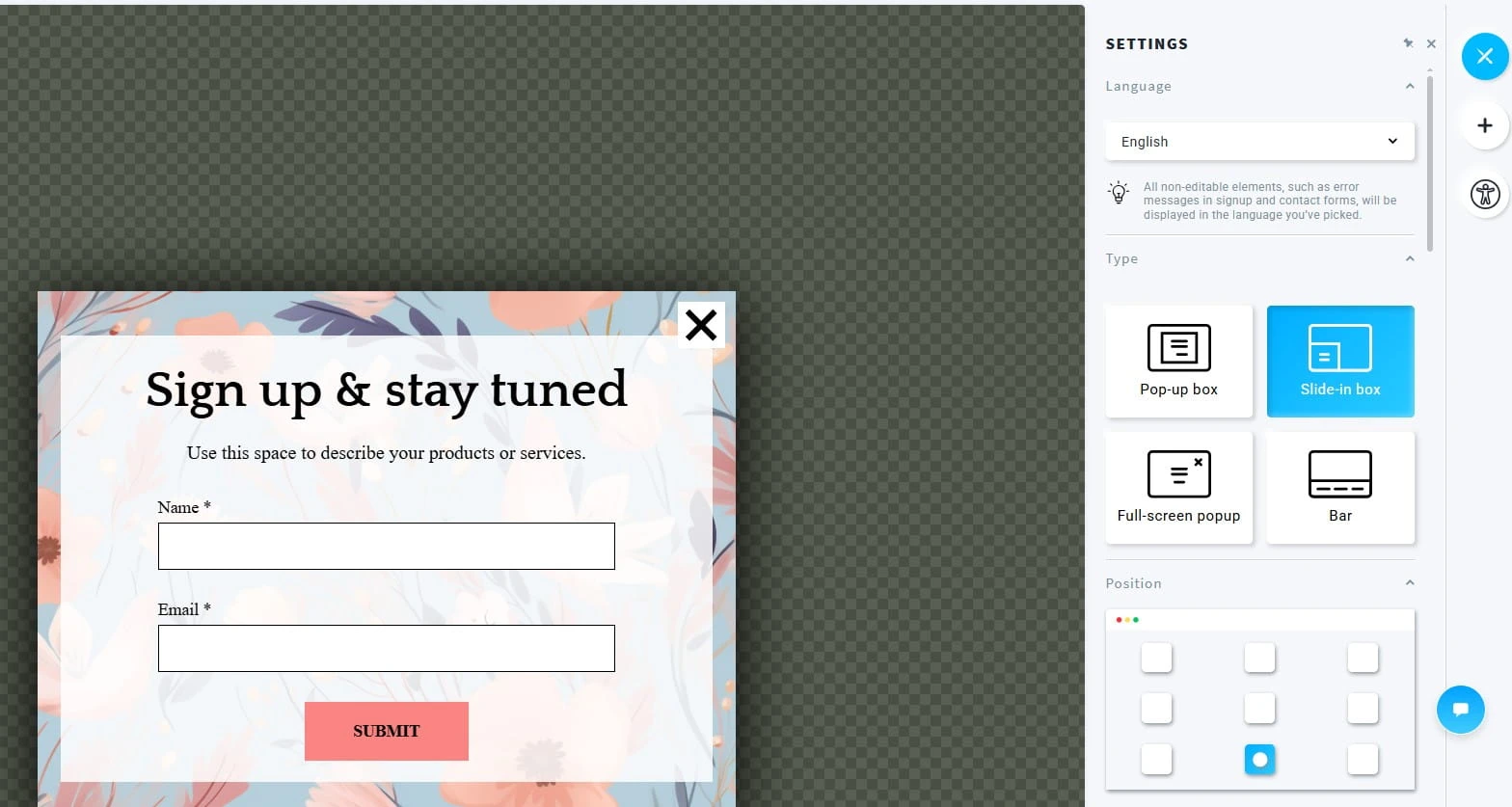
You can also create standalone landing pages using templates and an editor.
A landing page gives you a dedicated place to promote something specific, such as a free guide, a newsletter or a downloadable checklist. Rather than asking visitors to subscribe while they’re reading an article, you can direct them to a page explaining what they’ll receive when they join your list.
For example, if your website teaches people how to start affiliate marketing, you might want to offer people a checklist covering the first steps involved in building a website.
The landing page could explain what the guide includes, with a signup form underneath.
GetResponse also provides statistics for landing pages, so you can monitor how many visits and signups you’re getting. You can also check the subscription rate, which shows the percentage of visitors who sign up after visiting your page. This gives you a better idea of how well your landing page is performing.
There are restrictions on landing page visits, testing features and other allowances, depending on your subscription. It’s worth checking these before building a campaign that relies heavily on a particular landing page.
Autoresponders and Scheduled Emails
GetResponse’s autoresponder feature lets you prepare your emails in advance and choose when they should be delivered to your subscribers.
You can create a series of messages that are sent at different stages after somebody joins your list. You also have options for controlling the timing of those messages.
You can also choose which days of the week your emails are sent and set specific delivery times. GetResponse even has a feature called Time Travel, which lets you schedule messages to arrive at a particular time in each subscriber’s local time zone. This could be useful if you have readers in different countries.
For instance, you might prepare a short introductory series explaining what your website covers, followed by useful tips and links to relevant articles.
Once the autoresponder is active, GetResponse handles the scheduled delivery.
This is a nice feature if you’re running your website alongside a full-time job. You can prepare several emails when you have time, knowing that new subscribers will receive them according to the schedule you’ve created.
However, autoresponders aren’t included in GetResponse’s ongoing free plan. You can try them during the initial trial period, but you’ll need a paid subscription to continue using them afterwards.
Marketing Automation Workflows
GetResponse also offers a visual automation builder for creating more detailed email campaigns.
This goes further than just sending messages out at scheduled intervals. You can create workflows that respond to actions subscribers take, such as opening an email, clicking a link or joining a particular list.
For example, suppose you send a newsletter covering different types of website tools.
If someone clicks a link to an article on keyword research, you could set up a workflow that identifies their interest and sends another relevant message later.
You can also use conditions, filters and actions to organise how subscribers move through a campaign.
The automation builder presents these steps visually, so you can see how the different actions connect.
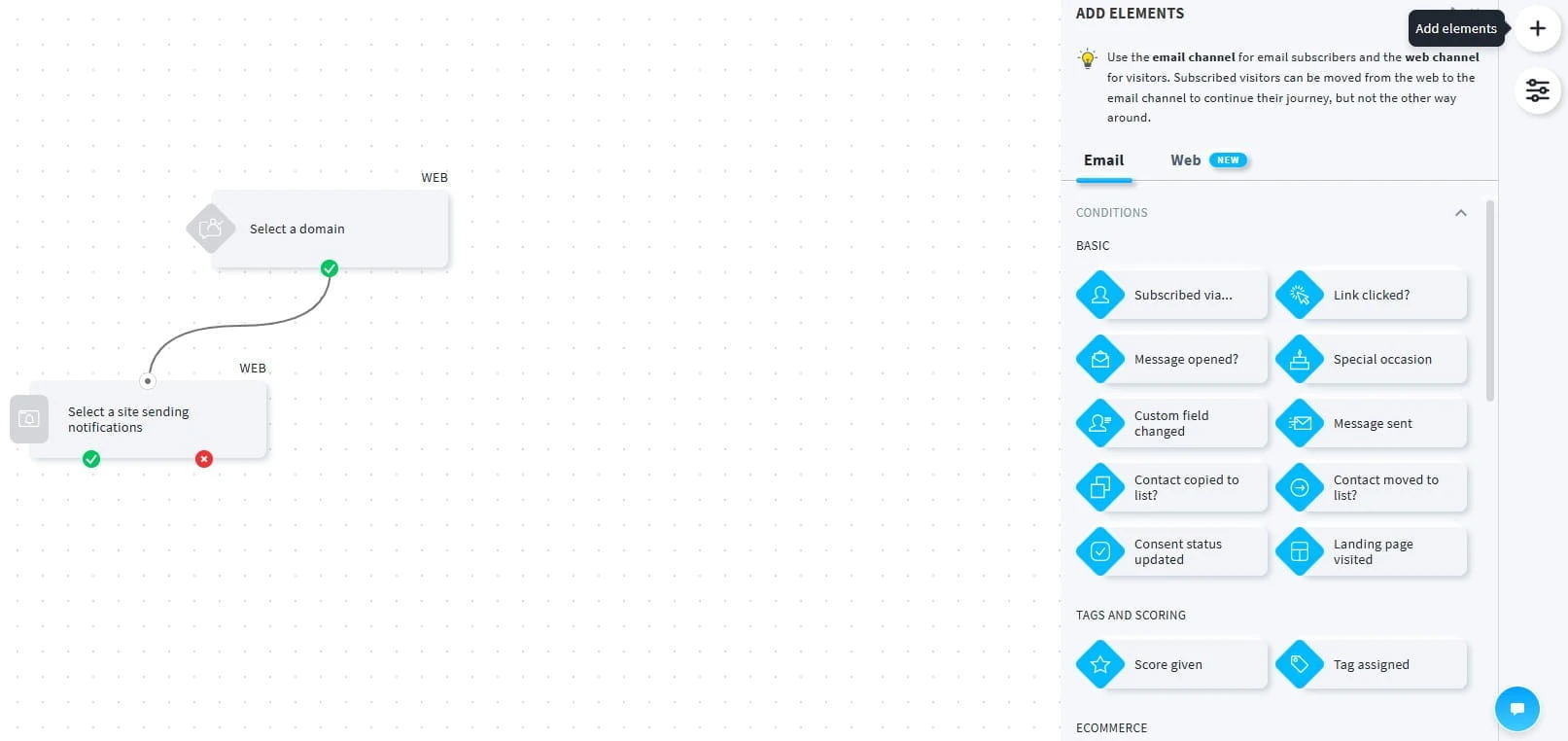
There’s quite a bit you can do with it, although creating complicated workflows takes some planning. You’ll need to think carefully about when messages should be sent and what happens if someone doesn’t open an email or follow a link.
GetResponse includes some basic automation features in its Starter plan, while the higher-priced plans give you access to more advanced workflows and additional options. It’s worth checking which features are included in your subscription before deciding how you want to use them.
For somebody just starting an affiliate website, I wouldn’t make advanced automation a priority to be honest. It’s something worth understanding, but you don’t need a complicated workflow to send out useful emails.
Contact Management and Segmentation
As your email list grows in size, it becomes important to know who you’re sending messages to.
GetResponse provides tools for organising contacts using lists, tags, custom fields and segments.
Tags can help you identify subscribers with particular interests. Custom fields let you store additional information, while segmentation allows you to select groups of contacts based on certain conditions.
Imagine your website covers blogging, affiliate marketing and WordPress.
You might have subscribers who are mainly interested in WordPress tutorials, while others prefer articles on affiliate marketing.
Using the available contact management tools, you could organise those subscribers and send more relevant information to each group.
GetResponse also supports dynamic segmentation, which means subscribers can automatically be added to a group when they meet certain conditions. For example, if you’ve created a segment based on an interest in WordPress, new subscribers who meet those conditions can be included without you having to add them manually.
GetResponse also records subscriber activity, giving you information about how people interact with your emails.
One thing to keep in mind is that GetResponse offers different levels of contact management depending on your subscription. Basic segmentation is available on the Starter plan, while more advanced segmentation features are included in higher-priced plans.
It’s worth checking which tools are available before choosing a subscription.
A/B Testing and Campaign Reports
Sending an email is only part of the process. You also need some idea of how your campaigns are performing.
GetResponse provides reporting tools that show information such as email opens, link clicks, unsubscribes and other campaign activity.
For example, if you send a newsletter promoting a new article, you can see how many recorded clicks it received and which links attracted attention.
You can use that information when planning your future messages.
Another feature is A/B testing, which lets you test different versions of an email campaign.
You might try two subject lines for the same newsletter to see which encourages more people to open it. GetResponse can then use the results to help determine which version performs better.
You can also test different versions of the email itself. For example, you might try changing the wording of a button or the way you introduce an article to see which version encourages more clicks. Once the test has run, you can select the version you want to use. GetResponse also has an option to choose the winner automatically and send it to the remaining subscribers in the campaign.
It’s worth remembering that email open rates aren’t perfectly accurate. For example, Apple’s Mail Privacy Protection feature can register an email as opened even when someone hasn’t actually read it. This means your open rate might look better than it really is, so I wouldn’t judge a campaign entirely by that figure.
Clicks, unsubscribes and the actions people take after visiting your website are also worth paying attention to.
A/B testing is most useful when you have enough subscribers to draw meaningful conclusions. If only a few people receive your emails, the results won’t tell you very much.
AI Email Writing Tools
GetResponse includes AI tools designed to help with writing email content and creating campaigns.
Its AI Email Generator can suggest subject lines, email copy and layouts based on information you provide.
You can also choose the type of email you want to create, such as a newsletter, welcome message or product announcement. There are options for selecting the tone, layout and colour scheme, giving you some control over what the AI produces before you start editing it.
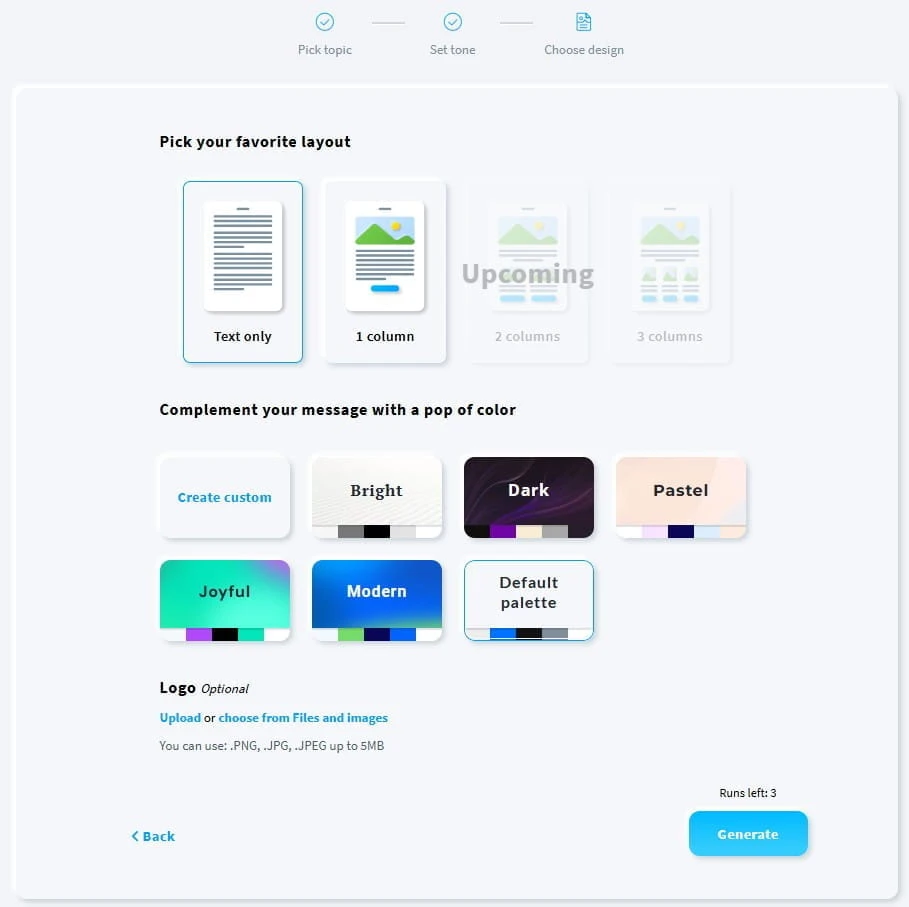
For example, you could enter details of a new article you’ve published and ask the tool to help prepare a newsletter introducing it to your subscribers.
You can then edit the suggested content before sending anything out.
I think this could be useful when you’re struggling to get started with an email, particularly if you send newsletters regularly.
However, I’d still read through everything carefully. AI-generated content can include awkward wording, inaccurate information or claims that need checking.
Your subscribers signed up to hear from you, so the final message should reflect your own knowledge and opinions, rather than something written entirely by AI.
GetResponse also has an AI Campaign Generator that can prepare a landing page, a welcome email and a newsletter based on the information you provide about your business and audience. You can then make changes to each part of the campaign before using it. This could save some time when putting together your first email campaign, although I’d still check everything carefully before publishing it.
Website Builder and Other Tools
GetResponse also includes a website builder that lets users create websites using templates and AI-assisted design tools.
This might be of interest to someone who doesn’t already have a website, but if you’re running an established WordPress blog, you probably won’t need to create another site inside GetResponse.
The platform also provides additional services, including sales funnels, webinars and tools for selling online courses and other products.
For example, GetResponse’s sales funnel tools can help you create a series of pages and emails designed to guide visitors towards signing up or making a purchase. You can also host webinars, where people register to attend an online presentation, training session or workshop.
There’s also a course creator that lets you put together lessons and other learning materials, which you can then offer to your audience. This could be useful if you eventually decide to create your own training programme or sell educational content through your website.
However, they’re not all included in the entry-level plans, and I wouldn’t choose a GetResponse subscription based on features you have no immediate plans to use.
How Easy Is GetResponse to Use?
Looking at GetResponse’s available tools and documentation, the basic email editor seems manageable for someone with no previous email marketing experience.
The drag-and-drop approach means you don’t need programming knowledge to create newsletters, and the ready-made templates give you a good place to start.
However, there’s quite a lot inside the platform. Between email campaigns, contact management, automation, landing pages and reporting, you’ll have several areas to become familiar with.
I haven’t personally tested the interface, so I can’t tell you exactly how long it takes to get comfortable with everything.
From the published documentation and user feedback, it’s the more advanced automation features that appear to require additional time and practice, especially if you’ve never set up an automated email campaign before.
One thing I’d recommend is concentrating on the tools you actually need at first. There’s no reason to spend hours learning the automation builder if your immediate goal is to send out a monthly newsletter.
If you’re using WordPress, GetResponse also provides an official integration that supports contact collection and other functions. Its documentation includes instructions for connecting a website and adding forms.
You should check how the integration works with your existing plugins, particularly if you’re already using a form builder. GetResponse itself recommends testing compatibility with installed WordPress plugins.
Overall, GetResponse offers plenty of features for managing email marketing campaigns, but how easy you’ll find the platform depends on which tools you intend to use and how comfortable you are learning new software.
Can You Use GetResponse for Affiliate Marketing?
Yes, GetResponse can be used for affiliate marketing, and the company actually promotes its own email marketing software to affiliate marketers.
This is something I think is worth looking at if you’re building an affiliate website. You might already be getting visitors from Google, but how many of those people leave your website without clicking an affiliate link or making a purchase?
Building an email list gives you another way to contact readers who’ve shown an interest in your content. You can send them useful information, introduce new articles to them and recommend products that are relevant to the subjects they signed up for.
GetResponse also provides automation templates designed for affiliate marketing, including welcome messages, product promotions and follow-up campaigns. Some of these require access to its paid automation features.
However, before you start including affiliate links in your emails, there are a few important things you should understand.
Make Sure People Have Agreed to Receive Your Emails
GetResponse has a strict anti-spam policy, which means you can’t simply collect email addresses from different places and start sending promotional messages out.
People need to have given you the appropriate permission to contact them.
For example, if somebody signs up to receive your weekly blogging tips, you should explain clearly what they’ll be receiving and whether your emails will include promotional content.
You shouldn’t buy email lists, collect addresses from websites or add people to your mailing list simply because they’ve previously contacted you.
If you’re collecting subscribers from the UK or European Union, you’ll also need to follow the applicable privacy and electronic marketing rules, including GDPR requirements where relevant.
GetResponse includes unsubscribe links in its emails, allowing people to stop receiving messages when they no longer want them. GetResponse also requires you to provide a valid postal address, which is included in your email footer. You should also make sure your signup forms and privacy policy accurately explain how you intend to use subscribers’ information.
I’d recommend reading the official GetResponse Anti-Spam Policy before starting your first campaign.
Check the Rules of Your Affiliate Programmes
GetResponse provides the tools for sending emails, but that doesn’t automatically mean every affiliate programme allows you to promote its products through email marketing.
Some programmes permit affiliate links in newsletters, while others have restrictions on email promotions or require you to get approval first.
For example, you might belong to an affiliate programme that allows you to promote products through your website but doesn’t permit direct affiliate links in emails.
That’s why I’d always check the programme’s terms before adding links to a newsletter.
You should also make it clear when you earn a commission if someone purchases through your affiliate link. Your disclosure needs to be easy for readers to understand and follow the applicable advertising rules.
Another thing worth remembering is that affiliate commissions depend on the tracking and attribution rules of the individual programme.
If someone clicks your affiliate link in an email, it doesn’t automatically mean you’ll receive a commission when they purchase. The programme may have a tracking window, eligibility conditions and other rules that affect whether a sale is credited to you.
I’ve explained this in more detail in my article on what an affiliate tracking cookie is.
How Could an Affiliate Marketer Use GetResponse?
Let’s say you’re running a website reviewing keyword research tools.
Someone finds one of your articles through Google and decides to subscribe because they want more advice on choosing keywords for their website.
Rather than immediately sending promotional emails, you could start by sharing useful information that helps them understand keyword research.
Your first message might introduce your website and explain what subscribers can expect. A few days later, you could send them a link to an article explaining common keyword research mistakes.
When you eventually recommend a keyword research tool, you could explain what it does, who might benefit from using it and any limitations readers should consider.
If your affiliate programme permits email promotion, you could include an appropriately disclosed affiliate link. You could also direct subscribers to a detailed review on your website.
The important thing is to give people a reason to continue opening your emails. If every message is trying to sell something, you risk losing their interest.
GetResponse’s reporting tools can also show which links subscribers click, helping you understand which subjects attract attention.
And as your subscriber list grows, you could use the segmentation and automation features we’ve already covered to send information related to different interests.
Is GetResponse Worth Using for Affiliate Marketing?
I think GetResponse has some good tools for affiliate marketers, especially if you’re planning to build an email list and communicate with your readers regularly.
You can start with the basic newsletter features and consider the paid automation tools when you have a reason to use them.
However, I wouldn’t rush into paying for an email marketing subscription if your website has very little traffic and you haven’t decided what you’re going to send to your subscribers.
I’d concentrate on publishing useful content, attracting visitors and giving people a genuine reason to join your list.
Once you begin collecting subscribers, you’ll have a better idea of which GetResponse features you actually need.
How Much Does GetResponse Cost and Is the Free Plan Enough?
GetResponse offers different subscription plans, including a free account for those people who want to get started without paying anything.
I’m not going to quote exact prices here because they can change, and I’d rather you check out the current figures directly on the GetResponse pricing page.
What I will explain is how the different plans work, what features they include and when you might need to consider upgrading.
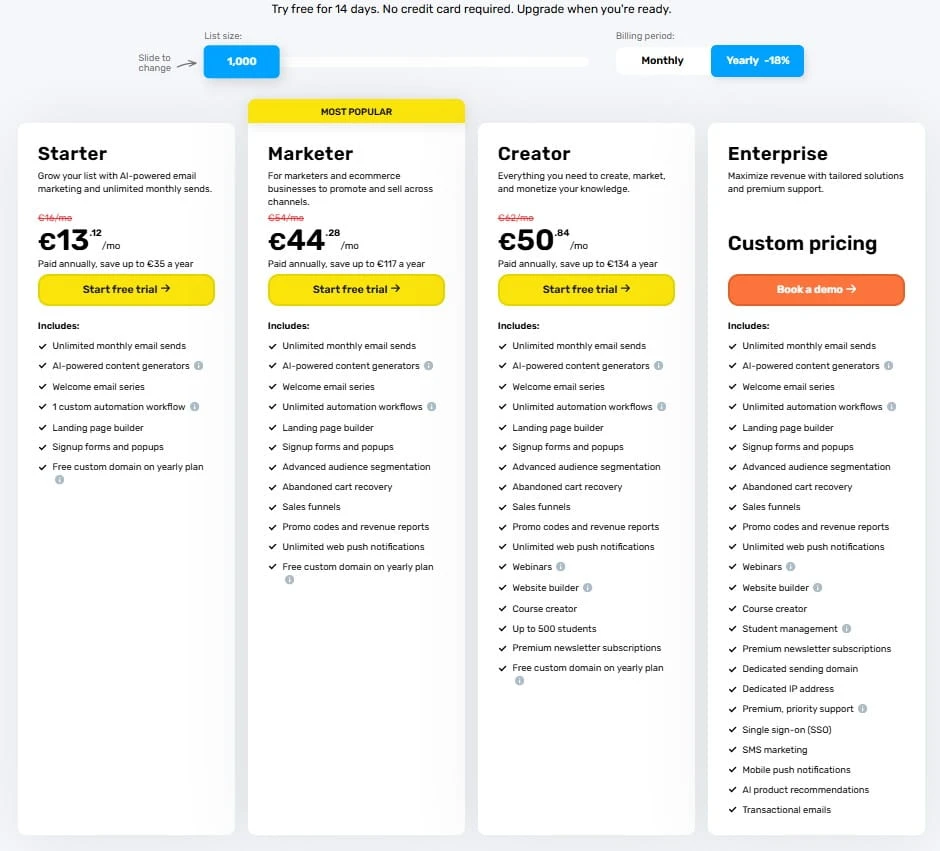
One thing worth knowing is that GetResponse bases its paid subscriptions on the features you need and the size of your contact list. As your list grows, your subscription cost can increase, even if you stay on the same plan.
You can also choose between monthly and longer billing periods, with discounts available when you pay in advance.
GetResponse Free Plan
GetResponse has an ongoing free plan that lets you collect subscribers, create signup forms and send newsletters without paying for a subscription.
You also get access to its basic email editor and landing page tools, making it possible to start building a list through your website completely free of charge.
However, there are limits on how many contacts you can store, how many newsletters you can send and which features remain available. Emails sent using the free account also include GetResponse branding.
For example, autoresponders and marketing automation aren’t included in the ongoing free account.
When you first register, GetResponse gives you temporary access to premium features during an initial trial period. Once that ends, those features become unavailable unless you upgrade to a paid plan.
If you’re running a new affiliate website and only want to collect subscribers and send occasional newsletters, I think the free plan is a reasonable place to start.
GetResponse Starter Plan
Starter is the entry-level paid subscription and is for people who want more email marketing features.
It includes autoresponders, which means you can prepare welcome emails and follow-up messages that are sent automatically to new subscribers.
You also get access to newsletter scheduling and basic marketing automation features, although there are restrictions on the number and complexity of workflows you can create.
For example, if you’ve started building an email list and want every new subscriber to receive a welcome message, Starter gives you the tools to do that.
There are still restrictions on the more advanced automation options, so I’d check the current feature list before subscribing.
For somebody running a small blog or affiliate website, Starter is probably the first paid plan I’d look into.
GetResponse Marketer Plan
Marketer is aimed at those who need more control over their email marketing campaigns.
It includes more advanced automation tools, additional workflows and features designed for ecommerce and sales campaigns.
For example, if your website covers several subjects and you want to send different messages based on subscribers’ interests and actions, the additional automation tools could be useful for you.
You can also use the sales funnel features to help manage campaigns involving signup pages, email sequences and product promotions.
However, I wouldn’t recommend paying for Marketer simply because it has more features. I’d want a good reason to use those additional tools before committing to the higher subscription cost.
GetResponse Creator Plan
Creator includes tools aimed at people who want to sell their own content, training materials or other products.
Alongside email marketing and automation, it provides features for creating online courses, hosting webinars and managing paid newsletters.
For example, someone running a successful educational blog might eventually decide to create a paid course or offer exclusive content to subscribers.
However, if your main goal is to collect email addresses and promote your latest blog articles, you probably won’t need everything included in Creator.
GetResponse Enterprise Plan
GetResponse also offers an Enterprise plan for larger organisations with more demanding marketing requirements.
This includes additional services, advanced marketing features and support arrangements based on the needs of the business.
Pricing is provided through a custom quotation rather than a standard subscription.
For most beginners building their first affiliate website, I wouldn’t really spend much time considering this plan.
Is the GetResponse Free Plan Enough?
For somebody starting their first blog or affiliate website, I definitely think the free plan is worth considering.
You can begin collecting email addresses and sending basic newsletters while you concentrate on publishing your content and attracting visitors.
However, I’d pay attention to the restrictions.
My advice would be to start by deciding what you actually want to do with your email list.
If you’re happy sending occasional newsletters yourself, there’s no reason to pay for advanced automation tools.
But if you’re beginning to attract regular subscribers and want to send automatic messages, Starter would be the first paid plan I’d look at.
If your website is still getting very little traffic, I’d concentrate on publishing more content and attracting visitors before spending money on an email marketing subscription. If you’re struggling with this, I’ve also written an article explaining why your website might not be getting traffic. However, there’s nothing stopping you from adding a free signup form now and collecting subscribers as people find your website. Your list might grow slowly at first, but at least you’ll have made a start.
One thing I’d be careful about is upgrading too early. According to GetResponse’s current policy, once you move from the free account to a paid subscription, you can’t downgrade that account back to the free plan again.
I’d also check the billing conditions before paying, especially if you’re considering an annual subscription. GetResponse’s current refund policy generally doesn’t provide refunds for subscription periods you’ve already paid for.
You can check the latest prices, contact limits, billing conditions and included features on the official GetResponse pricing page before making your decision.
What Are the Pros and Cons of GetResponse?
After looking through GetResponse’s features, pricing and email marketing tools, I think there are quite a few things to like about the platform. However, there are also some disadvantages worth looking into before you decide to sign up.
What I Like About GetResponse
- Plenty of email marketing features. GetResponse includes newsletters, signup forms, landing pages, autoresponders and marketing automation, giving you a wide choice of tools for building and managing an email list.
- A free plan to get started. You can begin collecting subscribers and sending basic newsletters without having to pay for a subscription.
- Automated email campaigns. The paid plans allow you to prepare welcome messages, follow-up emails and more advanced campaigns that respond to what your subscribers are doing.
- Useful reporting tools. You can monitor email opens, link clicks, unsubscribes and other campaign activity to see how people respond to your messages.
- Plenty of room to grow. If you eventually need more advanced automation, webinars, sales funnels or course creation tools, GetResponse offers these through its paid plans.
What’s Not So Good About GetResponse?
- Quite a lot to learn. With so many tools and settings available, beginners may need some time to become familiar with everything, especially the more advanced automation features.
- Costs increase as your list grows. Your subscription price depends partly on the number of contacts you have, so you could end up paying much more as your subscriber list gets bigger.
- Restrictions on the free plan. Autoresponders and marketing automation aren’t included in the ongoing free account, and there are limits on contacts and email sends.
- Some features require expensive plans. Advanced automation, certain ecommerce tools, webinars and course creation features are available through higher-priced subscriptions.
- Restrictions on downgrading and refunds. According to GetResponse’s current terms, you can’t return to the free plan after upgrading to a paid subscription, and payments are generally non-refundable.
Of course, I completely understand that not everything in life comes for free. A lot of time, money and effort goes into developing and maintaining software like GetResponse, so I would never expect all these features to be available without paying for them.
You generally get what you pay for, and I don’t have a problem with companies charging for their services. What matters to me is that you’re getting something useful for your money and aren’t paying for features you don’t really need.
What Do Users Say About GetResponse Customer Support?
Customer support is something I always look at when reviewing software, especially when it’s aimed at beginners who might need a little help getting started.
GetResponse provides support through live chat and email, along with a help centre containing tutorials, guides and answers to some of the more common questions.
The company also offers additional support services for larger businesses on its Enterprise plan. However, the availability of support depends on the channel and your subscription, so I’d check the current arrangements before you sign up.
I haven’t personally contacted GetResponse’s support team, so I can’t comment on my own experience. However, I’ve looked at feedback from people who have used the service.
Looking through customer reviews on Trustpilot and Capterra, there are some positive comments, along with a few complaints worth mentioning.
- Helpful support staff. Many customers praise the support team for being friendly, knowledgeable and willing to explain things clearly.
- Quick responses. Several reviewers mention receiving prompt assistance through live chat, particularly when asking questions or getting help with the software.
- Billing and account problems. Some customers report difficulties resolving payment disputes, account restrictions and cancellation issues.
- Delays with certain problems. Although many people describe positive experiences, others say they’ve had to wait longer for help with more complicated issues.
Of course, customer reviews reflect individual experiences, and you shouldn’t assume everyone will receive exactly the same level of service.
If customer support is particularly important to you, I’d recommend contacting GetResponse during the trial period. Ask a question about something you’re not sure about and see how helpful the response is.
You can also read the latest feedback on Trustpilot and Capterra before deciding.
How I Approached This Review
I’ve been involved in affiliate marketing since 2014, and over the years I’ve spent lots of time learning about the different tools and services available to website owners.
For this GetResponse Review, I wanted to understand what the platform offers, how its features could help bloggers and affiliate marketers, and what people should keep in mind before paying for a subscription.
I started by looking through GetResponse’s official website, including its different features, pricing plans, help documentation and terms of service. I also looked at customer feedback on Trustpilot and Capterra to see what people who have used the software had to say, including their positive experiences and any complaints.
As I’ve mentioned earlier, I haven’t personally used GetResponse, so I can’t give you results from my own testing or comment on how the software performs from personal experience. I’ve based my assessment on the information I’ve researched, paying close attention to the features, limitations and costs that matter to someone building an affiliate website.
I’ve also included links to official information throughout the review, allowing you to check the latest details for yourself before making a decision.
What I’d Like to See Improved
After looking through GetResponse’s features and subscription plans, there are a few things I’d like to see the company improve, especially for people who are just getting started with email marketing.
More features in the free plan.
I understand that GetResponse needs to charge for its services, but I’d like to see some basic autoresponder features included in the ongoing free plan.
For example, allowing beginners to send just one automatic welcome email when someone subscribes would be a nice addition. This way, they could start building a relationship with their readers without immediately needing to pay for a subscription.
More flexibility when downgrading.
Another thing I’d like GetResponse to reconsider is its policy on returning to the free plan.
As it is at the moment, once you’ve upgraded to a paid subscription, you can’t downgrade that account back to the free version.
I think allowing people to return to the free plan, provided their account is within its limits, would be quite helpful for beginners whose circumstances change or who need to reduce their expenses.
More flexibility with subscription costs.
I also think it would be good to have more affordable options for people who only need a few particular features.
For instance, somebody running a small affiliate website might want autoresponders but have no need for advanced marketing tools. At least not at the start.
Having more choice over the features you pay for could make GetResponse more attractive to people working with a tighter budget.
Of course, these are suggestions based on my own research rather than problems I’ve experienced personally. GetResponse already offers plenty of tools, but I think these changes would make the platform more appealing to beginners and people running smaller websites.
Other Email Marketing Platforms to Consider
There are some other email marketing platforms worth looking into before deciding on GetResponse, especially if you’re just starting to build an email list and aren’t sure which features you’ll need.
- MailerLite – This offers tools for creating newsletters, signup forms, landing pages and automated email campaigns. It also has a free plan with some automation features included, although of course there are limits on what you can do without paying.
- Brevo – Provides email marketing, automation and contact management tools, along with transactional email services. It offers a free plan with sending limits and paid subscriptions for those who need additional features.
- SendGrid – Focuses heavily on email delivery for websites and applications, including transactional messages such as password resets and order confirmations. It also offers marketing campaign tools for newsletters and promotional emails. I’ve covered the service in more detail in my SendGrid Email Service Review if you want to have a look.
Before making any decision, I’d spend a little time checking what each platform offers and how its pricing works. Think about the features you’re actually going to use, how many subscribers you expect to have and how much you’re prepared to spend. There’s no reason to pay for a subscription packed with tools you don’t currently need.
What’s My Verdict on GetResponse?
After looking closely at GetResponse’s features, pricing and customer feedback, I think it’s a good option for bloggers, affiliate marketers and small businesses that want to start building an email list.
There’s a lot to like about the platform, particularly its email marketing tools, autoresponders, landing pages and automation features. You can start with a free account and move to a paid subscription when you need additional tools, without having to move your subscriber list somewhere else.
On saying that, I wouldn’t recommend paying for GetResponse just because it has so many features. If you’re running a new affiliate website with very little traffic, I’d put your efforts into attracting visitors and building your content before spending money on an email marketing subscription.
For those who already have regular visitors and want to start communicating with subscribers, GetResponse is certainly worth looking at. The free plan gives you somewhere to start, and the paid plans offer additional options as your email marketing needs expand.
My main concerns are the restrictions on the free plan, the increasing subscription costs as your contact list gets bigger and the time beginners may need to become familiar with the more advanced tools.
Overall, I think GetResponse offers a good selection of email marketing features, but I’d recommend choosing your subscription based on what you actually need rather than paying for tools you might never use.

Frequently Asked Questions – FAQs
Is GetResponse legit?
Yes, GetResponse is an established email marketing company that’s been operating since 1998. It provides you with tools for creating newsletters, collecting subscribers and managing automated email campaigns. However, as with any subscription service, I’d recommend checking the current plans, billing conditions and customer feedback before signing up.
How much does GetResponse cost per month?
GetResponse offers several paid subscriptions, including Starter, Marketer and Creator, along with an Enterprise option for larger businesses. The price depends on your chosen plan, contact list size and billing period. You can check the latest figures on the official GetResponse pricing page.
Is there a GetResponse free plan?
Yes, GetResponse offers an ongoing free plan for collecting subscribers and sending basic newsletters. However, there are limits on contacts, email sends and available features. Some premium tools are available during the initial trial but require a paid subscription afterwards.
Is GetResponse good for beginners?
I think it’s worth considering if you’re starting an email list for your website. The basic tools for collecting subscribers and creating newsletters appear straightforward, although some of the more advanced features will take time to learn. I’d start with the free plan and see how you get on.
Can I use GetResponse for affiliate marketing?
Yes, GetResponse supports affiliate marketing, provided you follow its policies and send emails to people who have agreed to receive them. You should also check the rules of the affiliate programmes you’re promoting, as some restrict the use of affiliate links in emails.
Final Thoughts
If you’re thinking about starting an email list for your website, I think GetResponse is worth looking into. You can start with its free plan, collect subscribers and send newsletters without having to spend any of your hard-earned money.
Of course, there’s no point paying for features you don’t need just yet. I’d concentrate on building your website, attracting visitors and giving people a reason to subscribe. As your email list grows, you can decide if it’s worth moving to one of the paid plans.
I’d love to hear from you. Are you already using an email marketing service, or is there something stopping you from starting your own list? Let me know in the comments below, and I’ll be happy to answer any questions.
Chris
Quick Summary
GetResponse is a good platform for bloggers, affiliate marketers and website owners who want to build an email list, send newsletters and keep in touch with their readers.
The free plan is a good starting point, although autoresponders and the more advanced automation features require a paid subscription. I’d recommend you check which features you actually need before paying for a plan.
My Overall Rating For GetResponse Is 4 out of 5
Wealthy Affiliate
This is where my journey into the online world began, and it’s still the community I use for learning, tools, and support while working on my own projects.

About Chris Towers – Follow Me

My name is Chris Towers, and I run Affiliate Pro Solutions. I work with websites, content, and affiliate projects, and this website is where I share what I’ve learned from doing that work.
Most of what I write about comes from researching hosting companies, tools, and platforms that people use when building websites or trying to earn online. I look at how things are set up, what’s included, and where people often get caught out later.
I’m not connected to the companies I review beyond standard affiliate partnerships. This site does include affiliate links, but the aim here is to explain how the services work rather than push anyone into a decision.
You’ll find me on
Just to be open with you, this page includes affiliate links. If you click on one of these links and make a purchase, I earn a small commission. There is no extra cost to you at all. This simply helps support the content I share here. Thank you for your support, it really is appreciated.