
Topic – Affiliate Marketing
Post Reading Time – 41 Minutes
So, you’ve spent hours writing articles for your website, adding affiliate links and trying to attract visitors. Some of your posts are starting to get traffic, and maybe you’ve even noticed people clicking your affiliate links. But every time you log into your affiliate dashboard, the result is the same. No sales and no commissions.
Yes, I’ve been there, and it’s damn frustrating, isn’t it? You’ve put so much time and effort into building your website, yet you’ve got nothing whatsoever to show for it. Perhaps you’ve even searched Google for “Affiliate Marketing Not Making Money” because you’re struggling to understand why all that hard work hasn’t earned you a single commission.
But having no sales doesn’t automatically mean you’re doing everything wrong. There could be several reasons why you’re not earning commissions, and some of them might have nothing to do with the quality of your content.
Perhaps your affiliate links aren’t tracking properly, your visitors aren’t clicking through to the products you’re promoting, or people are clicking but deciding not to buy anything. You might even have a commission sitting in your affiliate account that hasn’t been approved yet.
In this article, I want to talk to you about the things I’d check to find out what’s happening. I’ll start with the easy checks before looking more closely at your affiliate clicks, product reviews and sales conversions, so you can understand where things might be going wrong and what you can do to put them right.
Why Is My Affiliate Marketing Not Making Any Money?
If your affiliate marketing efforts are not making money, start off by checking that your affiliate links are working, your clicks are being recorded and you don’t have any commissions waiting for approval. If everything looks fine, check how many visitors your articles receive, how many of them click your affiliate links and whether those clicks are turning into sales.
The problem could be something as simple as a broken link, or you might need to improve your product reviews or look more closely at the products you’re promoting. Finding out where things are going wrong will help you decide what needs your attention first.
What You’ll Learn From This Post
- How to check your affiliate links – What to look out for to make sure your links are working properly and sending visitors to the right pages.
- How to check your clicks and commissions – Where to look in your affiliate dashboard to see if clicks are being recorded and why some commissions might be missing or waiting for approval.
- Why visitors aren’t clicking your affiliate links – How to check your link placement, the products you’re promoting and whether readers have a reason to click.
- Why affiliate clicks aren’t turning into sales – What might be stopping people from buying after they’ve clicked your links, including problems with the seller’s website.
- What to do when you’re still not making money – How to check your product reviews, understand what your numbers are telling you and decide what needs your attention first.
Summarize This Content Using AI

Start Your Training
- Build Your Website & Earn Revenue
- Support, Tools & Training Included
- Complete with Business HUB
- Artificial Intelligence Writers
- My Personal Support
- No Risk Free Starter Account
- FREE BONUS AI CREDITS
TL;DR
Affiliate Marketing Not Making Money
If you’re struggling to make money from affiliate marketing, don’t just automatically assume your website or content is the problem. A lack of sales could come down to things like broken links, tracking issues, too few clicks or visitors who just aren’t ready to buy. Work out what’s happening before making any changes, and remember that earning your first commission can take time.
Why Am I Not Making Money From Affiliate Marketing? Where Should I Start?
If you’ve been working on your affiliate website for months and still haven’t earned a commission, I know all too well that it’s tempting to start changing things. Maybe you’re thinking about rewriting your articles, promoting different products or even starting another website completely.
But before you do any of that, I’d recommend finding out exactly what’s happening with the visitors and affiliate links you already have.
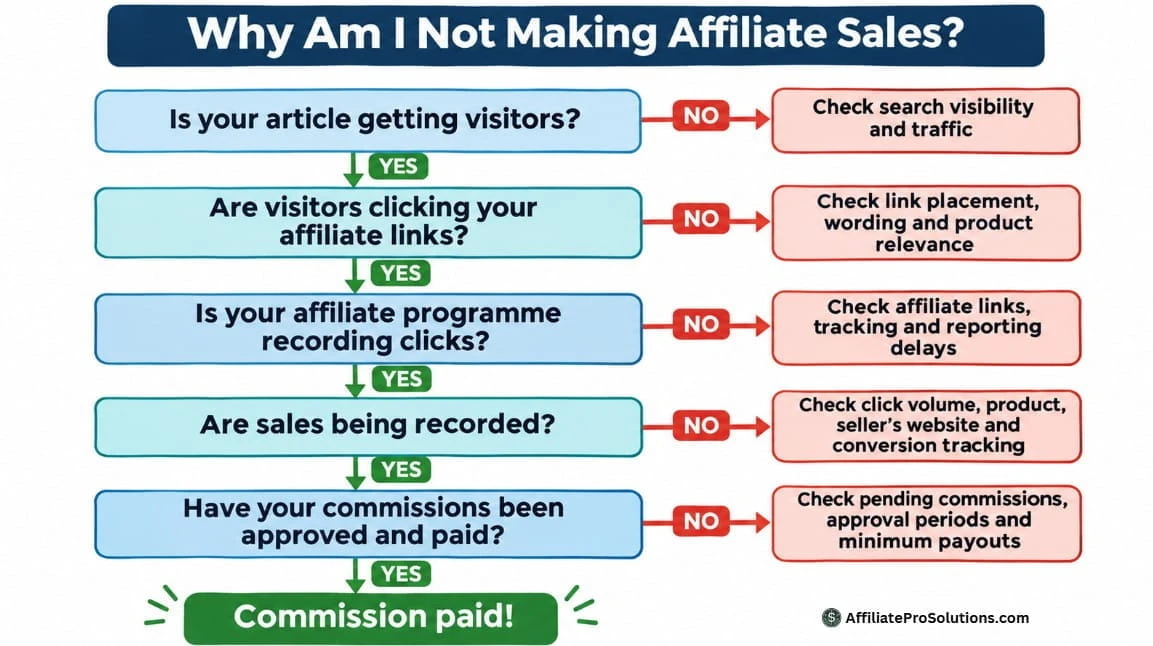
You see, earning an affiliate commission involves several stages, and quite a few things need to happen before any money reaches your bank account.
Someone first needs to find your article and read enough of it to become interested in what you’re recommending. They then need to click your affiliate link, visit the seller’s website and decide to make a purchase.
Of course, the purchase also needs to be correctly attributed to your affiliate account. The programme must then approve the commission before it’s available for payment, according to its payment terms.
That’s quite a lot to happen, isn’t it?
And when you’re looking at an affiliate dashboard showing zero commissions, it’s difficult to know which part of that process might be causing the problem.
What I’d Check Before Changing Anything
Rather than immediately rewriting all your articles or looking for new affiliate programmes, I’d start off by checking a few things that could help you understand what’s happening.
Here’s the order I’d recommend.
- Your affiliate links. Check that your links are working properly and taking visitors to the correct product or sign-up pages.
- Affiliate tracking. Look at your affiliate dashboard to see if clicks are being recorded. If something doesn’t look right, check the programme’s reporting information and contact support if you feel it’s necessary.
- Pending commissions. Check whether you’ve already made a sale that’s waiting for approval or have earnings that haven’t reached the minimum payment amount.
- Visitor clicks. Find out how many people are visiting your articles and how many are actually clicking your affiliate links.
- Your product reviews. Look at the information you’re giving to readers and ask yourself if it’s enough to help them decide if a product is right for them.
- Sales conversions. If you’re getting affiliate clicks but no sales, consider what might be happening when visitors reach the seller’s website.
You don’t have to start changing everything all at once. The idea is to work through these checks and see what your existing results are telling you.
Let’s Use a Simple Example
To help explain how this works, I’ll use a fictional example of a website hosting review throughout the article.
Imagine you’ve published a detailed review of a hosting company, included your affiliate links and started receiving visitors from Google.
After checking your statistics for the month, you find that your article has received 300 visitors. Of those visitors, six clicked through to the hosting company’s website using your affiliate link.
However, when you check your affiliate dashboard, you haven’t earned a single commission.
Now, does that mean your review isn’t good enough? Are your affiliate links broken? Is there something wrong with the hosting company’s sales page?
Or could it simply be that six clicks aren’t enough to expect a sale yet?
At this stage, you really don’t know, and that’s why it’s important to check your numbers and understand how your affiliate programme records clicks and sales.
I’ll refer back to this example as we work through the different reasons your affiliate marketing might not be making money.
And if your biggest problem is that nobody is finding your articles in the first place, I’ve already covered that in my guide on Why Is My Website Not Getting Traffic And What Am I Doing Wrong?.
For now, though, I want to concentrate on what happens when you have visitors, affiliate links and the possibility of earning commissions, but you’re still not seeing any money.
How Do I Track Affiliate Sales and Missing Commissions?
One of the first things I’d recommend doing when your affiliate marketing isn’t making money is checking what’s actually happening inside of your affiliate accounts.
You might be surprised at how much information is available there, especially if you’ve been concentrating on writing articles and haven’t spent much time looking at your affiliate statistics.
Most affiliate programmes provide you with a dashboard where you can check how many clicks your links have received, how many sales have been recorded and how much commission you’ve earned. Some give you more detailed reports, including which products were purchased, when the transactions happened and the status of each commission.
Of course, every affiliate programme is different, so the information available will depend on which companies you’re promoting.
If you’d like to understand more about how affiliate networks record clicks and sales, Awin has a useful guide to affiliate tracking that explains the different tracking methods and how purchases are attributed to affiliates.
Start by Checking Your Affiliate Clicks
I’d begin by opening your affiliate dashboard and looking at the number of clicks recorded over the last 30 days.
If you’ve been receiving visitors to your website but your affiliate dashboard is showing zero clicks, that’s something worth looking into.
First, make sure you’re checking the correct date range and that you’re looking at the reports for the right affiliate programme.
You should also check that the links you’ve placed in your articles are the ones provided by your affiliate programme and that they’re taking visitors to the correct pages.
Now, you might be tempted to click your own affiliate link to see if the dashboard records it. You can test that a link opens the intended page, but I wouldn’t rely on your own clicks to confirm that the tracking is working.
Some affiliate programmes filter out clicks from their own members, and others take time to update their reports. It’s also worth checking the programme’s rules before carrying out any tests.
If you’re using a tool that records outbound link clicks on your website, you can check those figures too. However, remember that your website analytics and affiliate dashboard measure activity in different ways, so the numbers won’t necessarily be identical.
If something still doesn’t look right, I’d contact the affiliate programme and ask them to check that your links are set up correctly.
It’s also worth remembering that affiliate links can stop working properly over time. A company might change its website address, remove a product or move its affiliate programme to another network. Sometimes, a link might still take visitors to the right website, but the tracking information is no longer being passed along correctly. That’s why I’d recommend checking your older affiliate links occasionally, especially if you’ve been promoting the same products for several years.
What Are Your Affiliate Statistics Telling You?
Let’s go back to the hosting review example I mentioned earlier.
Remember, the article received 300 visitors during the month, and six of them clicked the affiliate link. However, you haven’t earned a commission.
Depending on what appears in your affiliate dashboard, there are several possibilities.
- Your dashboard shows zero clicks. If your website analytics recorded six outbound clicks to the hosting company, there might be a problem with your affiliate links or how the programme records them. Check the details before assuming the tracking has failed.
- Your dashboard shows six clicks but no sales. The programme has recorded those clicks, but that doesn’t tell you if anyone made a purchase. It also doesn’t prove that any future sales will be attributed correctly.
- Your dashboard shows a pending commission. That’s encouraging because a transaction has been recorded against your account. However, the commission still needs to be approved before you can count on receiving it.
The important thing is to understand what the figures are telling you before deciding there’s a problem with your articles or the products you’re promoting.
And if you’re only getting a small number of affiliate clicks each month, don’t automatically assume something is wrong because you haven’t made a sale. We’ll look more closely at that later in the article.
Why Are Some Affiliate Commissions Pending?
Something else worth checking is the status of your commissions.
You see, earning an affiliate commission doesn’t necessarily mean the money will be available immediately.
Many affiliate programmes have a period during which they review transactions before approving payments. This gives the company time to deal with cancelled orders, refunds, failed payments or purchases that don’t qualify for commission.
Depending on the programme, you might see statuses such as pending, approved, rejected or paid.
A pending commission means the transaction has been recorded but hasn’t completed the approval process. Once approved, it may still be some time before the money is paid into your account.
You should also check whether your affiliate programme has a minimum payout amount.
For example, imagine you’ve earned £15 in approved commissions, but the programme only makes payments once your balance reaches £50.
Your commissions are recorded, but you haven’t reached the amount required for payment yet.
That’s why I’d recommend checking the payment terms of every affiliate programme you join. Look at how long commissions take to be approved, when payments are made and whether there’s a minimum amount you need to earn.
Could Affiliate Tracking Cookies Be Causing the Problem?
Another reason a sale might not appear in your affiliate account is how the programme tracks purchases.
Many affiliate programmes use tracking cookies to help identify which affiliate referred a customer. However, not every programme relies entirely on cookies, as some also use server-side tracking and other methods.
Problems can arise when someone clears their browser cookies, uses privacy settings that restrict tracking or returns to buy after the tracking period has expired.
Some programmes also have attribution rules that determine which affiliate receives credit if a customer clicks several affiliate links before purchasing.
This means someone could visit a seller’s website through your affiliate link, make a purchase later and still not generate a commission for you.
I’ve explained this in much more detail in my article on What Is An Affiliate Tracking Cookie?, including how cookie duration and attribution affect affiliate commissions.
For this article, I’d recommend checking the tracking period and commission rules of the programmes you’re promoting. At least you’ll understand what needs to happen for a purchase to be credited to your account.
When Should You Contact Your Affiliate Programme?
If you believe a sale should have been recorded but nothing appears in your dashboard, there’s nothing wrong with contacting the affiliate programme for an explanation.
Before doing that, though, I’d check the reporting delays and commission rules in your account. Some transactions take time to appear, and a missing sale isn’t necessarily a tracking problem.
If you have information suggesting someone made a qualifying purchase through your link, give the support team whatever details you can, such as the approximate date, the product involved and the affiliate link used.
Don’t include someone’s personal information unless you’re authorised to share it and the programme has a secure way of receiving it.
The support team may be able to investigate the transaction or explain why a commission wasn’t recorded, although they won’t always be able to confirm an individual customer’s purchase.
The main thing I’d recommend is checking your reports regularly and understanding how your affiliate programme handles the clicks, sales and payments.
Once you’re satisfied that your links and reporting are working as expected, you can concentrate on the next question. Are people actually clicking your affiliate links, and if they are, why aren’t those clicks turning into sales?
How Do I Get More Affiliate Clicks?
So, you’ve now checked your affiliate links, gone through your affiliate dashboard and everything appears to be working as it should. You’re also getting visitors to your website, but hardly anyone is clicking through to the products you’re promoting.
What’s going on?
Well, there could be several reasons for this, and I’d start by looking at the articles where you’ve placed your affiliate links.
Now, I want you to think about it for a moment. Just because someone visits your website doesn’t mean they’re interested in buying something. They might be looking for an answer to a question, researching a particular subject or simply gathering information before making a decision.
And there’s nothing wrong with that. Many people visit websites without any intention of spending money. Maybe this is you right now?
However, if you’re promoting affiliate products, you need to give your readers a good reason to click through and learn more about what you’re recommending.
Are You Attracting the Right Visitors?
One thing I’d look at is the type of searches bringing people to your articles.
For example, imagine you’ve written a review of a website hosting company. Someone searching for information on how website hosting works might read your article because they’re trying to understand the subject.
But on the other hand, someone searching for a review of that particular hosting company may already be considering signing up and wants to know more before spending their money.
That doesn’t mean everyone reading a product review is ready to buy, of course. But understanding what your visitors are looking for can help explain why some articles receive affiliate clicks and others don’t.
I’d recommend checking Google Search Console to see which searches are bringing visitors to your pages.
Look at the actual phrases people are using and consider what they’re hoping to find when they arrive.
Are they looking for general information, or are they researching a product you’ve recommended?
You might find that an article receives a reasonable amount of traffic but attracts readers who aren’t particularly interested in the affiliate products mentioned.
I’ve already covered how specific search phrases can attract visitors with clearer intentions in my article on What Is A Long Tail Keyword?.
For now, the important thing is understanding why someone has arrived at your article and what they might be interested in doing next.
Check Where You’ve Placed Your Affiliate Links
Another thing I’d look at is where your affiliate links appear within your articles.
I’ve seen websites where the only affiliate link is hidden away near the bottom of a very long review. By the time readers reach it, they may already have found the information they wanted and left the page.
Now, I’m certainly not suggesting you should fill every paragraph with affiliate links. In fact I don’t recommend that at all. That would become annoying for readers, and there’s no guarantee it would increase your clicks anyway.
Instead, I’d recommend placing links naturally where they’re useful.
For example, if you’re reviewing a website hosting company, you could include a link near the beginning when introducing the company, provided it belongs naturally in the explanation.
Further down, when discussing the different hosting plans, another link might help readers who want to check the latest prices or see exactly what’s included.
And towards the end of the review, after explaining your opinion of the service, you could give readers another opportunity to visit the company’s website.
The idea is to make your affiliate links available at points where someone might genuinely want more information.
You should also check how your articles appear on mobile phones. A link that’s easy to notice on a computer might be much harder to find on a smaller screen, especially when it’s surrounded by several long paragraphs.
Give Readers a Reason to Click
Something else worth checking is the wording you use for your affiliate links.
For example, if your article simply says “Click here”, the reader doesn’t really know what they’re going to find when they follow that link.
I’d rather tell them exactly where they’re going and why they might want to visit.
If I’m reviewing a hosting company and discussing its pricing, I might write something like this.
“You can check the latest hosting plans and prices directly on the company’s official website.“
I could then link the words “latest hosting plans and prices” to the appropriate affiliate page.
That’s clear, and the reader knows what to expect.
You can also use buttons where appropriate, particularly when there’s a natural opportunity for someone to check a product or service.
But again, I’d avoid filling an article with buttons and links simply because you’re hoping someone will click one. In actual fact, I usually avoid using buttons. I find them a little tacky.
And don’t forget that the information around your affiliate links matters too. If you’re recommending a product, explain what it does, what people should know before buying and why you’ve included it in your article.
People should have enough information to decide if they’re interested before visiting the seller’s website.
What Can Your Affiliate Click Numbers Tell You?
Let’s return to our fictional hosting review.
Remember, the article received 300 visitors in one month, and six people clicked the affiliate link.
If we’re treating those as six individual visitors, that means 2% of the people visiting the article clicked through to the hosting company.
Now, is 2% a good result?
I wouldn’t automatically say it was good or bad. It depends on the article, the visitors it attracts and the product being promoted.
What I’d recommend is looking at the results from your other articles, particularly those promoting similar types of products.
Perhaps one review receives 200 visitors and generates 15 affiliate clicks, while another receives 500 visitors but only generates three.
It’s worth looking at both articles to see what might explain the difference.
Maybe one answers questions from people who are already considering a purchase. Perhaps its affiliate links appear in places where readers naturally want to check the product.
Or maybe the article with fewer clicks doesn’t give readers enough information to become interested in the recommendation.
Of course, these are only possibilities. The numbers alone won’t tell you exactly why someone clicked or decided not to.
I’d also avoid making big changes based on just a few clicks. If an article receives very little traffic, you might need more information before you can judge how it’s performing.
What Would I Change First?
If I had an article receiving visitors but hardly any affiliate clicks, I’d begin by reading it again from the visitor’s point of view.
I’d check that the affiliate links are easy to find, that the wording tells readers where they’re going and that the product being promoted is relevant to the subject.
I’d also look at the searches bringing people to the article, because attracting visitors who have little interest in the product could explain why nobody is clicking.
If you’re unsure how to judge the searches you’re targeting, I’ve explained my approach in How To Know If A Keyword Is Worth Targeting.
And if I decided something needed changing, I’d start with one article and make a small, sensible improvement. Then I’d monitor the results rather than rewriting everything all at once.
Just remember, getting more affiliate clicks is only part of the process. Those clicks still need to turn into qualifying sales before you earn any commissions.
And that brings us to another problem. What happens when people are clicking your affiliate links, but nobody is buying anything?
Why Aren’t My Affiliate Product Reviews Making Sales?
If you’ve spent hours researching a product, taken the time to write a detailed review and included your affiliate links, it can be very frustrating when people read your article but nobody buys anything.
And if you’re already getting affiliate clicks, I can understand why you might start questioning the quality of your review.
But here’s something I’d like you to consider.
When someone clicks an affiliate link in your review, they’ve shown enough interest to visit the seller’s website. That’s encouraging, but it doesn’t necessarily mean they’re ready to spend their money.
They might want to check the latest prices, look at the available plans or find out more about the company before making a decision.
So, before you start rewriting all of your reviews, I’d recommend looking at the information you’re giving your readers and asking yourself if you’re helping them understand the product properly.
Are You Giving Readers Enough Information?
One mistake I’d avoid when writing affiliate product reviews is simply repeating the information already available on the seller’s website.
For example, imagine you’re reviewing a website hosting company.
You could list all its hosting plans, explain how much storage each one provides, mention its security features and finish by saying it’s a good choice for beginners.
That’s useful information, but it leaves other questions unanswered.
What happens when the introductory offer expires? Are there any additional charges? Is the cheapest plan suitable for someone starting their first website? What happens if they need help or want to move their website somewhere else?
These are the sorts of things I’d personally want to know before paying for a hosting service.
And that’s what I’d recommend concentrating on in your reviews. Give people the information they need to decide if a product is worth their money.
Here are some things I’d always consider including.
- Your overall opinion. Explain what you think of the product, who it’s intended for and any reasons someone might decide against buying it.
- The advantages and disadvantages. Be open about the good and bad points. If something bothers you or you find a particular feature disappointing, explain why.
- Your personal experience. If you’ve used the product yourself, tell readers what you did with it and what you thought. If you haven’t used it, be honest and explain that your findings come from research.
- Pricing and additional costs. Explain the available plans, what’s included and anything readers should know before paying. If there are introductory offers, check what happens when they expire.
- Product features and limitations. Give readers a clear understanding of what they’re getting, including anything important that’s missing or restricted to a particular plan.
- Alternatives worth considering. If another product could be more suitable for someone with different requirements, mention it and explain why.
Of course, you don’t have to include every possible detail about a product. Concentrate on the information that matters to someone thinking about buying it.
And remember that prices, features and subscription terms can change. I’d recommend checking the seller’s official website when writing your review and revisiting the information occasionally to make sure everything is still accurate.
Be Honest About Products You Haven’t Used
Something I think is really important when writing affiliate reviews is being honest about your experience with the product.
You might be reviewing something you’ve used for years, or perhaps it’s a product you’ve researched because you believe it could be useful to your readers.
Either way, make that clear.
If you’ve personally used a product, you can explain what you liked, what disappointed you and any problems you experienced.
You can also include your own screenshots, examples or observations to help readers understand how it works.
But if you haven’t used it, don’t write as though you have.
There’s nothing wrong with publishing a well-researched review, provided you’re upfront about where the information comes from.
For example, you can explain what the company offers, examine its pricing and features, look at its published documentation and point out any limitations you’ve found during your research.
Just be careful about making claims concerning reliability, customer support or ease of use when you haven’t experienced those things yourself.
I think being open with readers is very important when you’re recommending products that could cost them a considerable amount of money.
Are Your Reviews Answering the Questions Readers Have?
Another thing I’d check is what someone was hoping to find when they clicked on your review in Google.
Let’s say you’ve written an article targeting people searching for a review of a particular hosting company.
Some readers may already know what the company offers and simply want to check its pricing. Others might be concerned about customer support, the renewal charges or how difficult it is to get started.
Now, imagine your review spends most of its time describing the company’s features but barely mentions its renewal prices.
Someone specifically concerned about the cost of hosting their website might leave your article to find that information somewhere else.
That’s why I’d recommend looking at the questions people are asking about the products you’re promoting.
You can search Google for the product name, look at the questions appearing in the results and read through the information available on the company’s own website.
Customer reviews and support forums can also help you come up with common questions or reported problems, although I’d be careful about treating individual complaints as established facts.
Use what you find to decide if there’s something useful missing from your article.
After all, someone reading a product review is usually trying to answer a question before making a decision.
And if your review answers that question properly, you’ve given them a reason to trust the information you’re providing.
Let’s Go Back to Our Hosting Review
Remember our fictional hosting review that received 300 visitors and six affiliate clicks during the month?
Imagine you’ve checked the affiliate links and tracking, and everything appears to be recording correctly.
You then go back and read the review again.
You notice that you’ve explained the different hosting plans, mentioned the features and included a link to the company’s website.
However, you’ve barely mentioned the renewal prices, and you haven’t explained which plan someone starting their first website might need.
Those are useful details you could add.
You might explain what readers receive with the cheapest plan, what they’ll pay when the introductory offer ends and which additional features they should consider before signing up.
You could also mention any limitations that might become important as their website grows.
That would give readers more information to work with before visiting the hosting company’s website.
But here’s another important thing.
Even after improving your review, those six affiliate clicks might still produce no sales.
Perhaps the visitors weren’t ready to buy, or they decided the hosting plans were too expensive. They might even return to the company several weeks later.
That’s why I wouldn’t automatically blame the review simply because no commissions appeared in your account.
I’d make sure the article is giving readers useful and accurate information, then monitor its performance as more visitors arrive.
Don’t Forget Your Affiliate Disclosure
One final thing I’d recommend checking is whether you’ve clearly explained your affiliate relationship to readers.
If you’re earning a commission when someone purchases a product through your links, readers should know that.
Affiliate disclosure requirements depend on the applicable laws and where your audience is located, so it’s worth understanding the rules that apply to your website.
Personally, I believe being open about your affiliate commissions is the right approach anyway.
Readers should understand that you may earn money from a recommendation, and that your opinions aren’t simply there to encourage them to buy something.
I’d also make sure your disclosure is easy to notice and appears where readers will see it before interacting with your affiliate links.
If you’re wondering what an affiliate disclosure page should contain, you can have a look at my own Affiliate Disclosure page here on Affiliate Pro Solutions. It explains how I earn commissions through affiliate links and what that means for readers. I also display an affiliate disclosure in the sidebar of my website, so visitors can see that I may earn commissions from the products and services I recommend.
Once you’ve checked the quality of your reviews, there’s another part of the process worth examining.
You could have a detailed article, accurate information and readers clicking your affiliate links, yet still not earn a commission.
And sometimes the reason for that is what happens after someone arrives on the seller’s website.

How Do I Improve Affiliate Conversions?
So, you’ve written your detailed product review, your affiliate links are all working, and people are clicking through to the seller’s website. But when you check your affiliate dashboard, you’re still not seeing any sales.
Why? What could be going wrong?
Well, something I think is worth knowing here is that once someone leaves your website and arrives on the seller’s page, you have very little control over what happens next.
The company is responsible for presenting its products, explaining the prices, handling the checkout process and convincing visitors that spending their money is a good thing.
And even if you’ve done everything correctly on your own website, there’s no guarantee that someone who clicks your affiliate link will go ahead and buy something.
However, there are still a few things I’d recommend checking before deciding that your affiliate marketing efforts aren’t producing results.
Could the Seller’s Website Be Putting People Off?
One thing that’s easy to overlook is the quality of the website you’re sending people to.
You might be promoting a product that you genuinely believe is worth recommending, but what happens when someone arrives on the seller’s website?
Is the product information clear? Can visitors easily find the prices? Does the website explain what’s included, and is it obvious how someone can make a purchase?
Imagine recommending a website hosting service because it offers an affordable introductory package.
Someone reads your review, clicks your affiliate link and arrives on the hosting company’s website.
But they discover that the advertised price only applies when they pay for several years in advance. Perhaps there are additional charges for features they expected to be included, or the renewal price is higher than they thought.
At that point, they might decide the service is too expensive and just leave.
And there’s very little you can do about that once they’ve reached the seller’s website.
That’s why I’d recommend visiting the pages you’re linking to occasionally and checking what potential customers will actually see.
Look at the prices, the available plans, any additional charges and the information provided before someone signs up.
If you notice something important that readers should know, make sure it’s explained accurately in your review.
You can’t control the seller’s prices or website, but you can give your readers a better idea of what to expect when they get there.
Are You Sending Visitors to the Right Page?
Another thing I’d check is where your affiliate links take people.
For example, let’s say you’ve written a review discussing a particular hosting package that’s suitable for someone building their first website.
You explain the features, mention the price and give readers an affiliate link to check the package for themselves.
But when they click, they’re taken to the hosting company’s homepage, where they have to search through several different services to find the package you were talking about.
Some visitors might take the time to look around, but others could lose interest and leave.
If your affiliate programme allows links to individual product or pricing pages, I’d consider using those where you can.
That way, readers arrive at the information they were expecting to see.
Of course, not every affiliate programme allows you to create links to specific pages. Some require you to use their approved landing pages or tracking links.
Always check the programme’s instructions before changing an affiliate URL.
I’d also recommend checking your existing links occasionally, because companies can change their website structure, remove products or introduce new pricing pages.
What Happens During the Checkout Process?
Another possible reason for missing affiliate sales is the checkout process itself.
Someone might be interested in a product, happy with the price and ready to make a purchase, only to change their mind when they reach the final step.
Perhaps the company asks for more information than they expected, introduces additional charges or requires them to create an account before they can continue.
There could also be problems with payment methods, technical errors or a checkout page that doesn’t display properly on a mobile phone.
These things can discourage potential customers from going through with a purchase.
Now, as an affiliate, you generally won’t have access to the seller’s checkout statistics, so you can’t know how many of your visitors abandon their purchases.
And I certainly wouldn’t recommend going through the checkout process repeatedly just to investigate it.
But you can examine the publicly available information, check what the company says about payment methods and look for any obvious problems with the pages you’re promoting.
If you come across repeated complaints about the purchasing process, it’s worth looking into them rather than immediately assuming they’re accurate.
And if you consistently receive a reasonable number of affiliate clicks without any recorded sales, contacting your affiliate manager might help. Some programmes can provide additional information about their offers or conversion performance.
Are You Promoting Products People Are Prepared to Pay For?
It’s also worth considering the products themselves.
Just because a product is useful or has an affiliate programme doesn’t mean everyone visiting your website will want to buy it.
For example, imagine you’re writing articles for people who are completely new to affiliate marketing.
You might recommend a premium piece of software costing several hundred dollars a year.
Some readers could be interested, but others might be working with a very limited budget and aren’t prepared to spend that amount of money. At least not yet.
The same thing can happen when you’re promoting subscription services.
A reader might like what the product offers but decide they don’t want another monthly payment, particularly if they’re already paying for hosting, website tools and other services.
That’s why I’d consider the type of people reading your articles and how much they’re realistically prepared to spend.
I’d also check the affiliate products you’re promoting from time to time.
Are they still available? Have the prices gone up? Has the company removed features or changed its subscription terms?
If something changes significantly, you may need to update your review so readers know exactly what they’re considering buying.
What Is an Affiliate Conversion Rate?
Something else I’d recommend taking the time to understand is your affiliate conversion rate.
In simple terms, this tells you what percentage of recorded affiliate clicks result in a sale or another qualifying action, depending on how the programme measures conversions.
For example, imagine an affiliate programme records 100 clicks on your links, and two of those clicks result in qualifying sales.
That would give you a sales conversion rate of 2%.
Now, let’s return to our fictional hosting review.
Remember, the article received 300 visitors during the month, and six people clicked your affiliate link.
But you didn’t make a sale.
Does that automatically mean your conversion rate is poor or that something is wrong?
No, because six clicks really aren’t enough to draw any reliable conclusions.
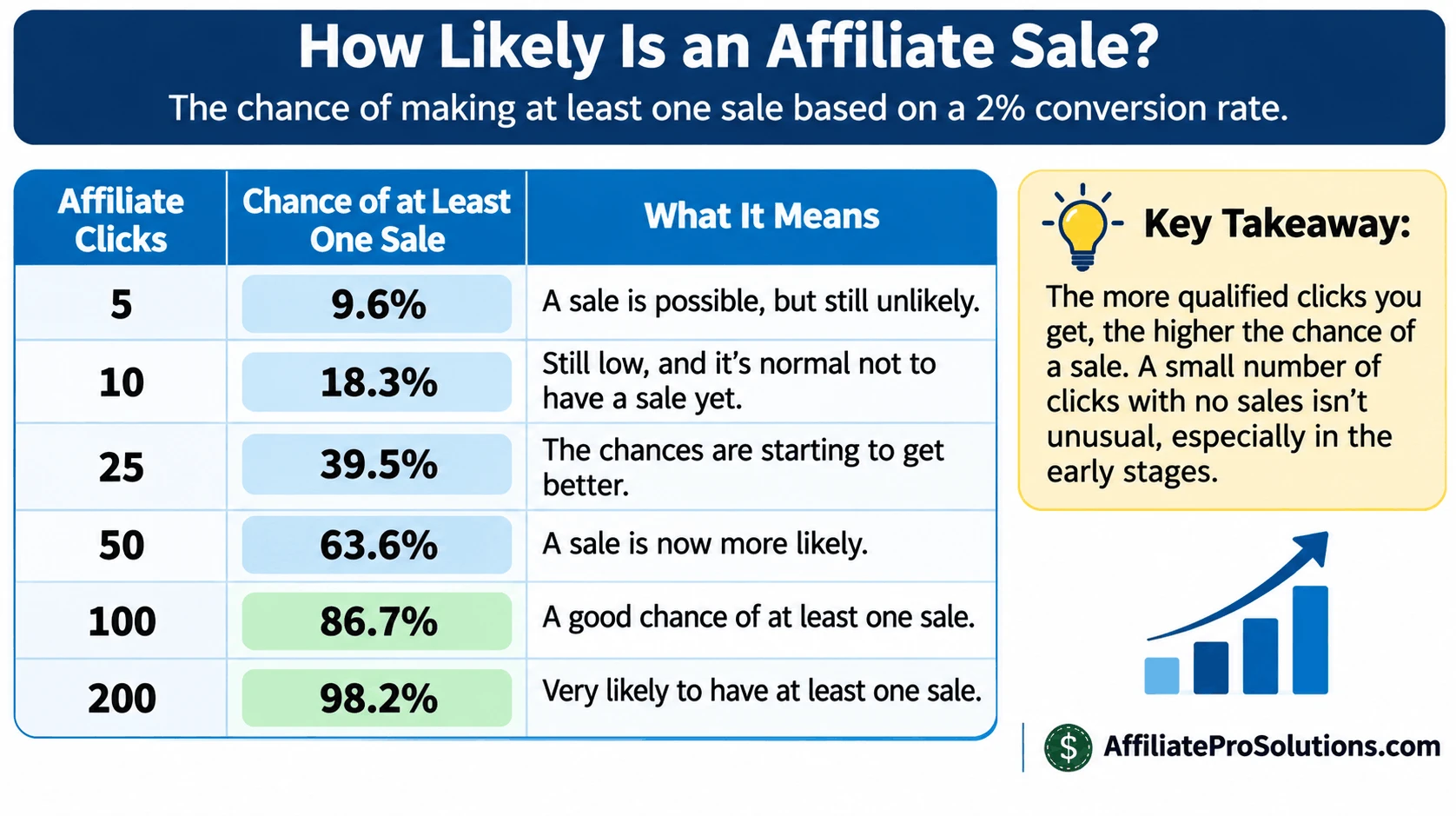
Let’s imagine, purely as an example, that the hosting company’s offer converts at 2%.
With six clicks, you’d expect an average of 0.12 sales. That doesn’t mean you’ll receive a fraction of a commission or that a sale will definitely arrive after a certain number of clicks.
It simply means that at such a small volume, receiving no sales would be entirely unsurprising.
You could receive a sale from your very first affiliate click, or you might go through dozens of clicks without anyone buying.
And remember, conversion rates vary depending on the product, the audience, the company and how the programme records qualifying transactions.
So, if you’re only getting a few clicks each month, I’d be careful about judging the success of an affiliate offer too quickly.
What Would I Do If I Was Getting Clicks but No Sales?
If I was receiving affiliate clicks but wasn’t earning commissions, I’d start by checking the seller’s website and the pages my links were pointing to.
I’d want to know if the prices and product information were still accurate, whether the company had introduced any additional charges and if the page made it reasonably easy for someone to understand what they were buying.
I’d also look at the affiliate programme itself.
For example, I’d check its commission terms, tracking period and any conditions that could affect which purchases qualify for payment.
If everything appeared to be working correctly, I’d look at how many clicks the programme had actually recorded.
A handful of clicks wouldn’t concern me too much. But if I’d received hundreds of clicks over a reasonable period without a single recorded sale, I’d certainly want to investigate further.
I’d consider contacting the affiliate programme, checking if there were any known tracking problems and reviewing the products I was recommending.
And if I decided to make changes to my own articles, I’d concentrate on one thing at a time and keep a record of what I’d changed.
That way, I’d have a better chance of understanding what happened when more visitors arrived.
One final thing I’d say is that you shouldn’t automatically blame yourself when someone doesn’t buy something.
You can write useful articles, recommend products you believe in and send interested visitors to a seller’s website. But the final purchasing decision belongs to the customer.
Your job is to provide accurate information, make sensible recommendations and give readers a reason to consider the products you’re promoting.
After that, you need enough recorded activity to understand how those recommendations are performing.
Frequently Asked Questions – FAQs
How Long Does It Take to Make Your First Affiliate Sale?
There’s no set time for earning your first affiliate commission. Some people make a sale within a few weeks, while others spend months working on their websites before earning anything.
It all depends on the visitors you’re attracting, the products you’re promoting and how many people actually click your affiliate links. If your website is still quite new and you’re only getting a handful of visitors each day, it could take quite some time.
I’d concentrate on understanding your traffic and affiliate clicks rather than expecting a sale within a particular number of weeks.
Should I Delete Articles That Aren’t Getting Any Affiliate Clicks?
No, I certainly wouldn’t start deleting articles just because they’re not generating affiliate clicks.
First, check if those articles are actually getting visitors. If nobody is finding them, you need to understand why. And if they are getting traffic, have a look at the affiliate links and the products you’re recommending.
Also, remember that some informational articles aren’t written with the intention of selling something. They can still bring useful visitors to your website and lead readers towards other relevant content.
I’d look into what’s happening before deciding an article isn’t worth keeping.
Could Ad Blockers or Browser Settings Stop Me From Earning Commissions?
Yes, they can interfere with certain affiliate tracking methods, although it depends on how the affiliate programme records referrals.
Some browsers and ad-blocking extensions can restrict tracking cookies or prevent particular tracking requests from working. This means a visitor could click your affiliate link and make a purchase without the transaction being attributed to your account.
However, some affiliate programmes use additional tracking methods, so a blocked cookie doesn’t automatically mean you’ll lose the commission.
I’d recommend checking how your affiliate programmes handle tracking and attribution rather than assuming every missing sale is caused by browser settings.
Could My Niche Be the Reason I’m Not Making Money?
Possibly, but I wouldn’t immediately assume you’ve chosen the wrong niche just because you’re not earning commissions.
You might be attracting readers who are interested in your subject but aren’t particularly interested in buying the products you’re promoting.
It’s also worth checking what affiliate programmes are available in your niche, how much they pay and if their products are things your audience would consider purchasing.
Before making any major changes to your website, I’d check your traffic, affiliate clicks and the products you’re promoting. You might find that your niche is perfectly fine and the problem is somewhere else.
Are People Actually Making Money From Affiliate Marketing?
Yes, people are earning money through affiliate marketing, and there are established companies that pay commissions for referring customers who make qualifying purchases.
However, that doesn’t mean everyone who starts an affiliate website will earn money, or that publishing a certain number of articles guarantees success.
Some affiliates earn occasional commissions, others build businesses that generate a regular income, and many websites never earn enough to cover their expenses.
If you’re currently earning nothing, I wouldn’t take someone else’s income claims as proof that you’re doing something wrong. I’d concentrate on understanding what’s happening with your own website and what you can improve on.
What I’ve Learned From My Own Affiliate Marketing Experience
I’ve been involved in affiliate marketing since 2014, and I’ve earned commissions through Wealthy Affiliate and other affiliate programmes over the years, so I know from personal experience that affiliate marketing can work.
However, I’ve also learned that getting visitors to your website and earning commissions are two very different things.
Through my work on Affiliate Pro Solutions, I’ve spent many hours researching keywords, writing product reviews, studying website statistics and checking how visitors interact with my content.
One thing I’ve learned during this time is that someone clicking an affiliate link doesn’t necessarily mean they’re ready to buy something. And once they’ve reached the seller’s website, there’s only so much you can control.
That’s why I believe it’s important to understand what’s happening with your website before making any major changes. Sometimes the problem isn’t where you first think it is.
Final Thoughts
If your affiliate marketing isn’t making money, I hope this article has given you a better understanding of what could be going wrong and, more importantly, what you can do about it.
As I’ve explained throughout this post, there are different reasons why you might not be earning commissions. Your affiliate links might not be recording clicks properly, your reviews might need some attention, or people could be visiting the seller’s website and simply deciding not to buy anything.
And sometimes, you just haven’t received enough affiliate clicks to expect a sale yet.
Whatever the reason, I wouldn’t recommend making major changes to your website until you’ve had a proper look at what’s happening. Work through the checks we’ve discussed, concentrate on anything that needs attention and give yourself time to see how things develop.
I’ve been involved in affiliate marketing long enough to know that it can be annoying when you’re putting in the work and the results aren’t coming. But don’t let that frustration push you into making decisions without understanding the problem first.
Now, I’d like to hear from you.
Are you struggling to get people clicking your affiliate links? Are you getting clicks but no sales? Or perhaps you’ve made a sale that hasn’t appeared in your affiliate account?
Leave a comment below and let me know what’s happening. I’ll do my best to point you in the right direction.
Chris
Just to be open with you, this page includes affiliate links. If you click on one of these links and make a purchase, I earn a small commission. There is no extra cost to you at all. This simply helps support the content I share here. Thank you for your support, it really is appreciated.