
Topic – Website Builders
Post Reading Time – 32 Minutes
If you’ve ever tried to build a website before, you’ll know how hard it can feel at first. There are many platforms out there offering services, and a lot of them sound great until you start looking into things a little deeper. That’s why so many people look for a Wix Website Builder Review like this one. They want to know a bit more before signing up. Wix has been around since 2006 and it keeps popping up in the search results, videos, and small business chats, and it’s usually described as an easy way to get a website online without touching code.
Just because it’s popular, it doesn’t mean it’s the right choice for everyone. Wix gets a lot of good things said about it for being beginner friendly, but that doesn’t mean it suits every project or every budget. Some people like how quickly they can get something online and live, while others only notice the limits after they’ve already spent time setting everything up. What I think really matters is what Wix actually gives you once you’re using it, not just how often it’s recommended.
This review is based on research, platform documentation, user feedback, and publicly available testing results, not my personal hands on use. My aim is to give you a clear and honest viewpoint of what Wix offers, where it works well, where problems can show up, and what’s worth thinking about before you commit to it. So if you’re looking at the free plan, considering a paid option, or just trying to decide if Wix is the right choice for your site, this should help you move forward with more confidence.
You can also take a look at the official Wix website to see what’s included and how the plans are laid out.
Summarize This Content Using AI
TL;DR
Wix website builder review
This review looks at how the Wix website builder works, what it offers in terms of its features and ease of use, and how it performs in everyday situations. It explains the main tools you get, how the editor works, and what to think about before deciding if it’s right for your website. This gives you a good idea of what Wix does and what you can expect from it.
A Quick Summary of Wix Website Builder
- Product name – Wix
- The platform itself – Wix is a cloud-based website builder. Hosting, updates, security, and most of the technical tasks are handled for you, so you can concentrate on putting your site together rather than managing servers or software.
- How long it’s been around – Wix was launched in 2006 and has grown steadily since then. It now has millions of users worldwide, which explains why it shows up so often online when people talk about building websites without code.
- What it’s mainly built for – The main goal is simple, no code website creation using a visual drag and drop editor. It’s designed for people who don’t want to deal with coding, hosting setups, or technical configuration.
- Types of websites you can create – Wix supports a wide range of site types, including business websites, online shops, photography sites, portfolios, blogs, restaurants, events, and landing pages.
- Free plan availability – There is a free plan you can use long term, but it comes with limits such as Wix branding, a Wix subdomain, and restricted storage.
- What paid plans change – Paid plans remove Wix ads, allow you to connect your own domain, increase storage and features, and unlock options like ecommerce and online payments.

How Wix Handles Hosting, Security, and Performance
Managed hosting and cloud setup
Wix runs as a fully managed, cloud-based platform. Put simply, it just means you don’t need to go looking for separate hosting, worry about updates, or deal with the technical maintenance yourself. All of that is handled for you in the background, so you can concentrate on building and managing your website instead of dealing with server related tasks.
Wix uses a multi-server cloud system, which helps spread the traffic and reduce the risk of outages. If your site suddenly gets more visitors than usual, the system is designed to cope with that without you having to step in and do anything.
There’s also an advertised uptime guarantee of 99.99%, and based on the long-term monitoring and user reports available, downtime tends to be quite rare, even on the free plan.
Caching and a built-in content delivery network (CDN) are enabled by default. This helps website pages load faster for visitors in different parts of the world, rather than everyone being served from a single location.
Site speed and reliability
From published testing data and user feedback, site speed generally sits within a reasonable range.
- Desktop load times are often under two seconds
- Mobile load times are usually closer to three seconds
- Performance remains fairly consistent across regions such as Europe, North America, and parts of Asia
It’s also worth keeping in mind that speed can change depending on how a site is built.
Adding large image files, video backgrounds, or too many third-party apps can slow things down, especially on mobile devices. Keeping layouts clean and avoiding unnecessary extras will help to maintain a better performance.
Security and ongoing updates
Security is handled automatically across all Wix sites.
Each site includes SSL encryption, firewall protection, and protection against denial of service attacks. Updates and patches are applied in the background, so there’s no manual work involved on your side.
Two-factor authentication is also available for account logins if you want an extra layer of protection. This suits people who don’t want to worry about security maintenance but still want a good level of protection in place.
Wix Plans Free vs Paid and What You Really Get
Free plan details
The free plan never expires, which makes it very handy if you just want to test things out or see how the builder works before committing to anything further. That said, it does come with some limitations that are worth knowing about upfront.
- Your site displays a Powered by Wix banner across the pages
- You’re given a wixsite.com subdomain rather than using your own domain name
- Storage and bandwidth are quite limited
- Online payments and full store features aren’t available
- Tools like Google Analytics and custom favicons aren’t included
For small test sites or early drafts, I think the free plan is completely fine. For anything you plan to show to customers, readers, or clients, most people end up outgrowing it quite quickly.
Paid plans and upgrades
Moving to a paid plan removes all of the branding and lets you connect your own domain name, which instantly makes a website look more serious. That’s usually the main reason people upgrade, but there are a few things that aren’t always obvious at first.
- Paid plans apply to one site only, so each upgraded website needs its own plan
- Storage and bandwidth increase as you move up, but the lower tiers can still feel limited, especially if you upload lots of images or videos
- Ecommerce and online payments only unlock on mid-level plans and above
- Transaction fees apply on online sales, and payment processors like PayPal also take their share
- Plans can’t be transferred between websites once they’re active
The pricing plans vary by region, and costs tend to rise as more features are added. Introductory prices can look appealing at first glance, but the renewal rates are often higher, so it’s worth checking those details before you sign up to avoid any unwanted surprises later.
You can also visit the official Wix plans page to see all of the latest options, pricing, and features available right now, including the details on what each tier offers and how they compare.

Wix Templates and Design Options
Template library overview
One area I noticed where Wix gets a lot of attention is its template library.
Depending on the source you check, the number of templates seems to sit somewhere between 900 and well over 2,000. Either way you look at it, there’s a lot to choose from.
These templates cover everything from small business and restaurant websites to weddings, portfolios, music projects, and more niche ideas like escape rooms or pet grooming services.
Most of the templates come with starter layouts and sample content already in place ready for you to use, which makes it easier to visualise how your own site might look.
Quite a few of them also include preinstalled features such as booking forms, contact sections, or menus, so you’re not always starting with completely nothing.
All the templates are designed to work on mobile devices straight away too. You don’t need to change anything just to make the site usable on phones or tablets, which helps you to avoid common layout issues early on.
Mobile editor and custom adjustments
Wix also offers a separate editor for the mobile version of your site.
This lets you adjust how things look on smaller screens without affecting the desktop layout. For example, you can hide large background images, move text blocks, or resize galleries just for mobile users.
This is one area I’ve seen people get frustrated with. The smallest change on a desktop layout would change something on the mobile version that never looked right.
Desktop and mobile versions here work independently, which gives you more control over how the website feels on different devices.
For me, that feels helpful if you want a cleaner or simpler layout on phones without having to redesign everything.
Switching templates after launch
One important thing you need to be aware of is that templates can’t be changed once a site is live.
If you decide later that you want a different design, the only option is to create a new website and manually move your content across.
Because of that, it’s always worth spending a bit of extra time choosing a template at the start. Picking something you’re comfortable sticking with can save a lot of work and a headache after.
Editing Sites with Wix and What the Builder Is Like
How drag and drop works
The Wix editor is built around a very visual way of working. You can add text boxes, images, videos, shop items, or apps just by dragging them straight onto the page and placing them where you want them to sit.
You’re also given quite a high level of control over the spacing and placement, right down to the pixel if you want it. That means elements aren’t locked into rigid rows or columns, and you can move things around freely until they look right for you.
There are guides and markers that appear as you move the elements, which helps with alignment and spacing. Layering is also built in, so you can stack items, move them forward or backward, and fine-tune how everything sits together overall.
Wix also includes ready-made layout sections such as services, testimonials, and pricing blocks.
You can drop these into a page and then replace the text and images with your own. The page structure and menu editing are handled from the sidebar, which keeps things organised as a website grows.
Ease of use and learning curve
For the basic edits, the editor feels easy to use quite quickly. There’s a lot of on-screen help, small hints, and pop-up box guides that explain what the different tools do as you work. That makes it easy to work things out as you go without needing to read through long instructions.
Once you start using more advanced design features, there is more to learn of course. It’s not difficult, but it does take a bit of time to get used to everything that’s available.
As sites become larger and more complex, especially with lots of apps, images, or custom sections, the editor can sometimes feel a bit slow. I think this shows up more on older computers or when you’re working with heavy image galleries.
Because of this, I’d recommend saving your progress regularly and keeping your layouts tidy to help reduce frustration when working on bigger builds.
Getting Started on Wix AI Tools vs Manual Setup
Two paths to getting started
When you first create a site with Wix, you’re given two different ways to begin. Which one works better will really depend on how much control you want from the start.
- An AI-generated setup – For this option, you answer a short questionnaire about your site type, goals, and general style. Wix then creates a draft website for you and adds suggested features and apps automatically.
- A Manual setup using a template – Here, you choose a template yourself and edit it step by step. This gives you more control over how things look and how the website is structured from the beginning.
From what I’ve seen through research and user feedback, the manual template option usually gives you a better end result, especially for business websites. The AI-generated sites can feel a bit generic at first and sometimes miss the mark, which means you having to go back and regenerate designs until something clicks.
The good news is that both options are fully editable afterward, so you’re never locked into what the AI creates.
AI tools and extra features
Wix includes quite a wide range of AI-based tools across the platform. These are designed to speed things up, especially if you’re starting from the very beginning.
- AI-written text for pages, product descriptions, and blog posts
- Image creation and editing tools such as for background removal and resizing
- A logo generator for those starting with no existing branding
- AI-generated SEO titles and meta descriptions
- Google Ads copy suggestions
- Automated chat tools for basic customer replies
- Business idea suggestions and planning tools
- Visibility tracking to monitor how content appears in the search results and newer AI-driven search tools
These tools can be helpful if writing or design isn’t your strong point, but the results aren’t always perfect.
As with all generated AI content, I recommend you take the time to edit and personalise anything before publishing as this will usually lead to a much better outcome.
Wix Features for Bloggers, Online Stores, and More
Blogging tools
Wix includes a built-in blogging feature, so you can run a blog directly on your main website without needing anything extra.
This is good for personal blogs, business updates, or longer article-style posts.
You can expect basics like
- Categories and tags to organise your posts
- Scheduled publishing if you want your posts to go live later
- Featured images for each post
- Editable URLs and SEO fields
- Social sharing options built into each post
For smaller blogs or content that supports a business website, this setup covers most of the everyday needs with little effort.
Online store and selling features
Wix also allows you to sell directly through your website if you upgrade to the right plan. The store system supports
- Physical products
- Digital downloads
- Subscription based products or memberships
You can customise product pages, create discount codes, and set up basic marketing features such as abandoned cart emails.
Dropshipping, including print on demand, is available through partner services rather than being built in directly.
Inventory tools work fine for small to medium sized shops. Once stores grow larger or more complex though, some users report that things can start to feel a bit limited.
Bookings, forms, and extra tools
Wix includes tools for managing bookings, appointments, RSVPs, and event tickets without needing any outside software. You can also build contact forms and reservation systems directly from the dashboard.
This setup is good for service based businesses, events, and local services that need scheduling rather than full ecommerce.
App marketplace
Wix has a large app marketplace with hundreds of add-ons created by Wix and third-party developers.
These apps cover things like
- Appointment booking and class scheduling
- Event calendars
- Contact forms, reviews, popups, and chat tools
- Email marketing tools
- Payment integrations such as PayPal or Stripe
- Extra reporting and analytics tools
- Social feeds and promotion tools
Some of the apps are free, while others come with monthly fees.
One thing I want to say here is it’s worth being selective when it comes to apps. Adding too many can clutter the site and affect the loading times, so sticking to what you actually need tends to work better overall.

SEO and Site Growth with the Wix Website Builder
Wix includes a set of built-in SEO tools that cover the basics most website owners need to get started and keep things organised.
You can edit page titles, meta descriptions, and URLs on individual pages or blog posts, which gives you control over how your site appears in the search results.
There’s also an SEO setup checklist that walks you through the main steps in simple language. This is aimed more at beginners, but it still helps to make sure that any important things aren’t missed early on.
XML sitemaps and canonical tags are created automatically in the background, so you don’t need to touch any technical settings to get those in place.
Image optimisation is also handled for you, and there’s a built-in redirect manager that comes in handy if you ever change or remove pages.
Wix also connects directly with Google Search Console (GSC), making it easier for you to track indexing and basic search performance without any extra setup.
For local businesses, Wix includes tools to help submit website details to online directories, which can be useful if your website supports a physical location or local services.
Overall, these tools are straightforward enough for people who don’t have much SEO experience, but they still allow room for any manual adjustments if you know what you’re doing.
Wix didn’t always have the best reputation when it comes to SEO, but based on the current documentation and user feedback, things are much more flexible than they used to be.
Marketing and Communication Tools
Wix includes marketing and communication tools that are all managed from the main dashboard, which helps keep things simple if you don’t want to deal with lots of separate services.
From one place, you can create and send out email newsletters, set up basic automated email campaigns, and use ready-made templates to save time when putting your messages together.
Social media tools are also built in.
You can connect your website to platforms like Facebook, Instagram, and X (formerly Twitter), display social feeds on your site, and manage basic posting without leaving Wix.
Paid advertising is handled from the same area too, and this allows you to set up and track Google and Facebook ads alongside your other website activity.
Wix also provides reporting tools that show traffic, sales, and campaign performance, which can be useful for getting a general idea of how your site is doing.
For those businesses selling products or services, there are options to create discount codes, coupons, and simple upsell offers. Invoicing and payment tracking are included as well, which suits service-based websites that don’t need a full accounting system.
Communication with visitors is also handled through the Wix Inbox.
This pulls messages from contact forms, live chat, social media, and connected email accounts into a single place. So if you’re managing a site on your own or running a small business, having everything in one place makes it easier to stay on top of any enquiries.
You can save your replies for common questions and share the inbox access with other site editors if your workload grows. This is a practical setup that keeps communication organised without making things complicated.
How Wix Handles Website Security
When it comes to security, Wix handles most of it for you, which is often what people want if they don’t enjoy dealing with any technical upkeep.
All of the security monitoring runs in the background, with regular testing in place to help see issues early rather than after something goes wrong.
Every site comes with SSL encryption as standard, along with firewall protection and safeguards against denial of service attacks. You don’t need to set any of this up yourself, and there’s nothing to maintain day to day.
The software updates and security patches are applied automatically, so you don’t need to worry about keeping things up to date.
There’s also an option to enable two-factor login for your account if you want an extra layer of protection when signing in.
For anyone who has previously managed their own updates or worried about security, this kind of setup removes a lot of the pressure and makes running a website a lot less stressful.

Wix Customer Support and Help Resources
Wix offers you various ways to get help if you run into problems while building or managing your website.
There’s a large help centre in place with written guides and tutorials, along with the live chat and call back request features if you need more direct support.
Email support isn’t widely available anymore in many regions, which can be frustrating for people who prefer the more detailed written replies rather than chat based conversations. Wix isn’t the only one to do this and many website builders are moving their support efforts towards live chat and call back systems, which lets staff troubleshoot issues more quickly than going backwards and forwards with email.
In most cases, the support process starts with an automated chatbot.
I’m not a huge fan of these but they are designed to guide you to help articles or narrow down the issue before connecting you with a real person. While this can feel a bit limiting at first, it is usually possible to reach a human support agent if the issue can’t be resolved through the automated steps.
Support availability depends on your location, and response times can vary. Straightforward questions about site settings or general features are usually handled without much trouble. The more complex issues, especially those involving billing or technical limitations, sometimes take longer and they may require a bit of back and forth to get sorted.
Alongside direct support, Wix also has active community forums and a wide range of video guides.
These resources are extremely helpful, and many of the more common problems already have step by step solutions shared by other users. For people who are happy to look things up and troubleshoot on their own, this can reduce the need to contact support directly.
What Users Are Saying About Wix
When you look through some of the long-term reviews and user feedback, a few clear things start to show up.
People who are new to website building say they like how quickly they can get a website online and how easy it is to make changes once everything is up and running. For beginners and small business owners, that first experience is usually seen as a strong point, especially when there’s no technical background involved.
At the same time, I’ve seen that pricing comes up quite often in user discussions.
Common Concerns That Come Up Over Time
Some people feel caught out by the renewal costs or by needing a paid plan for each individual website they run. Others mention that moving from the free plan to a lower paid tier doesn’t always unlock as much as they expected, which can be disappointing if those limitations only become obvious later.
Performance is another area that gets some mixed feedback.
Sites that are kept simple generally run smoothly. This isn’t unique to Wix either. As with most website builders, users report that performance levels can dip once lots of apps, animations, or extra features are added. This shows up more on mobile devices, where heavier layouts have a bigger impact on the loading times.
Template choices and visual editing are regularly mentioned in a positive way. Many users like the range of designs which are available and the freedom to move elements around without being limited to a strict layout.
That flexibility is described as one of the main reasons people choose Wix in the first place.
Over the longer term, some users point out that costs can rise as projects grow and more features are added. Plan limits also become more noticeable on larger sites, and moving away from the platform later can take time due to limited export options.
Migration of a website isn’t impossible, but it usually involves rebuilding rather than moving everything across automatically.
For anyone thinking about growing a site over several years, this is something worth keeping in mind from the beginning.
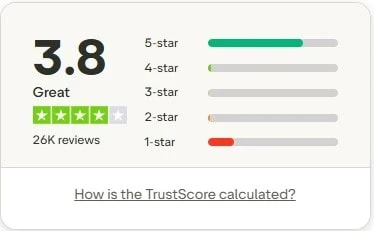
The Wix Trustpilot rating taken at the time of writing. Image taken from Trustpilot.com
A Quick Look at Public User Ratings
Looking beyond the individual comments, Wix also has a large number of public reviews across independent review platforms. On Trustpilot, Wix currently holds a rating just under four stars, based on tens of thousands of reviews.
Most of the positive feedback focuses on how easy the platform is to use, especially for people with no prior website experience. Templates, visual editing, and the range of built-in tools are mentioned often in the favourable reviews.
The lower-rated feedback tends to highlight recurring issues around pricing increases, support response times, and performance once websites become more complex. These are the same themes that come up repeatedly in longer-term user discussions elsewhere.
Taken as a whole, the public ratings reflect a platform that works well for simple and mid-level projects, but can frustrate users once expectations grow beyond that.
Who the Wix Website Builder Is Likely to Suit Best
Wix works best for people who want to get a website online without turning things into a technical project. Based on the long-term feedback I’ve read, and how the platform is set up, there are some clear cases where it does well.
Wix is usually a good fit for
- Beginners who want an all-in-one website builder and don’t want to deal with hosting, updates, or the technical setup
- Small businesses, service providers, and solo operators who need a professional-looking website without needing to hire a developer
- People who like visual design and want the freedom to move elements around using drag and drop editing
- Bloggers or small online shops that don’t rely on complex inventory systems or advanced membership features
For these types of users, Wix removes a lot of the usual barriers that come with building and maintaining a website, which is why it gets recommended so often.
Who Wix May Not Be the Best Choice For
That said, Wix isn’t designed for every type of website or user. Some limitations become more noticeable depending on how advanced a project is meant to be.
Wix may be less suitable for
- Developers or advanced users who want deep customisation, scripting access, or full control over the code
- Large online stores with thousands of products, complex shipping rules, or advanced stock management
- Anyone who is very price-sensitive or planning to run multiple websites, since each site requires its own paid plan
- People who already know they’ll want to move platforms later, as migrating away from Wix often means rebuilding rather than transferring everything
This doesn’t make Wix a bad option, far from it, but it does mean it’s important to plan ahead.
If you think your site is likely to stay fairly simple, Wix can work well for you. If you expect rapid growth, heavy customisation, or a future platform change, those factors are worth considering before you commit to the platform.
Things to Think About Before Choosing Wix
Before committing to Wix, it’s worth taking a step back and thinking about how your website might develop over time. Wix is designed to make getting started easier, and for many people that’s exactly what they’re looking for. Still, I think it helps to look a little further ahead than just the first few weeks.
Costs can increase as your site grows, especially if you’re running more than one website or start needing the higher-tier features. The platform works on a per-site plan structure, so long-term pricing is something to bear in mind rather than just looking at the entry-level offers.
The editor gives you a lot of freedom, which is a big positive, but it also means you need to be a little careful. Moving elements around freely can sometimes lead to layout issues if you’re constantly moving things around without a clear structure in mind.
Keeping designs simple and organised works best.
It’s also sensible to think ahead if you believe your website might become more complex later. Wix is good for straightforward sites, but once projects grow or need changes, you’ll notice more limits. Planning with that in mind can help avoid you getting frustrated down the line.
None of these are a reason to avoid Wix, but it is a reminder that choosing a website builder is easier when you think beyond just getting something online quickly.

Frequently Asked Questions – FAQs
Wix is generally seen as a good website builder, especially for those people who want to get online without dealing with technical setup.
It offers a wide range of templates, a visual editor, and built-in tools that cover most basic website needs.
For personal sites, small businesses, blogs, and simple online stores, Wix gives you enough features to build and manage a website without outside help. Whether it’s “good” or not really comes down to how complex your project needs to be and how much control you want in the long term.
The biggest downside people mention is its flexibility over time.
Once you choose a template, you can’t change it later, which means changing your site’s look often involves rebuilding everything rather than just editing it.
Pricing can also become an issue for people as sites grow, since each website needs its own plan and higher tiers unlock essential features. For users who expect their site to stay fairly simple, this isn’t usually a problem, but it can matter more as projects get bigger.
Wix can be a good option if your goal is to build and manage a website without worrying about hosting, updates, or security.
Everything is taken care of in the background, and most of the settings are handled for you.
This makes it appealing for beginners and small businesses that want something reliable without needing to deal with technical work.
Yes, Wix does offer a free plan that you can use for as long as you like. That said, the free version comes with limits.
Your site will display the Wix branding, use a Wix subdomain, and have restricted storage and features. You also won’t be able to accept online payments.
The free plan is good for testing or learning the platform, but most people upgrade once they want a more professional setup.
Wix isn’t used by everyone because it doesn’t suit every type of website.
A few users mention that the editor can feel like a lot to take in at the beginning, while others only hit limits after they’ve been using Wix for a while.
Costs can also add up, especially for users running multiple sites or needing higher-tier plans. Wix works best for the more straightforward projects, but it’s not always the right choice for more complex or highly customised websites.
My Research-Based Tips for Getting the Most from Wix
Although I haven’t used Wix myself, there are some patterns that show up again and again across official documentation, long-term user feedback, and independent reviews. These points appear often enough that they’re worth keeping in mind if you’re considering the platform.
One of the biggest things users stress is choosing a template carefully at the start. Since templates can’t be changed later, rushing this step can lead to extra work further down the line. Picking something flexible early on usually makes updates easier.
App usage is another common theme. Wix has a large app marketplace, but adding too many apps often leads to higher costs and slower page loading times. People who keep things simple seem to have fewer issues over time.
It’s also sensible to keep copies of important content outside Wix, including text and images. If changes are needed later, having everything backed up can save you a lot of frustration.
What Could Be Better With Wix
From the research and long-term feedback I’ve read, there are a few areas where Wix could improve the overall experience, especially for people planning to use the platform for more than just a short project.
Template switching is one of the most common frustrations. Once a site is live, changing the design usually means starting again and moving all the existing content manually. Even a basic option to transfer core content between templates would save users so much time.
Migration tools are another area that comes up often. While moving away from Wix is possible, exporting full site structures or backups isn’t straightforward. Better export options would make long-term planning feel a lot less restrictive.
Pricing clarity is also mentioned regularly. Introductory offers can look appealing at first, but the renewal costs sometimes catch users off guard. Clearer pricing expectations upfront would help people to make more informed decisions.
None of these are reasons to avoid the platform completely, but I think improving them would make Wix easier for people to stick with over time.
Alternative Website Builders Worth Looking At
Of course, Wix isn’t the only option available, and depending on what you want to build, it can be useful to be aware of a few other platforms before making a final decision.
Some website builders people often look at alongside Wix include the following
- Squarespace
This is often chosen by people who care a lot about visual presentation and clean layouts. It’s commonly used for creative projects, personal sites, and small business pages where design plays a big role. - Shopify
Built mainly around selling products online. This is usually an option people consider when their online stores start to grow or they need more detailed product and order management. - Webflow
Appeals more to users who want more control over layout and structure. It offers a lot of flexibility, but it also comes with more to learn. - WordPress.com
A hosted version of WordPress that gives you more control than many builders while still keeping things managed for you. It’s often considered by people who want room to grow and are happy to spend some time learning how the platform works.
For context, this site runs on WordPress, so my viewpoint comes from managing a different type of platform rather than using Wix directly.
If you’re unsure which direction to go in, trying a free plan or trial on a couple of platforms can help you get a feel for what suits you.
Spending a bit of time testing things early on can save a lot of frustration later, especially if you expect your site to grow or change as you move forward.
Final Thoughts From This Wix Website Builder Review
If your main goal is to get a website online without dealing with coding, hosting setup, or ongoing technical maintenance, Wix does a good job of covering those basics. The editor is visual, the template selection is wide, and most of the tools people need for small websites are built in from the start.
For many beginners, service businesses, and simple projects, that ease of use is the main reason Wix keeps coming up in recommendations.
That said, it’s not a platform that suits every situation.
Costs can rise as features are added, and moving away from Wix later usually means rebuilding rather than transferring everything across. It’s worth thinking ahead about how far you expect your site to go before committing to it.
This review is based on research, documentation, and long-term user feedback rather than personal use, but the goal has been the same throughout. To give you a clear picture of where Wix works, where its limits can appear, and what’s worth considering before you sign up.
If you want to look through the features and plans yourself, you can visit the official Wix website to see what’s currently included.
Thanks for taking the time to read this Wix Website Builder Review. And if you’ve used Wix yourself, I’d be interested to hear your thoughts.
If you have any questions or comments, feel free to leave them below.
Chris
Quick Summary
Wix is a good choice if you want to build a website quickly without dealing with hosting, updates, or technical setup, and you prefer working with a visual editor. It may not be right for you if you expect to grow into a more complex website, need advanced customisation, or want the freedom to move to a different platform easily later on.
My overall rating for the Wix Website Builder is 3.8 out of 5
Wealthy Affiliate
This is where my journey into the online world began, and it’s still the community I use for learning, tools, and support while working on my own projects.

About Chris Towers – Follow Me

My name is Chris Towers, and I run Affiliate Pro Solutions. I work with websites, content, and affiliate projects, and this website is where I share what I’ve learned from doing that work.
Most of what I write about comes from researching hosting companies, tools, and platforms that people use when building websites or trying to earn online. I look at how things are set up, what’s included, and where people often get caught out later.
I’m not connected to the companies I review beyond standard affiliate partnerships. This site does include affiliate links, but the aim here is to explain how the services work rather than push anyone into a decision.
You’ll find me on
Other Related Website Builder Reviews
- Wix Website Builder Review Before You Sign Up

- Weebly Review For Beginners – Easy Website Builder Or Too Limited?

Just to be open with you, this page includes affiliate links. If you click on one of these links and make a purchase, I earn a small commission. There is no extra cost to you at all. This simply helps support the content I share here. Thank you for your support, it really is appreciated.
I have used Wix before, but only the free version. Since then I have moved onto WordPress, as there is a lot more flexibility there and the costs are not as high as Wix if you want to upgrade.
WordPress is a little more complicated, but the learning curve is well worth the effort, and at least you can change it up as time goes on without having to start from scratch with your website.
Also if you own multiple websites, Wix can get a little expensive.
Thanks for sharing that Michel.
Yes, the free version of Wix is really good for getting a feel for things, but the limits do start to show once you want to build or run more than one site. That’s usually where the costs start adding up.
WordPress does have more to learn at the start, but like you said, the flexibility makes it worth it in the long run. Being able to change themes, add features, or move things around without rebuilding everything is a plus.
And you’re right about having multiple sites as well. Paying per site on Wix can get expensive pretty quickly.
Appreciate you adding your experience here.
Chris
This is a really useful overview, especially for those of us who are trying to decide whether Wix actually fits their plans in the long term. I like that it doesn’t oversell things and points out where people can hit limits later on.
Thanks for putting this together, it helped me a lot.
Thanks Monica and I appreciate that.
That was pretty much my aim here, to give people a clearer picture before they commit to it. Wix can be a good platform in the right situation, but it definitely helps to know the limits upfront.
Glad it helped.
Chris