
Topic – Keyword Tools
Post Reading Time – 21 Minutes
Finding keywords isn’t always easy. I know because I read all the time how people struggle with it. I did too at the start. You can spend hours researching, checking numbers, comparing tools, and at the end of it all, you’re still not sure if you’re targeting the right terms.
Wordtracker is often mentioned as a reliable and reasonably priced keyword research tool, especially for beginners and smaller site owners. It’s been around for a long time, which is usually a good sign and shows stability. But that alone doesn’t answer the question most people are asking.
Is Wordtracker worth it today if you’re serious about building traffic, or are there better ways to approach keyword research at the same price point? In this review, I’m going to look at what Wordtracker offers, where it performs well, where it struggles, and who it’s best suited for.
You can also check the official Wordtracker website if you’d like to compare what they say with what I cover in this review.
Summarize This Content Using AI
TL;DR
Is Wordtracker Worth It
This review looks at what Wordtracker gives you as a keyword research tool and what it is like to use in normal day to day research. It covers the main features, the data you can pull, and what the limits are if you need deeper SEO tracking or reporting. You will also see who Wordtracker is best for and who will probably want something else. That way you can decide if it is worth paying for, or if free tools and a different platform would be better for you.
A Quick Summary of Wordtracker
Wordtracker has been around since 1998. That’s long before most of the tools people talk about today even existed. It’s one of the older platforms for keyword research, and that alone is why many people still recognise it.
Here’s a quick overview of what it actually is and who it’s for.
- Tool – Wordtracker. Primarily focused on keyword research.
- Founded – 1998, which makes it one of the longest running keyword tools still active.
- Main focus – Keyword discovery and research. It doesn’t include backlink analysis or technical site audits.
- Reputation – Beginner friendly, lightweight, and easier to use than the larger SEO platforms.
- Typical users – Solo bloggers, freelancers, small business owners, and anyone who doesn’t need advanced reporting.
- Pricing – Freemium. There’s a limited free version, with paid plans starting at a lower monthly cost compared to some of the larger SEO platforms.
- Purpose – A specialist keyword research tool rather than an all in one SEO suite.
Wordtracker does one main thing. It helps you find keywords. If you’re looking for technical SEO tools or reporting, you won’t find that here.
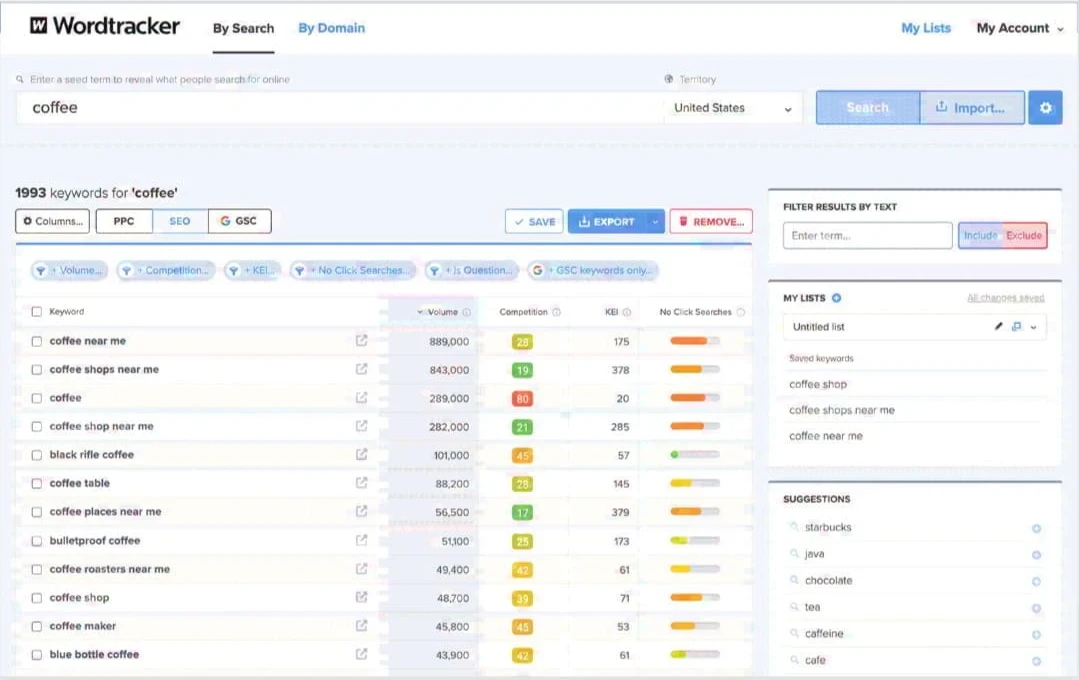
Wordtracker keyword research dashboard showing keyword ideas, volume, competition, and KEI scores.
What Wordtracker Actually Offers
Wordtracker is built around one thing – keyword research. You enter a search term and select the country or platform you’re researching, and the tool generates related keyword ideas along with search volume estimates and basic competition scores.
It doesn’t offer backlink analysis or technical audits. It stays focused on keyword research. So everything revolves around finding keywords and deciding if they’re worth targeting or not.
Inside the platform, here’s what you’ll find.
- Keyword suggestions with search volume and competition data
- Longer, more specific keyword ideas that are often less competitive
- KEI score, which weighs search volume against competition
- Basic competitor inspection through domain or URL input
- Rank tracking for selected keywords
- Filtering options to narrow results by term or location
- Multiplatform keyword data including Google, YouTube, Amazon, and eBay
- Export options and saved project lists
- A Chrome extension for pulling keywords from live pages
All of these help you identify search terms, get a basic sense of competition, and organise your research.
That’s what Wordtracker does. Nothing more, nothing less.

Wordtracker also has an Academy section with guides on SEO, content, and marketing. It’s helpful if you want learning material all in the same place, but it’s separate from the tool itself. The dashboard still stays focused on keyword research rather than things like site audits or backlink data.
How Wordtracker’s Features Work in Practice
Keyword Suggestions and Opportunity Ratings
When you enter a keyword into Wordtracker, it generates a list of related search terms. Alongside each suggestion, you’ll see several metrics designed to help you judge whether a term is worth targeting.
These include:
- Estimated search volume
- A competition score, which gives a general idea of how difficult that term is
- An opportunity score, which combines volume and competition into one simplified rating
- The KEI score, which weighs search volume against competition
For someone new to keyword research, these numbers can look a bit technical at first. Wordtracker includes short explanations and tooltips inside the dashboard to help clarify what each score means.
The idea is straightforward. You’re given quick indicators to help decide whether a keyword might justify your effort.
Long Tail Keyword Discovery
You’ll often see it return longer, more detailed keyword variations instead of just broad phrases.
It gives more detailed variations that may attract narrower search intent. For niche blogs, affiliate content, or product pages, these longer phrases can sometimes offer better targeting opportunities.
There’s nothing too advanced going on here. You’re just reviewing longer keyword phrases and deciding which ones look realistic to target.
Competitor Inspect Tool
Wordtracker includes an option to enter a domain or individual URL. The tool then displays keyword data associated with that page.
It doesn’t go into too much detail, but it provides a basic view of what terms appear connected to that domain. For quick checks, this is enough. For more advanced competitive research, you’d need additional tools.
Rank Tracking and SERP Preview
Depending on your plan, you can track selected keywords and view ranking snapshots.
There’s also a search preview feature that shows how a page listing may appear in the search results. This can help when reviewing page titles and descriptions before publishing or updating your content.
Filtering and Organisation
Filtering is simple. You can include or exclude certain words, focus on specific countries, or narrow the results by platform.
Projects and saved lists allow you to organise your research into simple groups. This keeps all your keyword planning structured.
Multiplatform Search Data
Wordtracker allows keyword research across Google, YouTube, Amazon, and eBay.
While Google remains the strongest for data, having access to multiple platforms can be useful if you publish content beyond the standard search results. The depth and consistency can vary outside Google, so it’s worth reviewing the results carefully.
Wordtracker Extension
The Chrome extension allows you to analyse a webpage directly from your browser.
By clicking the extension while viewing a page, you can extract keyword ideas or see a visual word summary. It’s a nice addition for quick research when reviewing content or competitor pages.
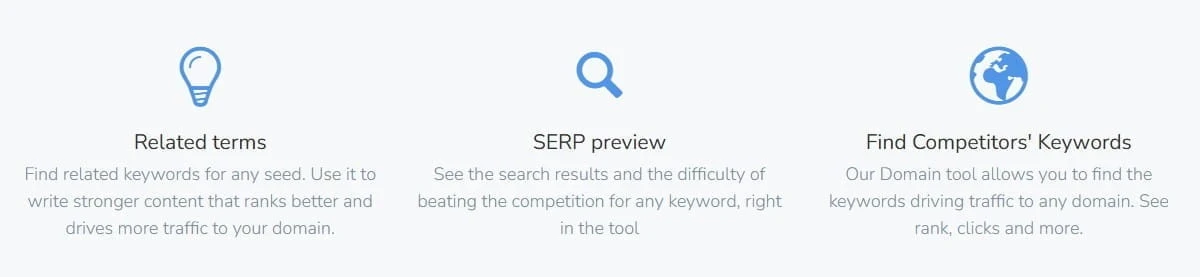
Wordtracker feature highlights showing related terms, SERP preview, and competitor keyword research.
How Much Does Wordtracker Cost?
Wordtracker offers a low cost introductory month before moving you onto one of its standard subscription plans. After that, you can choose between monthly billing or discounted annual billing.
There are three main tiers.
- Bronze
- Silver
- And Gold
Each step up increases your usage limits, such as how many keyword results you can generate, how many ranking lists you can track, and how many competitors or territories you can analyze.
In general, Bronze is enough for light keyword research and a small number of projects. Silver gives you more room for regular research and tracking more keywords. Gold is for heavier use, with the highest limits if you are researching a lot of keywords or managing multiple sites.
The yearly option reduces the effective monthly cost compared to paying month by month.
Because pricing, limits, and promotions can change, I recommend that you check the official Wordtracker pricing page for the most up to date details before making a decision. That way you can see exactly what each plan includes and whether it’s good for the level of research you plan to do.
If your main goal is keyword research and you don’t need any advanced reporting or technical SEO features, the price is reasonable. You’re paying for focused keyword discovery, not a full SEO suite. If you need broader data and management tools, you’ll need more than this.
What’s Good About Wordtracker?
Wordtracker gets positive feedback for one main reason. It’s easy to use. The interface is simple, and you don’t feel like you need hours of training just to understand where things are.
It’s also good for beginners. The built-in explanations and short guides help if you’re new to keyword research and not yet comfortable reading all the different search metrics.
Pricing is another reason people look at it. The plans are lower than many of the larger SEO platforms, which makes it more realistic for site owners and freelancers who don’t want an expensive monthly commitment.
For everyday keyword research, it covers what most small site owners need. You can generate ideas, review competition at a basic level, track selected terms, and organise your projects without unnecessary extra features getting in the way.
It’s also fairly good at returning longer, more specific keyword phrases, which can be useful when building niche content or product focused pages.
The multiplatform support can help if you’re researching for Google, YouTube, Amazon, or eBay. And the ability to save lists and organise projects keeps all your research in order.
If your goal is to find keywords and keep your research structured, Wordtracker handles all of these basics.
Weaknesses and Limits Mentioned by Users
No keyword tool is perfect. Wordtracker keeps things simple, but that also means there are certain limits.
These are the issues that come up most often.
- The keyword database is smaller than some larger SEO platforms, which can limit the depth of results in certain niches.
- It doesn’t include backlink analysis or technical site audits.
- The competitor inspection feature provides only a basic level view.
- Search volume figures can differ from other tools, and the data sources aren’t explained in great detail.
- There’s no strong seasonal or historical trend tracking.
- Multiplatform data outside Google can vary in depth and consistency.
- Project management features are basic and not designed for large teams.
- It isn’t built for heavy scale work across many clients or campaigns.
- Public reviews and independent coverage are limited compared to more widely discussed tools.
These limits don’t mean Wordtracker is bad. They just show what it is and what it isn’t. If you need more than keyword research, you’ll need something else to go alongside it.
Who Wordtracker Is Best For
Wordtracker is good for people who are new to keyword research or running smaller projects.
If you’re just getting started with SEO, blogging, or affiliate content, the platform is simple to use. You’re not faced with lots of reports or technical data. It stays focused on keyword discovery, which can make the learning curve a bit easier.
It can also be good for individual site owners and freelancers who don’t need complicated reporting. If your main goal is to find keyword ideas and track a handful of terms, it covers all that quite comfortably.
Some users describe it as a stepping stone tool. Something that helps you understand keyword research before moving on to more advanced systems.
Who Wordtracker Probably Isn’t For
If you’re managing large scale SEO campaigns or working with multiple clients, Wordtracker may feel a bit limited. Skip Wordtracker if you need any of the following.
- A tool that includes backlink research and site audits
- Deeper competitor research and reporting for client work
- Clear seasonal trend data for planning content
- Multi user access for teams
There’s no backlink analysis. Historical trend data, competitor research, and reporting features are all basic.
More experienced SEOs often look for extra in-depth data, more transparency around metrics, and broader research capabilities.
It just means that Wordtracker is built for a specific level of use.
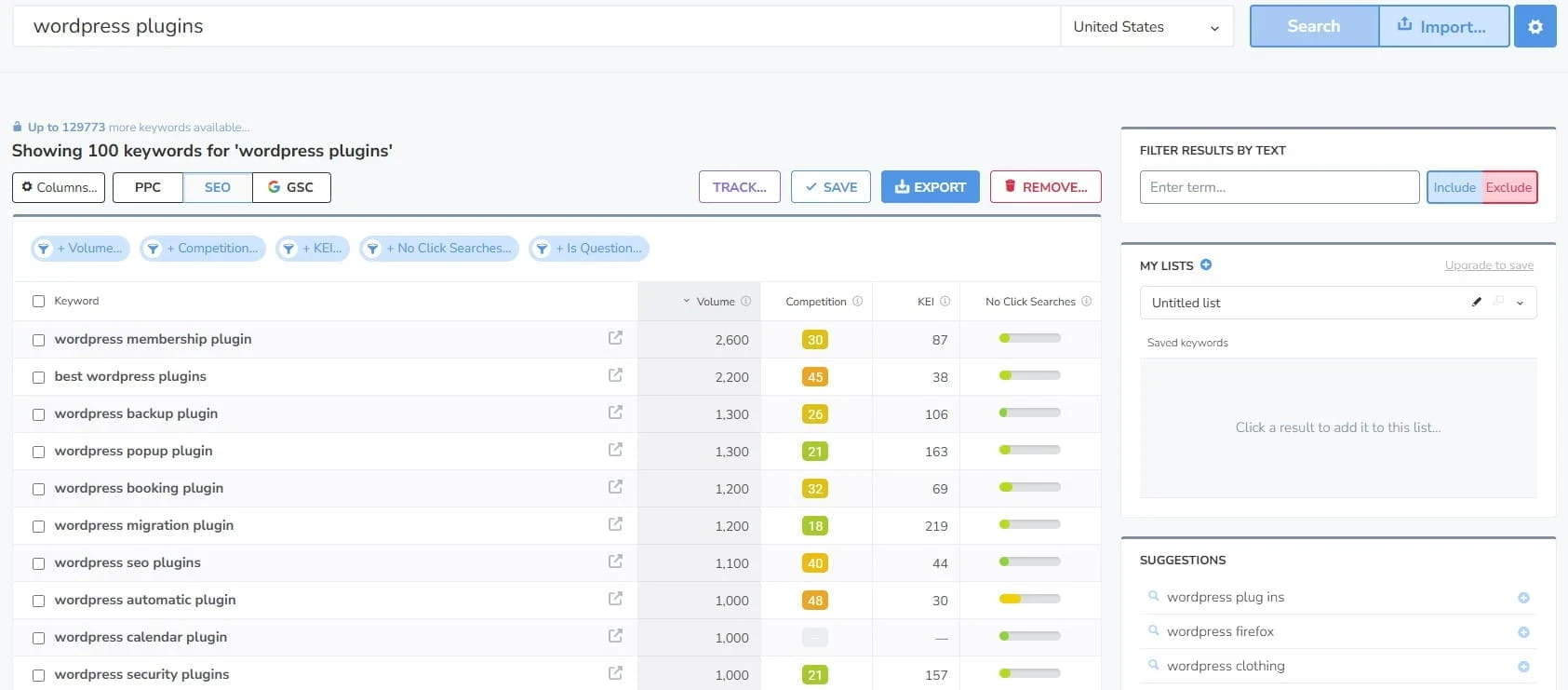
Wordtracker keyword search results for “wordpress plugins” showing volume, competition, and KEI data.
A Closer Look At Wordtracker’s Metrics And Data Sources
When you start using Wordtracker, two numbers appear constantly inside the dashboard. The Keyword Effectiveness Index, known as KEI, and the Opportunity score.
Both are there to give you a quick idea of whether a keyword is worth going after. They combine the search volume with competition, so instead of having to look through multiple columns, you get a simplified rating.
How KEI And Opportunity Work
The KEI score looks at the search volume and compares it against the competition.
A higher KEI usually suggests that a keyword has a reasonable demand without being too crowded. Years ago, this score carried a lot of weight in SEO. Today, most experienced users treat it as a quick reference point rather than a final score to base a decision on.
The Opportunity score works in a similar way. It looks at the search volume and competition together and turns them into one number. Instead of analysing each column yourself, you’re given a quick reference point. It can help narrow things down, but it shouldn’t be treated as a guarantee.
Both scores are readily visible, which makes scanning through large keyword lists a lot quicker.
What isn’t all that clear is exactly how competition is calculated. Wordtracker doesn’t go into much detail about how the scores are built. The same goes for the search volume. You’re given the numbers, but not a full explanation of where everything comes from.
You’re given working numbers to guide your decisions. You’re just not given full transparency into how those numbers are produced.
That’s why I treat these scores as a rough guide and always check the search results before deciding what to target.
CTR And Intent Metrics
Some guides and reviews mention there is click through rate or intent related data available. Inside the dashboard itself, I didn’t see anything detailed around this.
If you’re looking for deeper intent analysis or search behaviour tracking, Wordtracker doesn’t really cover that.
Where Wordtracker Sits Compared To Other Tools
Fresh Data And KEI Use
Wordtracker says its keyword data is updated regularly and pulled from more than one source, but there isn’t much public information about how often or how large the database actually is.
The KEI score is useful if you just want a quick reference point. It gives you a general feel for volume versus competition. But the search results today are much more complex than they were years ago. I wouldn’t rely on KEI alone to make your decisions. It’s a guide, not a final answer.
For longer, more specific keyword ideas, it still does the job.
Database Depth
If you’re looking for detailed monthly trends or strong seasonal information, this isn’t really the tool for that.
The data is strongest for English-speaking markets. Google results are clearly the main focus. Other platforms are included, but not at the same depth.
For everyday keyword discovery, that’s fine. For heavy analysis, it’s limited.
Project Organisation
You can save keyword lists and group them together into simple projects. That’s good for keeping your research tidy.
There aren’t built-in tools for content mapping, topic clustering, or managing large editorial plans. If you’re running a small site, that may not matter so much. If you’re managing a large content operation, you’ll need something more advanced to go alongside it.
Scaling And Reporting
If you’re running multiple client campaigns or need detailed reporting, Wordtracker isn’t designed for that.
The price is good for individual site owners. Paying a lower monthly fee to handle your keyword research is reasonable. But once you need collaboration features, detailed exports, or large scale reporting, you’ll start noticing the limits.
Compared To Google’s Free Tools
Some people wonder if they even need a paid tool when Google Keyword Planner exists.
The difference here is mainly the speed and convenience. Wordtracker gives you long-tail suggestions quickly and lets you filter them without being inside an ad account. It’s built specifically for keyword research rather than advertising.
If you only research occasionally, Google’s free tools may be enough. If you’re doing keyword work regularly, Wordtracker is more focused and quicker to use.
Does Wordtracker Still Fit Modern SEO?
SEO has changed. Long gone are the days when you could just pick a keyword and write an article around it. Most site owners now think more about the topic depth and how pages connect together.
That’s why I plan my content in groups, with one main page and a few supporting pages that answer the smaller questions people search for.
Wordtracker can help at the starting point. It’s good for finding keyword ideas and spotting terms that don’t look too competitive. But it doesn’t guide you through planning full content structures or building out connected topic groups.
It works fine as a keyword research tool. Not as a complete SEO management system. Some platforms combine keyword research with site audits, backlink tracking, and reporting. Wordtracker doesn’t try to do that.
If you combine it with other tools, including free Google resources, you can cover what most small site owners need. On its own, it stays focused on research rather than an overall strategy.

Frequently Asked Questions – FAQs
You type in a keyword, pick a country or platform, and Wordtracker returns your related keyword ideas. It shows the estimated search volume plus difficulty scores, so you can filter through the list. You can then save keywords into lists or projects, and on some plans you can track your rankings for terms you choose.
Yes. The layout is simple, and the main metrics are easy to find. If you are new to keyword research, it helps you build lists quickly without needing any advanced SEO knowledge.
It is useful for finding keyword ideas and judging which topics may be worth writing about. Like most tools, the numbers are estimates, so it’s worth double checking important keywords by looking at the search results and using Google Keyword Planner for a second reference.
Not usually. Wordtracker mainly covers keyword research and some basic tracking. It does not offer backlink research or deep technical site checks, so people often use it with Google tools and, if needed, a broader SEO platform later on.
Yes. AI has changed how people create content, but the search engines still rank pages based on usefulness, clarity, and how well a page answers what was searched. Good keyword research still helps you pick topics people want, write pages with clear intent, and avoid publishing content that no one is searching for.
What I Like About Wordtracker and How I Judge Keyword Tools
I’ve spent a lot of time doing keyword research for my own sites, mainly for blog topics, product pages, and my affiliate content. When I look at a keyword tool, I’m looking for something that helps me go from an idea to a usable list without wasting my time.
In this review, I focused on the basics that matter most for smaller sites, like how relevant the suggestions are, how useful the long tail ideas look, how easy it is to filter and save lists, and whether the metrics are clear enough to help people make a quick decision.
I based my notes on Wordtracker’s published features, plan limits, and what’s shown on their own pages, then compared that against the way I normally do keyword research for my own sites.
For this review, I also ran a few searches inside Wordtracker, filtered the results by location, and checked the KEI and Opportunity scores on keywords I would normally target. I also looked at the Domain and rank tracking areas to see what reporting you can get, and how easy it is to save lists for later.
Overall, what I like about Wordtracker is the fact that it’s simple. The free plan makes it easy to test it, the layout is clear, and it’s easy to move around. I think the Chrome extension is also handy for pulling ideas from pages while you’re planning your content.
I still treat any tool as a starting point, so I always check the actual search results before I commit to a keyword.
How Wordtracker Stacks Up Against Alternatives
It helps if you compare Wordtracker with three groups of tools.
All in one SEO tools
Tools like Ahrefs, Semrush, and Moz cover far more than just keyword research.
They also include backlink data, site audits, stronger competitor research, and more detailed reporting. Wordtracker is more simple to use and usually costs less, but it does not try to compete in those areas.
It focuses on keyword research only, and the keyword database can feel smaller compared to the bigger platforms.
Free tools
Google Keyword Planner and free browser tools can work if you only do keyword research now and then. The downside is that they can feel limited, and some are built more for ads than content planning.
Wordtracker is quicker for building keyword lists and keeping them organised.
Other lightweight keyword tools
Tools like KWFinder and Ubersuggest are in the same general price range and do a similar job.
They can offer different extras like exports, layout preferences, or limited free searches. Wordtracker keeps things simple and sticks to keyword research.
If you want another low cost keyword tool in the same general category, I also wrote a Wordze review.
What I’d Like To See Improved
I would like to see a little bit more clarity on where the search volume data comes from and how often it’s updated. That would help people know how much weight to put on the numbers they’re given.
The competitor research could also go further. The Inspect feature is good for quick checks, but it feels limited once you start comparing it to other tools in the same price range.
Even a basic backlink view would be useful, especially for beginners trying to judge why a keyword might be harder than it looks.
It would also help to have a simple way to turn keyword lists into content plans, like grouped suggestions or related topics you could build your supporting pages around.
Finally, more clear walkthroughs and independent reviews would help new users feel more confident before paying for a plan.
My Final Thoughts on Wordtracker
Wordtracker is a good choice if you want a keyword research tool that is simple to use and priced for smaller sites. It gives you keyword ideas quickly, it’s decent for long tail terms, and it lets you save lists so your research stays organised.
It does have its limits. If you need deeper competitor research, backlink data, site audits, or detailed reporting, Wordtracker won’t cover that. In that case, you’ll probably end up using it alongside Google tools or moving to a bigger platform later.
If you’re unsure, try it on a few topics you’re already planning to write about, then check the search results before you commit to anything. You can start with the Wordtracker free plan and see what you think.
If you’ve already used Wordtracker, feel free to share what you thought of it.
Thank you for reading and please leave your comments below.
Chris
Quick Summary
Wordtracker is a good choice if you mainly want help generating keyword ideas, checking basic competition, and building simple lists for content planning without needing to pay for a full SEO suite. It will probably not be the right option if you need detailed backlink data, full website audits, advanced reporting, or deeper tracking across lots of projects.
My overall rating for Wordtracker is 4 out of 5
Wealthy Affiliate
This is where my journey into the online world began, and it’s still the community I use for learning, tools, and support while working on my own projects.

About Chris Towers – Follow Me

My name is Chris Towers, and I run Affiliate Pro Solutions. I work with websites, content, and affiliate projects, and this website is where I share what I’ve learned from doing that work.
Most of what I write about comes from researching hosting companies, tools, and platforms that people use when building websites or trying to earn online. I look at how things are set up, what’s included, and where people often get caught out later.
I’m not connected to the companies I review beyond standard affiliate partnerships. This site does include affiliate links, but the aim here is to explain how the services work rather than push anyone into a decision.
You’ll find me on
Other Related Keyword Tool Reviews
- Wordze Review How Wordze Works and Who It’s Best For

- Is Wordtracker Worth It? An Honest Look at What You Get

Just to be open with you, this page includes affiliate links. If you click on one of these links and make a purchase, I earn a small commission. There is no extra cost to you at all. This simply helps support the content I share here. Thank you for your support, it really is appreciated.
Wow, I didn’t realize that Wordtracker was still going after all these years. They must be good to have weathered it for this long. I love all the organizing that it offers to store your tracking information and data.
I now use Jaaxy, so haven’t looked at Wordtracker again. Does it offer more than Jaaxy, otherwise why would you need two keyword trackers?
Thanks Michel
Yeah, it’s been around a long time for sure.
To be honest, if you’re already using Jaaxy and it’s doing what you need, you probably don’t need a second tool. For most site owners, one keyword tool is more than enough.
Wordtracker is good if you prefer its way of showing keyword ideas and saving lists, or if you want a second view on a keyword before you commit to writing your content. But it’s not a big step up from Jaaxy in the sense of giving you a full SEO suite.
They’re both mainly there to help you find keyword ideas and sort them into something you can use.
Hope this helps.
Chris
Good review thanks.
After you check KEI, what do you do next before you pick a keyword? Do you check the search results to see what’s ranking and what the intent looks like?
And do you see Wordtracker as something you’d use long term, or more something you use for a while before moving to a bigger tool?
Thanks for the comment.
Yes, after KEI, I always check the search results to see what’s ranking and what the intent looks like. No matter what tool you use, that’s always important.
Long term, I think Wordtracker is fine if you mainly want keyword ideas and simple lists. If you need deeper competitor data, backlinks, or audits, you’ll need a bigger tool at some point.
Chris