
Topic – Keyword Tools
Post Reading Time – 22 Minutes
If you are someone who spends a lot of time creating content, running a blog, or managing a website, you’ve no doubt felt the frustration of having to move around between different tools. One for keywords, another one for planning, another for writing, then maybe something else again for doing your editing. It slows everything down and breaks your concentration, and that’s the problem I want to talk to you about in this Wordze Review.
Wordze has been designed to handle keyword checks and brings topic ideas, keyword data, competitor insights, content outlines, AI support for writing, and editing tools together under one roof. The main aim is to help you see ranking opportunities and turn them into well written articles without having to drag yourself across half a dozen different platforms.
I’ve spent some time going through what Wordze offers, how the different features are set up, and what it’s designed to help you with. This review is based on a close look at the platform, the available tools, and how it compares to the way content is usually planned and written. I’ll go into what Wordze includes, what stands out, and what you should be aware of, so you can decide if it fits in with the way you like to work.
You can also check the Wordze website here to see what’s included.
Summarize This Content Using AI
TL;DR
WordZe review
This review looks at what WordZe offers as a keyword research tool, how its features work in day-to-day use, and what you should know before deciding if it’s something you’d use regularly. It explains the essential tools included, how the interface feels, and what types of users might find it helpful. That gives you a overall view of WordZe so you know what to expect.
A Quick Summary Of The Wordze Content Creation Tool
To start, here is a short summary of the main details of Wordze, what it’s designed to do and who it’s for.
- Product Name – Wordze
- Type of product – An all in one tool for keyword research, topic research, AI writing, and on page content checks.
- Main goal – To help users plan content, see ranking opportunities, understand competition, and publish stronger articles with less jumping around between different tools.
- Who it’s for – Bloggers, content creators, affiliate marketers, small business owners, SEO focused website owners, and anyone responsible for writing or improving online content.
- Main features – Live keyword data, topic groups and content ideas, search trend data by time and location, content gap checks, competitor analysis, AI help for writing, on page editing tools, and WordPress publishing support.
- Pricing style – Individual and team plans with monthly and yearly options. A low cost trial is available, along with a thirty day refund period.
Wordze is built to keep all of your research, writing, and editing in one place, with tools that link together as you move from planning to publishing.
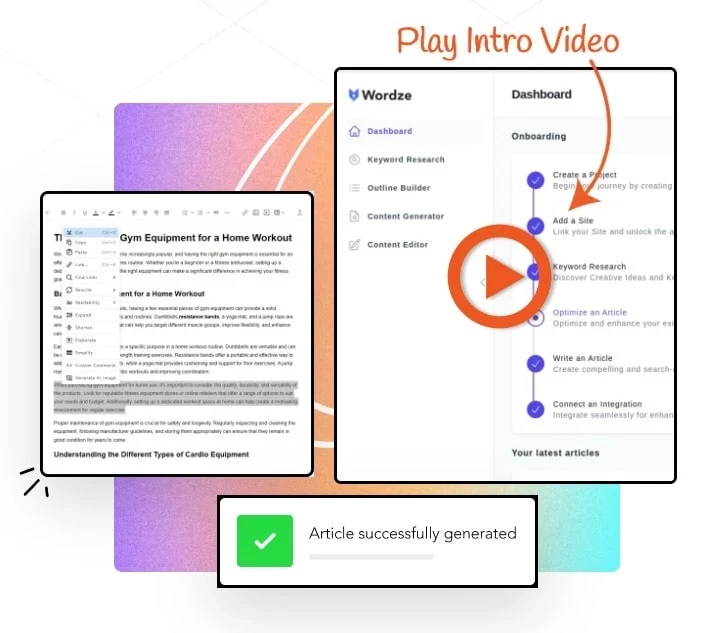
Screenshot taken from Wordze.com
Wordze Topic and Keyword Research
The main focus of Wordze is its research tools. Getting topics and keywords right makes a big difference to how content performs once it is published, so this is the area most people will spend their time in when using the platform.
Topic Discovery
Wordze groups live search topics into themes, which helps with planning connected articles instead of writing one off posts.
Topic groups show related ideas based on search information. These groups help with planning site structure and keeping content connected instead of all over the place.
It shows common questions people are searching for along with related subtopics, which helps you understand what readers are actually looking for.
Content gap checks point out topics that are not being fully covered by existing pages. This can give you good ideas for articles that may have less competition.
All of this makes it easier to see what matters inside a niche without needing to go through large keyword lists. Everything is laid out in a way that supports planning rather than just collecting data.
Keyword Research
Wordze also includes a detailed keyword research section with a wide range of filters and data points to narrow things down.
Live search volume shows recent numbers along with estimates for the following month, helping you keep decisions based on current interest.
Difficulty scores give a better idea of how hard it may be to rank for a keyword, based on information taken from pages that are already ranking.
Match types and filters let you switch between broad, phrase, and exact searches. You can also refine results by length, competition, or intent.
A KEI style score, short for Keyword Effectiveness Index, combines search demand with competition. This gives a quick way to see which terms may be worth concentrating on.
Extra keyword data includes misspellings, typos, related terms, and synonyms. This can be useful when building clusters or expanding on content ideas.
Having all of this available in one place makes it easier to plan your articles and keyword groups without jumping between different tools or spreadsheets.
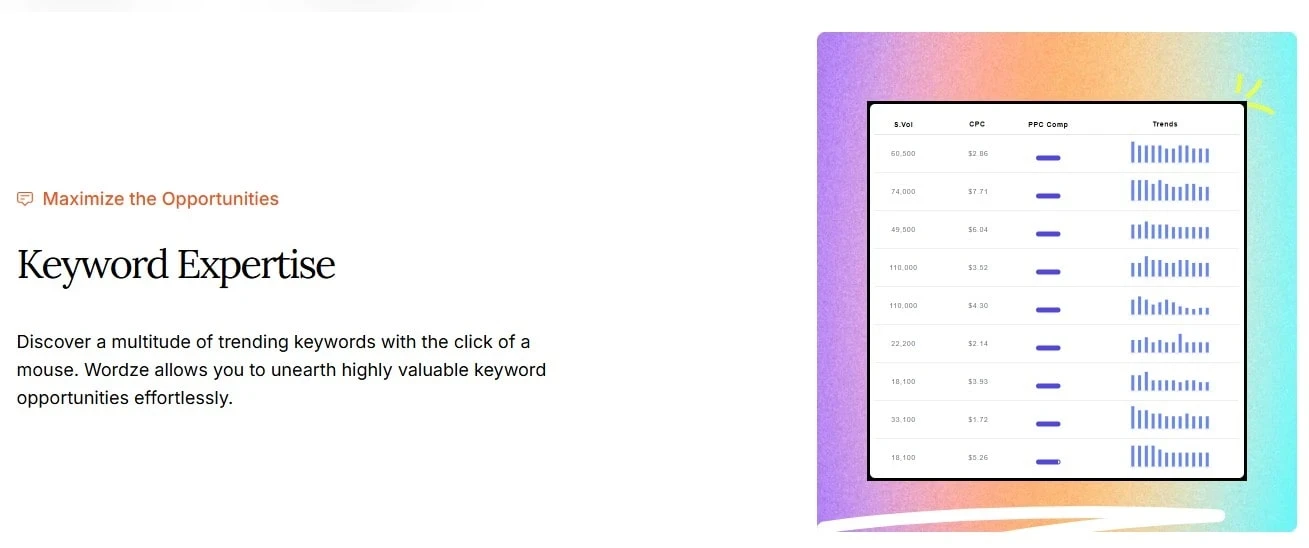
Screenshot taken from Wordze.com
Competitor & Difficulty Analysis
Wordze looks at the pages already ranking for a keyword and, instead of showing a single score, breaks things down so you can see what you are up against before deciding what to target.
For each keyword, Wordze reviews the top ranking pages and pulls together useful details about them.
It shows backlink information and general site strength, including referring domains, how long a domain has been around, and estimated authority levels.
It also provides a ranking difficulty score. This gives you an idea of how hard it may be to compete, based on signals taken from the search results and large content sites.
Another helpful part is the extra context around what is ranking. You can see whether the results are blog posts, guides, product pages, forums, or other types of content, along with how in depth those pages appear to be.
This makes it easier to judge the quality of the current results. When rankings are filled with forums, user generated pages, or older content, it becomes easier to spot gaps where a well written and up to date article could perform well.
Historical & Geographic Data
This part of Wordze focuses on how search interest changes over time and where searches are coming from. It is useful when timing and location matter for the content you are planning to create.
You can see how the interest in a topic changes over different time periods, including 30 days, 60 days, 90 days, and up to a full year.
It also shows you where searches are coming from, with location data that can go as far as city level in some cases.
Some of the helpful details include:
• Search interest charts showing how topics rise and fall over time
• Location based data by country and city
• Clear visuals that make patterns easier to see
• Support for choosing which topics to concentrate on and when to publish them
This section is extremely useful if you write local content or you want a better idea of how interest changes depending on timing and location.
Content Planning and Outlining with Wordze
Once a keyword or topic group looks promising, Wordze also includes tools that can help with your planning and structure before you start writing. This part of the platform is aimed at keeping your ideas organised from the start, rather than having to start fixing things later.
Outline Builder
The outline builder is designed to help shape an article before you open a blank page. It can generate suggested headings based on keyword information and pages that are already ranking, which then gives you a starting structure to work from.
You can also view the different types of headings commonly used in existing articles for the same topic. From there, headings and sections can be adjusted, moved around, or expanded so the outline matches what people are searching for.
This makes planning things out much easier, as you are not opening multiple pages and taking notes by hand. Instead, you can start with a clear layout that reflects how similar content is already structured.
Draft Creation
Once an outline is in place, it links directly into the writing side of the platform. This allows you to organise your main points and the overall flow of the article before the writing begins.
Having all of this early on helps keep content completely focused on the topic and the questions readers are likely to have, rather than drifting off track halfway through the article.
Screenshot taken from Wordze.com
AI Writing Capabilities
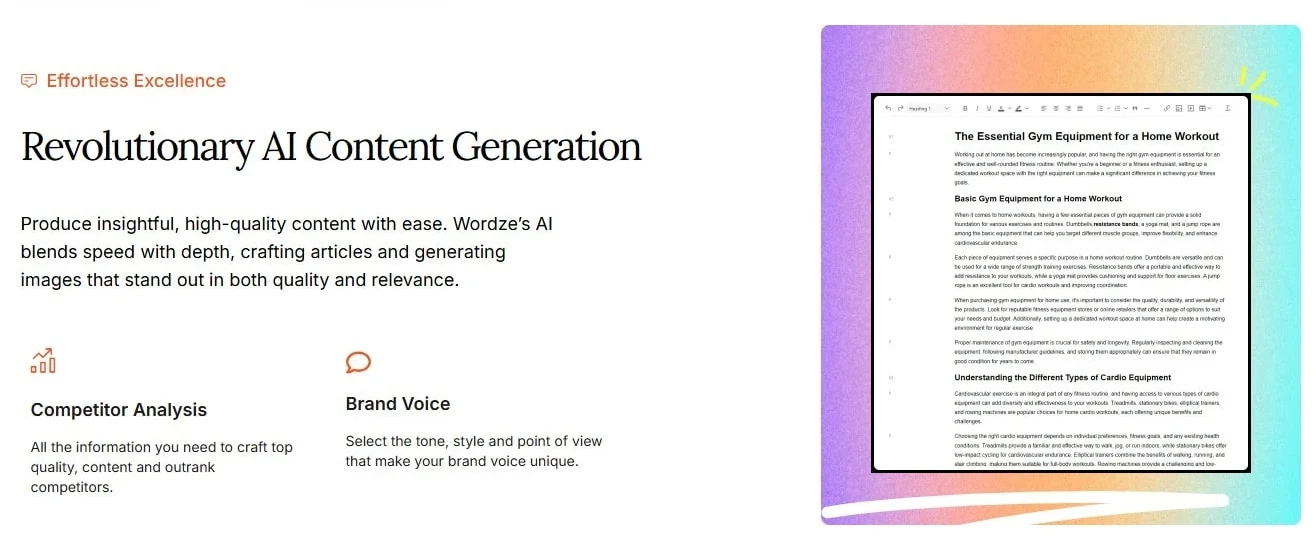
Wordze has AI writing tools included, and they can be used for full articles or for smaller sections of content. The AI is mainly there to help with any early drafts and idea generation, rather than replacing your own writing completely.
Some of the ways the AI tools can be used include:
• Creating a full draft based on an outline, with content added under each heading
• Writing individual sections such as introductions, lists, explanations, or FAQs
• Adjusting the writing style so it feels more formal, relaxed, or suited to the type of content you are working on
• Generating images inside the platform so visuals can be added without leaving the tool
Personally, I think that the AI output works best as a starting point. Like most AI writing tools, the content benefits more from doing some editing and adding your own voice so the final article sounds natural and personal.
Content Editing and On Page Optimization
Wordze includes a built in editor that helps you improve your article after the main writing is done. It’s there to help tighten things up and make sure the content reads well and stays on track for readers.
Some of the checks included are:
• A readability check that highlights long sentences, awkward wording, and the overall reading level
• A keyword usage check that keeps an eye on main and supporting keywords, flagging when something is used too much or not enough
• Clarity suggestions that help keep paragraphs easy to read and simple to follow
• SEO guidance that shows how closely your draft lines up with the basic on page requirements
This makes it easier to review an article before publishing without needing to move it through several different tools. It helps keep your writing clear for readers while still covering the basics that the search engines look for.
Publishing and Exporting Tools
Wordze keeps the publishing side of things simple, from preparing your content for review and getting it ready to go live. The idea is to remove some of the problems that often show up near the end of the writing process.
Content can be exported in formats such as TXT, PDF, or HTML, which means you are not locked into working inside the platform. You can move your drafts wherever you need to and make changes without any extra steps.
There is also a direct WordPress connection, allowing articles to be published straight from Wordze when they are ready. Alongside this, drafts can be organised, marked as ready, or kept in review, making it easier to manage all of your content as it moves through different stages.
This setup is really good for solo writers and small teams who prefer to work in one place and publish to different platforms without having to copy and paste everything by hand.
Integrations With Other Tools
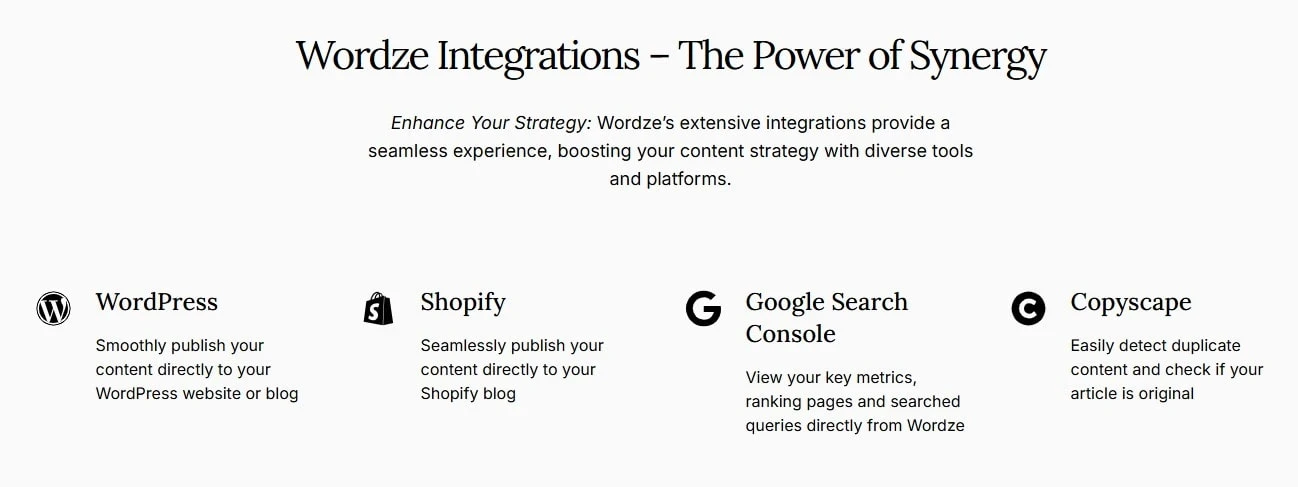
Wordze connects up with a set of well known tools that most content creators are already using. These connections are there to make it easier to move from the research phase to publishing without interrupting your workflow.
There is support for WordPress, which allows your content to be published directly once it is ready. It also makes it possible to bring existing posts into Wordze so they can be reviewed and improved inside the platform. I personally think this is one of the strongest features of Wordze!
There is also a plagiarism checking option available through an API connection. This helps you check your content for any duplication issues before it is published, which can be useful when working with longer articles or multiple drafts.
Wordze can also connect with Google Search Console. This is another great feature that allows you to view search data, see which pages may need your attention, and find more ideas for linking content together more effectively.
It would be nice to see more connections added over time, such as project management or additional SEO tools. That said, the current integrations cover what most creators need for their everyday content work.
Screenshot taken from Wordze.com
Extra Tools and Features in Wordze
I like platforms that include a few extra tools to help with the everyday tasks, and Wordze adds some useful ones that support the main features without getting too much in the way.
Some of the additional tools included are:
• A keyword density checker that lets you add a draft and see whether main keywords are being missed or overused
• A thesaurus and synonym finder, which can be quite handy when rewriting sections or adding variety to your wording
• Content filters that allow you to remove keywords or topics linked to adult, gambling, drug, or pirated software terms
• Tools that let you move data between keyword research, competitor checks, and the content planning areas
I don’t think that these extras are the main reason to use Wordze, but they do help speed up your routine work, especially if you manage a lot of content or move between different tasks during the day.
Data Export and Custom Reporting
If you’re a person that likes working with data in Excel or Google Sheets, Wordze makes it easy to export your keyword lists and topic data. Most reports can be downloaded in the standard formats, so you can sort, organise, or combine the information in a way that suits how you like to work.
This is useful if you have to report to clients, track progress across bigger projects, or you like to review your data over time.
You can come back to keyword groups, make any changes, and keep everything moving in the right direction without starting from the beginning.
Wordze Review Pricing and Plans
Wordze offers quite simple pricing options for individuals and teams. You can choose to pay monthly, pay yearly for a lower overall cost, or start with a trial to see if it’s the kind of tool you’re looking for.
The main options include:
• Individual plans
Designed for individual bloggers and freelancers. These plans include access to the research tools, writing features, and editing tools, with a set limit for content and keyword usage.
• Team plans
Built for small teams or agencies. These come with support for multiple users, higher usage limits, more projects, and the ability to connect several websites.
• Trial option
A low cost way to test the platform before committing to it long term. This gives you the time to look through the tools and see how everything goes together.
• Refund policy
There is a thirty day refund period, giving you the option to step away if it turns out not to be the right platform for you.
Overall, the pricing is laid out clearly, with no hidden steps or extra charges added later for the core features like writing tools or exports.
For the latest pricing details and plan options, you can check the Wordze pricing page here.
What I Like Most About Wordze
There are a few things that stand out once you look through what Wordze offers as a whole.
• It brings topic research, keyword research, competitor checks, and writing tools together in one place, which cuts down on switching between different tools
• The layout is simple to follow, and the built in tips help newer users get comfortable without getting confused
• The pricing setup is easy to understand, with a trial option that lets you take a look without any pressure
• AI writing and image creation are included as part of the platform, without needing to pay extra
• Filters make it easier to avoid keywords that are not useful or relevant
• It suits individual creators, growing blogs, and small teams who want to keep everything in one place
Screenshot taken from Wordze.com
Things to Watch Out For With Wordze
No tool is ever perfect, and there are a few points worth keeping in mind before making a commitment.
• AI written content works best only as a starting point and still needs your own editing and voice
• Integrations outside WordPress and plagiarism checking are limited, which may matter for more advanced setups
• Some of the research features take a little time to get used to, especially if you are new to this type of tool
• Historical keyword and search result data only goes back about a year, which limits longer term analysis
Fine, none of these are a reason to put you off, but they are worth knowing about upfront so you can decide if Wordze is for you!
Who Is Wordze Best For?
You’ll be able to get the most out of Wordze if you’re someone who spends a lot of time planning, writing, and managing content. It’s good for bloggers, content creators, and affiliate publishers who want their topic research, keyword checks, and writing tools all in one place, rather than spread across several different platforms.
It’s also good for freelancers and individual creators who want to speed up their keyword research and article drafting without their workflow becoming complicated. Small teams can benefit from this platform too, especially when you’re working together on research, outlines, and drafts, without having to pay for multiple separate tools.
Wordze is also good if you prefer seeing topics and data laid out visually instead of working through large spreadsheets. Being able to look at ideas, keywords, and content plans in a clearer format can make planning feel a lot more easy to manage.
If you run a very large team or you rely on deep custom integrations, it’s worth checking what is available first. For most creators and site owners, though, Wordze is good for day to day content work.
Who Might Want to Skip Wordze?
Wordze may not be the best platform for everyone.
For example, if you prefer doing all of your research and writing completely by hand and do not want any AI support involved at all, this platform may feel somewhat unnecessary, even though the AI tools are optional.
It may also fall a bit short for agency users who already rely on custom systems, advanced workflows, or deeper integrations. If your setup depends heavily on APIs or linking multiple tools together, Wordze could feel a bit limiting for you.
People who need access to very long term keyword or search data may also find the limits restrictive, as historical data only goes back around a year. For some projects, that might not be enough.
Finally, if you rely on a wide range of third party integrations or strongly dislike working inside a bundled dashboard, Wordze may not suit the way you prefer to work.

Frequently Asked Questions – FAQs
Yes. Wordze is set up so beginners can get started without feeling confused.
There are onboarding steps, short videos, and on screen tips that explain what each tool does. So, even if you are new to keyword research or content planning, you can start using the basics straight away and learn more as you go.
Wordze refreshes its search and topic data on a regular basis, with updates that reflect recent search activity rather than old figures.
This helps you make decisions based on what people are currently searching for, instead of having to rely on outdated numbers.
No, not at all.
The AI tools are optional. You can use Wordze purely for topic research, keyword checks, outlining, and content planning if you prefer to write everything yourself.
The platform still works very well without using any AI generated text.
Yes. Wordze includes team plans that allow multiple users to work together.
These plans come with higher usage limits and shared projects, which can be useful if you collaborate on research, outlines, or content drafts.
Wordze works well for ongoing content planning and publishing, especially if you regularly create articles or manage a growing site.
While some data only goes back around a year, the tools themselves are built for steady, repeat use rather than one off projects.
How I Look At Wordze As a Content Publisher
I want to be clear with you here. This review is not based on my long term daily use of Wordze. Instead, it comes from looking closely at how the platform has been built, what the tools are designed to do, and how they work within content planning and publishing workflows.
I’ve spent years working with websites and creating content, so I review tools like Wordze from that point of view. What matters to me is whether a platform solves problems, keeps things organised, and supports the way content is actually created from the start through to the finish.
Wordze is set up to bring research, planning, writing, and editing all into one place. That structure can make life easier for people who regularly publish content and want to reduce unnecessary steps. The tools follow the same steps most people already use when planning and writing articles.
Whether Wordze is the right choice for you depends on how you like to work, but the platform itself is well built with content creators and publishers in mind.
What I’d Like to See Improved
There are a few areas where I think Wordze could be improved over time. None of these are really major issues, but they are worth mentioning here.
• More third party and workflow integrations, especially links with project management tools, which would help teams keep everything connected
• A wider time range for keyword and competitor data, as the current one year limit may feel restrictive for larger or older sites
• The option for advanced users to create custom templates or checklists that follow how they like to structure content
None of these points take away from what Wordze already offers. They are simply areas where the platform could improve further as more content creators and teams start using it.
Other Tools to Consider If You’re Looking at Wordze
When looking into a platform such as Wordze, I think it’s normal to come across a few other well known tools while you’re doing your research.
Some people may already be familiar with tools like Surfer SEO, which mainly deals with on page editing and content scoring, but it tends to cost a little bit more and does not cover research and writing in the same place.
Tools like Ahrefs or Semrush are widely used for keyword and backlink research. They are powerful, but again, they are usually more expensive and require separate tools for your writing and image creation.
Jasper is another good choice and that one is mainly based around AI writing. It can be useful for drafting content too, but it generally needs to be used alongside another platform for keyword research and planning.
Wordze puts research, planning, writing, and editing in one place. For those who prefer keeping their workflow all in one place, that structure may be easier to manage than having to juggle several separate tools.
Final Thoughts on Wordze
By this point, you should have a clear idea of what Wordze is designed to help you with and how its tools are laid out. Rather than trying to do everything for you, the platform supports the way content is normally planned, written, and reviewed.
From looking closely at the structure of the platform, Wordze appears to be aimed at people who want organisation and proper steps when working on their content. The tools follow a logical order, which can make you feel more in control when planning and publishing, especially if you work on content regularly.
Whether Wordze is the right platform for you comes down to how you like to work. If you prefer having all of your research, planning, and writing tools available in one place, and you want the option of AI support without being forced to rely on it, then it’s worth taking the time to look through the platform properly.
If you want to explore the platform yourself, you can check the Wordze website here to see what’s included.
Thanks for taking the time to read this Wordze review. And if you’ve used Wordze yourself, I’d also be interested to hear what you think.
If you have any questions or comments, please leave them below.
Chris
Quick Summary
Wordze is a good platform if you want your topic research, keyword checks, planning, and writing tools all in one place and you prefer a more organised workflow. It may not be good for you if you rely on very advanced custom integrations or need long term historical data going back several years.
My overall rating for Wordze is 4 out of 5
Wealthy Affiliate
This is where my journey into the online world began, and it’s still the community I use for learning, tools, and support while working on my own projects.

About Chris Towers – Follow Me

My name is Chris Towers, and I run Affiliate Pro Solutions. I work with websites, content, and affiliate projects, and this website is where I share what I’ve learned from doing that work.
Most of what I write about comes from researching hosting companies, tools, and platforms that people use when building websites or trying to earn online. I look at how things are set up, what’s included, and where people often get caught out later.
I’m not connected to the companies I review beyond standard affiliate partnerships. This site does include affiliate links, but the aim here is to explain how the services work rather than push anyone into a decision.
You’ll find me on
Other Related Keyword Tool Reviews
- Wordze Review How Wordze Works and Who It’s Best For

- Is Wordtracker Worth It? An Honest Look at What You Get
Just to be open with you, this page includes affiliate links. If you click on one of these links and make a purchase, I earn a small commission. There is no extra cost to you at all. This simply helps support the content I share here. Thank you for your support, it really is appreciated.
I must admit that this is the first time that I have heard of Wordze and it looks like a good tool for any writer to have.
I see you are also a member of Wealthy Affiliate so I wondered if Wordze would be needed as the platform already has image, AI content generators and a keyword tool or would it be a good thing to try it out and see if it could help further with the keyword research side?
Thanks Michel.
Yes, Wealthy Affiliate already covers a lot and for most people it’s more than enough, especially at the beginning.
Wordze isn’t something you need if you’re already using WA.
Where it could help is if you want to go a bit further with your keyword research and topic planning later on. It’s more of an extra option rather than a replacement.
Appreciate you reading and commenting.
Chris
Great review.
I’ve always found it frustrating having to use one tool for keyword research and another one for writing, as it slows me down. Wordze seems to be trying to keep everything in one place, from finding topics right through to publishing on WordPress.
From what you’ve seen, does the AI writing actually work well with the keyword data, or do you still need to spend time adjusting things to get the SEO side right?
Thanks Leah, and I get what you mean.
From what I’ve seen, the AI writing does a good job and follows the keyword data and structure quite well, but I still see it more as a starting point than a finished article.
I’d always expect to do some editing myself to make sure things read properly and stay on point.
The benefit is having everything in one place, rather than going between tools.
Chris