
Topic – Video Player/Screencasts
Post Reading Time – 31 Minutes
If you’re on the search for a Wistia Platform Review like this one, then you’re probably in more of a decision phase rather than just browsing for the sake of it. You’ve also probably come across Wistia more than once while looking into various video hosting tools, and now you’re trying to work out if it’s actually worth your time and money.
Looking at it on paper, Wistia is more often than not described as a platform built for businesses, educators, and teams that use video content in a more structured way. That sounds good, but it also raises a question. Is it actually useful, or is it just another platform that sounds better than it really is once you get past all of the marketing?
That’s what my review is here to help you with. Instead of assuming you already use Wistia, I’m going to talk to you about what the platform offers, who it seems best suited for, and where it may fall a little short. So if you’re weighing up your options and want a better picture before committing to it, this will give you a good starting point.
Wistia is a good choice for businesses, teams, and educators who already know how they want to use video and need it to stay on their own website. It’s less suitable if you’re only looking for free hosting, making casual uploads, or wanting a platform just for reach and discovery.
You can also visit the official Wistia website here if you want to see their details and current plans directly.
Summarize This Content Using AI
TL;DR
Wistia platform review
This review looks at how Wistia works for hosting and sharing video content, what features it has, and how it might suit people’s different needs. You’ll get a clear view of the main tools, strengths, and things to think about before you commit to it, so you can decide if it fits your goals. It’s a simple look at what Wistia offers and what to expect if you use it.
A Quick Summary of Wistia
Before we get started, here’s a short summary of the main details on Wistia.
- Product Name – Wistia
- Platform focus – Wistia is a video hosting platform designed mainly for embedding videos on your own website, landing pages, or internal portals, rather than for building out a public social channel.
- Common use cases – It’s mostly used for things like marketing funnels, product demos, customer education, team onboarding, gated training content, webinars, and podcast hosting.
- Branding control – The video player can be customised to match your site, including colours and logos, and videos play without third-party ads or outside recommendations.
- Core features – The platform includes tools for lead capture, detailed viewing analytics, interactive calls to action, and integrations with common CRM systems (Customer Relationship Management) and email platforms.
- Pricing approach – There is a free plan for light use, but the paid plans increase in cost as your video library grows or your audience size increases.
- Who it’s aimed at – Wistia is generally aimed at B2B companies, marketing teams, agencies, educators, and anyone that uses video as part of a more structured sales, training, or support setup.
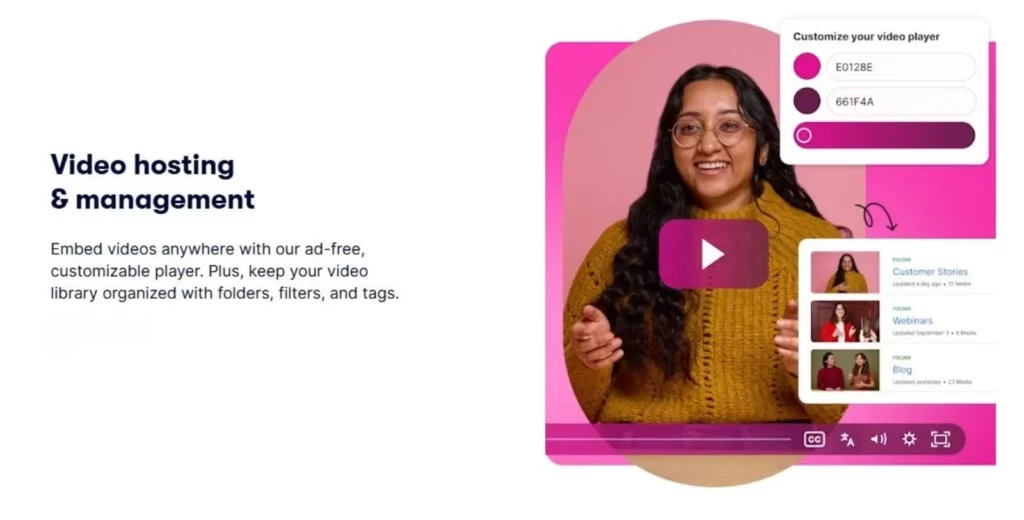
Wistia video hosting and management features. All screenshots taken from Wistia.com
Getting Started With Wistia
How Wistia Fits Into a Video Marketing Setup
Wistia isn’t built around building followers or looking for the attention of the public. So if you’re looking for something more social, this is not it! It’s built more for businesses that want their videos to stay on their own websites, landing pages, or learning areas, without pulling viewers away to somewhere else.
What stands out for me is how much control the platform lets you keep in your hands. Your videos sit alongside your content, your pages, and your offers, without any outside branding or distractions getting in the way.
That matters a lot, especially if video plays a role in education, training, or sales support, where the attention and trust levels are more important than just reaching out to people.
This works best for things like product walkthroughs, case studies, onboarding material, gated educational content, training libraries, webinars, and internal communication. In these cases, video plays a supporting role instead of being the main thing people come for.
Wistia isn’t really meant for casual uploads or entertainment content. If your main goal is to just post videos and hope people stumble across them, then this probably isn’t the right tool for you. It works better for businesses that already know where their videos will go and who they’re for.
Supported Content Types and Use Cases
Wistia is often seen as a simple video embed tool, but it supports a wider range of content than many people expect. While website video is a common use, the platform also works well for videos shared with customers and those used internally.
Wistia supports standard video uploads, including the more common formats like MP4, which makes it suitable for things such as product walkthroughs, recorded presentations, and customer-facing videos.
It also supports live and recorded webinars, which can later be reused as on-demand content without the need to move files somewhere else.
Wistia also works well for training material and internal videos.
Many teams use it to organise onboarding sessions, staff updates, or educational resources that need to stay private and easy to manage. Audio and podcast hosting are also supported, with an embeddable player that lets episodes be placed directly on your site alongside the written content.
All in all, I think that this makes Wistia a good option for planned video content where each video has a clear reason for being there. It suits situations where videos are meant to educate, guide, or support people over time, rather than just being uploaded casually.
It’s more for teams that already use video often, not just as a one-time thing.
Working With Video in Wistia
Video Player Customisation and Playback Experience
One area where I think Wistia seems to get a lot of attention is the amount of control it gives over how videos look and behave once they are added to a website.
Instead of just using a fixed style, Wistia allows you to make adjustments to the player so it sits nicely alongside your own pages and content.
The player can be styled with your own colours and branding, and you can decide how much control viewers have while watching. Things like skipping, rewinding, or changing the playback speed can be shown or hidden depending on how you want people to consume the video.
There are no ads, no suggested videos, and no outside branding pulling people’s attention away, which keeps the focus firmly on the content itself.
For those longer videos, Wistia also supports chapters and clickable timestamps, which makes it easier for viewers to move around without having to go back and forth trying to find a specific part.
This makes it useful for training material, onboarding videos, or recorded sessions where people often return to the same sections more than once.
Interactive elements are another part of the player experience.
Videos can include clickable buttons, links, or simple forms that appear at set points during the playback. These can be used to point viewers towards more information, collect email details, or offer something extra once a video has been watched.
When used carefully, these features help videos do more without feeling intrusive or overdone.
Lead Capture and Video Gating
One area where Wistia has put a lot of work in is using video as a way to collect contact details and guide people towards a next step, rather than just letting them watch something and leave.
With Wistia, video can be set up to include things like:
- Email capture forms that appear before a video starts, part way through, or once it finishes
- Gating options that require viewers to enter an email address before watching part or all of a video
- Simple forms that collect more than just an email address if it’s needed
- Triggers based on viewer actions, such as watching to the end, submitting a form, or clicking a button
These actions can then be connected to email tools or CRM systems, so follow ups can happen automatically without needing to do any manual work.
This setup is usually better for situations where video is part of a wider process, such as offering a free lesson, unlocking training material, or encouraging someone to request more information.
So instead of focusing on the view counts alone, the emphasis is on what viewers actually do after watching a video.
Analytics and Viewer Insights
Wistia puts a lot of effort in helping you understand how people actually watch your videos, and not just whether they clicked play or not. The analytics are set up to give a clearer picture of viewer behaviour rather than showing you only numbers.
You can see how many visitors start a video, how long they stay watching, and roughly how far they make it through before dropping off. There are also visual graphs that show where attention levels increase or fall, which makes it easier to see the sections that people replay or skip past.
Wistia also includes heatmap style reporting, which shows how the individual viewing sessions behave, within the limits of privacy settings. This helps build an overall picture of how content is being consumed without needing to identify specific viewers.
The useful part here is that the data is practical. Instead of just confirming that a video was watched, it helps highlight which parts are holding attention and which parts might need adjusting.
This kind of feedback can be used to improve how videos are structured, especially for training, onboarding, or educational content where clarity is important.
Integrations With Marketing and Automation Tools
Wistia is built to work with other tools rather than just stand on its own. It connects with many of the platforms businesses already rely on, which makes it easier to use video alongside email, customer management, and website tracking.
It integrates with well known CRM and email platforms such as HubSpot, Salesforce, Marketo, Pardot, Mailchimp, ActiveCampaign, and Zapier. These connections all allow video activity to be tied into email follow ups or contact records without needing to handle everything manually.
Wistia can also be connected to analytics tools such as Google Analytics, so video activity can be viewed alongside the rest of a site’s data. This helps give a better idea of how video fits into what visitors are doing overall, rather than treating it as something separate.
On the publishing side, Wistia videos can be added to websites built with platforms like WordPress, Webflow, Squarespace, and Shopify without much setup. Videos can be placed where they are needed, whether that’s on landing pages, blog posts, or private areas of a site.
What this means in practice is that video activity does not stay isolated.
Things like how long someone watches, whether they click a button, or if they submit a form can be used elsewhere in your setup. This information can then support follow up emails, access to additional material, or general tracking, depending on how everything is connected.
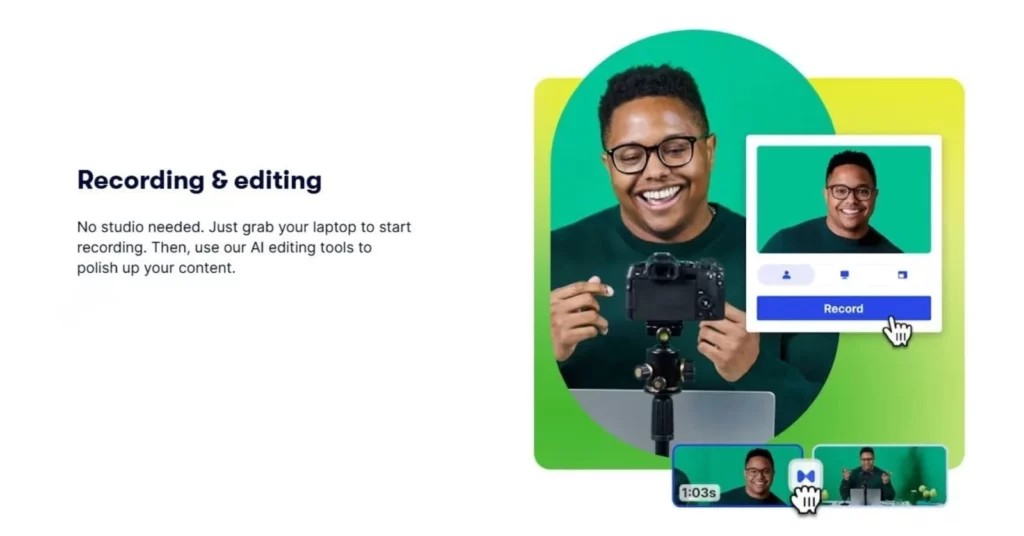
Wistia recording and editing features.
Recording, Webinars, and Editing Capabilities
Wistia includes built-in screen and webcam recording tools, which are mainly there for creating simple videos without needing any extra software. This is good for things like short walkthroughs, internal updates, or basic explanation videos where the aim is to get something recorded and shared without making it complicated.
The editing options inside Wistia are somewhat limited. You can trim the start or the end of a video, cut out small sections, and make some small adjustments, but it’s not intended to replace proper video editing software. If a video needs more detailed work, it’s better to edit it using another tool and upload the finished version.
Webinars are also supported and they follow the same straightforward approach.
Live sessions can be branded to match your site and then made available as recordings afterwards without that much effort. This is particularly handy for training sessions, presentations, or events where not everyone can attend at the scheduled time.
Overall, these tools are there to make recording and sharing video easier, not to turn Wistia into a full editing platform.
They work at their best when video is used regularly and needs to be managed without adding extra steps.
Adaptive Playback and Streaming Quality
Wistia handles video playback in a way that adjusts automatically to the viewer’s device and connection.
When a video is uploaded, different versions are created in the background, allowing the player to serve a suitable quality level without any manual setup.
In practice, this helps videos load more reliably across desktops, tablets, and phones, including on slower connections. Viewers don’t need to choose quality settings themselves, and there’s no extra work needed from the site owner to make this happen.
All of the file handling and delivery happens quietly behind the scenes. There’s no need to manage multiple uploads, adjust any technical settings, or worry about how the videos will behave on different devices.
Once a video is added, it’s ready to be used wherever it’s placed.
This keeps video playback very consistent, which is useful when videos are part of training, education, or other situations where interruptions can be annoying.
Managing and Publishing Video Content in Wistia
Organising Content and Team Collaboration
When you start working with more than just a handful of videos, keeping things organised becomes more important. Wistia helps with this by letting you group and manage your content in a clear and organised way.
Inside the platform, videos can be organised using:
- Projects that separate the content by purpose, team, or area of the business
- Folders within projects to group the related videos together
- Clear naming and layout options so videos don’t end up getting lost in a long list
This makes it easier to manage the different types of content, such as training materials, customer resources, or internal updates, without everything being bundled into one place.
Wistia also supports basic team collaboration. So you can invite other people to access your account and control what they’re allowed to do.
This includes:
- Giving view-only access to certain users
- Allowing editing access for team members or contractors
- Keeping sensitive or internal videos restricted only to specific people
This is good for businesses that build up video libraries over time, rather than uploading the occasional clip. It’s especially useful when videos are shared across teams or reused for training, support, or internal communication, where organisation matters just as much as the video itself.
SEO Features and Website Embedding
Wistia handles video embedding in a way that keeps everything tied closely to your own website. When you add a video to a page, it’s not treated as something separate or external. It simply sits on the page like any other piece of content.
The videos can include transcripts, which means there is text content sitting alongside the video. That can be helpful for accessibility, but it also gives the search engines more context about what the video is about.
This makes it easier for them to understand how the video relates to the rest of the page.
Wistia also supports video-specific markup and sitemap options.
These help the search engines find video content more easily and understand where it belongs on your site. The result is that the video content is connected to your domain, rather than helping the hosting platform more than your own website.
What matters the most here is where the attention stays. Visitors watch the video on your page, alongside your content, without being sent somewhere else. The video supports the page it’s on instead of competing with it.
Once a video is embedded, there’s nothing extra for you to configure. You don’t need to adjust any technical settings or manage anything manually.
Everything needed to make that work happens automatically, so once a video is added, there’s nothing else you need to deal with.

Wistia Platform Pricing, Strengths, and Limitations
Wistia Pricing and What to Expect
Wistia’s pricing is based on how much video you host and how those videos are used, rather than offering just one plan for everything. I think that’s worth keeping in mind, as it can affect how suitable it is for different types of users.
Here’s how the pricing generally works.
- The free plan
There is a free option, but it’s quite limited. You can host a small number of videos and some basic features are available, but branding remains on the player and some of the integrations are restricted. It’s mainly useful for testing how the platform works rather than running anything for the long term. - The paid plans
Paid plans increase in cost based on how many videos you host, how much bandwidth is used, and which features are unlocked. As your video library grows or your audience gets larger, the price moves up with it. - Bandwidth matters
Pricing depends on more than just how many videos you upload. The viewing numbers and overall usage also play a part. If your videos get a lot of views, especially on public pages, this is something you need to keep an eye on. - Who it may feel expensive for
Freelancers, solo creators, or small teams with a growing library may find the pricing adds up fairly quickly, especially if video traffic increases over time. - Where the value shows most
Wistia is usually a good choice when video is doing real work, such as supporting sales pages, training materials, customer education, or internal resources. In those cases, the cost is easier to justify because video isn’t just there for decoration.
Wistia does provide tools to help estimate usage as your library gets bigger, which is helpful when planning ahead. Still, pricing is something that needs to be monitored rather than set and forgotten.
For the most up-to-date plans, limits, and usage details, it’s always best to check Wistia’s official pricing page directly.
Strengths That Users Often Mention
After looking through feedback from people using Wistia in marketing, education, and technical roles, I want to mention a few positives that come up again and again.
The playback experience is one of the most common points mentioned.
Videos mostly load quickly and play smoothly, which helps them feel professional when placed on a website or inside training materials. There are no ads, no suggested videos, and no outside branding competing for attention, so viewers can stay focused on what they’re watching.
Another area that gets attention is the amount of control over how the video player looks and behaves. Being able to match the player to a website’s style, while keeping everything clean and distraction free, is something many users seem to like, especially when video is used for customer-facing pages or internal resources.
Lead capture is also worth mentioning here. Having simple forms and actions built directly into the video means viewer activity can turn into something useful, rather than just stopping at the play button. This is supported by viewing data that shows how people watch a video, rather than just whether they clicked play.
Reliability is another point that comes up quite a lot. Wistia is generally seen as stable for both smaller audiences and larger view counts, which matters when videos are part of training libraries, support material, or ongoing campaigns.
Privacy and access controls are also talked about regularly, especially by teams that need to keep certain videos restricted or shared only with specific groups.
Overall, the strengths people highlight seem to focus less on the extras and more on the consistency, control, and how video works alongside the rest of what a team is already using.
What Long-Term Users Say About Wistia
Looking at the long-term user feedback, Wistia is well regarded by businesses that rely on it daily. Many of the reviews I’ve seen mention using the platform for years, hosting large video libraries, and relying on it for website embeds, training, and internal use.
The most common criticism seems to be pricing as libraries grow, which matches what comes up elsewhere in this review. Outside of the cost concerns, reliability and analytics are mentioned consistently as reasons people stick with the platform over the long term.
Where Wistia Has Limitations
Even though Wistia does a lot of things well, it’s not a platform for every situation. There are a few areas where it may feel limiting, depending on how you plan to use video.
One thing to be aware of is that Wistia is not built as a full video editing tool. You can make some basic cuts and trim videos, but anything more detailed than this needs to be done somewhere else before uploading.
So if you’re used to editing directly inside a platform, this may feel a little bit restrictive.
There can also be a bit of a learning curve, especially for people who are new to working with video or marketing tools. Some of the features take a bit of time to get familiar with, and the interface may feel like more than you need if you’re only looking for something simple.
Wistia is also not designed for social style video sharing.
Videos aren’t meant to be discovered, shared widely, or picked up organically in the same way as content on some of the public platforms. If reach and visibility are your main goals, this probably isn’t the right tool for that kind of use.
Finally, the platform is clearly aimed at structured, planned video use.
It works best when videos have a clear purpose, such as training, education, or customer support. For casual uploads, entertainment content, or large volumes of informal video, it can feel like more than you actually need.
How Wistia Is Commonly Used
Using Wistia Alongside YouTube and Vimeo
Wistia does not seem to be used that much on its own, and that’s usually by choice. Many businesses use it alongside some of the other video platforms, with each one serving a different purpose.
Public platforms like YouTube and Vimeo are often used for visibility and reach. They’re useful when the goal is to get videos in front of people who don’t already know your brand. Videos there are easy to find, easy to share, and work for general awareness.
Wistia on the other hand, is used once someone is already on your site.
Videos are placed on pages you control, such as blog posts, landing pages, training areas, or private resources. That keeps viewers on your own content without pulling them away to another platform.
Used together, this can give you flexibility. A video might be on YouTube or Vimeo to help people find you, while a more detailed or important version is on your own site through Wistia. That way, video supports what you’re already doing rather than replacing it.
A lot of businesses end up using this kind of setup so they can get visibility publicly, while keeping more of their important video content under their own control.

Who Gets the Most Out of Wistia?
Wistia seems to work really well for people who already have a good reason for using video, rather than those just experimenting with it. It’s usually good for:
- Businesses that want control over how their videos look, where they appear, and how the viewer activity is handled
- Marketing teams using video for campaigns, webinars, onboarding, or guiding people towards a next step
- Educators creating training material, internal learning resources, or member-only content
- Agencies or consultants who place videos on client sites and want everything to look clean and consistent
- Teams that rely on viewing data to understand how videos are being watched and where attention drops off
On the other hand, if your goal is just casual uploads, wide public exposure, or unlimited free hosting, Wistia may feel like more than you need.
In those cases, a public platform or a simple file-sharing option is often easier and cheaper.
How Wistia Works With the Tools You Already Use
Wistia isn’t meant to replace the tools you’re already using. It’s built to work with them and pass useful information between systems without making things more complicated.
When video activity is connected to things like email platforms, customer records, or website tracking, it makes it easier to understand what people do after watching a video.
You can see how long someone watches, whether they interact with anything, and what happens next.
That information can then be used elsewhere if you need it. It might trigger a follow-up email, update a contact record, or allow access to additional content, depending on how everything is set up. This means that video can work alongside what you’re already doing, instead of being handled all on its own.
Used this way, Wistia supports training, education, and customer communication without forcing you to change how you already work.
My Thoughts After Reviewing How Wistia Is Commonly Used
From reviewing how Wistia is used across business websites, training platforms, and support resources, it’s clear to me that the platform is aimed at teams that want more control over how video is presented and managed.
A lot of companies turn to Wistia when privacy matters to them or when video needs to support something specific, such as product pages, training material, or customer education.
In those cases, the aim isn’t just to get views for the sake of it, but to keep people on their site and guide them toward something useful, like learning more or taking a next step.
One thing that I noticed come up quite a lot is the learning curve. Wistia offers quite a few options, especially when it comes to integrations and tracking viewer behaviour. That means it can take a little bit of time to get comfortable with everything, especially for teams that are new to using video as part of their setup.
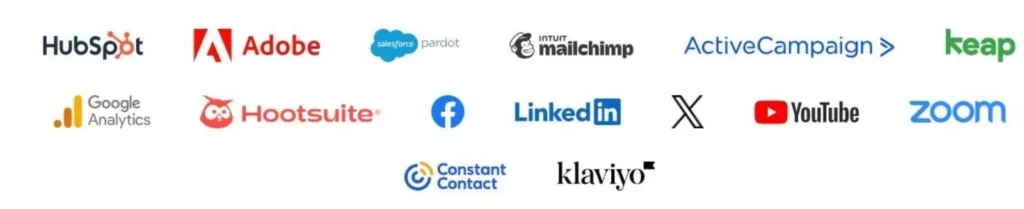
Platforms and tools that integrate with Wistia
Once things are in place though, the viewing data is more useful than just simple view counts, because it shows how people actually watch and interact with a video.
Wistia is also used by teams that rely on training libraries or repeated video content. Being able to organise videos, manage access, and reuse recordings for things like onboarding or internal updates helps keep everything tidy.
This can be good for when videos are shared across departments or reused for different purposes.
Overall, I can see that Wistia appears to be the best for situations where video is planned, purposeful, and used regularly. It’s not for uploading something once and moving on. It’s more for building a video library that supports ongoing work, training, or communication without turning into a mess to manage later.
Final Wistia Platform Review and Supporting Information
Things That Could Improve
Even though Wistia covers a lot of ground, I think there are a few areas where it could be better, especially for teams using it on a regular basis.
A few things that stand out are:
- More flexible editing tools inside the platform. Basic trimming works fine, but some simple additions like text overlays or on-screen notes would reduce the need to use separate editing software.
- A more forgiving starting point for smaller teams. Entry-level plans and bandwidth limits can feel a bit tight early on, particularly for creators or small teams still finding their feet.
- Clearer guidance for new users who aren’t used to marketing or video tools. Some features can take time to find and understand, especially at the beginning.
- Stronger podcast-focused features. The audio support is there, but it’s not as developed as platforms built mainly for podcasts.
- More practical examples showing how different types of businesses use the platform. Step-by-step guides for areas like education or SaaS would help new users get value faster.
None of these are what you can call negatives, but they are areas where the platform could become easier to work with and more welcoming for new users.
Comparing Wistia to Other Video Platforms
I think it helps to look at Wistia in relation to other video platforms, mainly to understand what kind of role it’s meant to play rather than to decide which one is “better.”
With YouTube, this is clearly for reach. Videos are easy to find, easy to share, and free to host, which makes it a good choice for public visibility. The only thing is that videos stay on YouTube’s platform, with ads, suggested content, and limited control over how everything looks on your own website.
Vimeo is something in between. It offers a cleaner presentation and more control than YouTube, along with creative tools that are appealing to filmmakers and agencies. It’s good for showcasing work, but it’s not as focused on things like lead capture, detailed viewer tracking, or using video as part of a sales or training process.
Loom is built for quick screen recordings and short messages. It’s good for one-to-one communication, internal updates, or fast explanations, but it’s not intended for managing large video libraries or embedding structured video content across websites. If you are comparing it with a tool that focuses more on screen recording, editing, and lesson style content, you can also read my ScreenPal Review.
Hosting videos yourself or using a private CDN does give you control over your files, but you’re usually responsible for everything else. Features like viewer data, interactive elements, and simple embeds aren’t built in, and managing those parts becomes your job.
For many teams, that extra work is more than they want to take on.
Looked at this way, Wistia fills a specific gap.
It’s usually used when videos are kept on your own site and used for training, education, or customer communication, without sending viewers off to another platform.

Frequently Asked Questions – FAQs
Wistia can be worth it if video plays an important role in your business. It’s usually chosen by teams that use video for training, education, sales support, or customer communication, rather than just uploading videos for the sake of it.
If you want control over how videos appear on your website, want to understand how people watch them, and prefer not to send viewers elsewhere, Wistia is a good choice.
If video is only an occasional extra or you just need free hosting, it may be more than you need.
That depends on how you plan to use video.
Vimeo is good for showing off your creative work and sharing videos publicly with a cleaner look than some other platforms. Wistia is usually chosen when video needs to support something specific, such as training, onboarding, or customer education, and stay on your own site.
If you don’t need detailed viewer data, access controls, or built-in actions inside the video, Vimeo may be enough. If those things are important to you however, Wistia is often the preferred option.
Wistia places a strong emphasis on security and access control. Videos in your account are private by default and are not indexed by the search engines unless you choose to embed or share them.
You can control where videos appear, restrict access, and limit who can view or manage content. This is one of the reasons Wistia is commonly used for internal training, private resources, and customer-only material.
The main difference is how and where the videos are used.
YouTube is built for public sharing and visibility. Videos are easy to find and are hosted entirely on YouTube’s platform.
Wistia is used when videos are placed on your own website and are meant to support things like training, education, or customer communication. It keeps viewers on your content instead of pulling them into a public video platform.
Yes. Videos uploaded to Wistia are private by default. They are not visible to the search engines and cannot be found unless you choose to share them.
You can share videos by embedding them on your site or sending direct links. You also have control over who can access them and where they can appear, which makes Wistia suitable for private or restricted content.
How This Wistia Platform Review Was Put Together
Before getting to the end of this review, I just want to tell you how I approached writing it.
I haven’t used Wistia personally with my own projects. Instead, this review is based on looking closely at how the platform is set up, what problems it’s built to solve, and how it’s commonly used across business websites, training systems, and customer resources.
Rather than relying on marketing claims, I looked at how Wistia is described and used in practice. That includes reviewing the platform’s features, pricing structure, documentation, and how different types of teams apply it for training, education, and customer communication.
I’ve worked with websites and online tools for a long time now, so my way of reviewing something like Wistia is to look at where it works, where it doesn’t, and what kind of user it’s aimed at. Not every tool is meant for everyone, and I think this review reflects that.
Everything here is based on publicly available information, user feedback, and how Wistia compares to other video tools people commonly use. My goal isn’t to push you in one direction, but to help you decide whether this type of platform is right for what you’re trying to do.
Final Thoughts on Wistia
Wistia is built for people who already know why they want to use video. It’s good for businesses, teams, and educators who rely on video for things like training, customer communication, or guiding people toward a next step, rather than just uploading content casually.
What really matters here is the amount of control you get. Videos stay on your website, follow your branding, and don’t come with ads, other suggested content, or distractions pulling people’s attention elsewhere.
For teams that care about privacy, presentation, and understanding how videos are actually used, that control matters.
Pricing means it’s usually better for organisations where video plays a regular role, rather than solo creators uploading large volumes just to host them somewhere. When video supports training materials, product pages, onboarding, or internal resources, the value is easier to justify.
If your goal is to use video in a more structured way and keep it tied closely to your own content, Wistia is well worth a look.
Thanks for reading my Wistia Platform Review. If you’d like to see the current plans or how everything is set up, you can visit Wistia’s official website for the details.
If you have any questions or comments, feel free to leave them below.
Chris
Quick Summary
Wistia is a good choice if you need control over how video is used on your own website and you rely on it for training, customer communication, or structured content. It works best when video has a clear purpose and is part of your ongoing setup.
It’s not ideal if you’re only looking for free hosting, casual uploads, or a platform built around reach and public discovery.
My Overall Rating For Wistia Is 4 out of 5
Wealthy Affiliate
This is where my journey into the online world began, and it’s still the community I use for learning, tools, and support while working on my own projects.

About Chris Towers – Follow Me

My name is Chris Towers, and I run Affiliate Pro Solutions. I work with websites, content, and affiliate projects, and this website is where I share what I’ve learned from doing that work.
Most of what I write about comes from researching hosting companies, tools, and platforms that people use when building websites or trying to earn online. I look at how things are set up, what’s included, and where people often get caught out later.
I’m not connected to the companies I review beyond standard affiliate partnerships. This site does include affiliate links, but the aim here is to explain how the services work rather than push anyone into a decision.
You’ll find me on
Other Related Video Player/Screencast Reviews
- Wistia Platform Review Is It Worth Using for Business Video?

- ScreenPal Review An Honest Look At The Features And Limits
Just to be open with you, this page includes affiliate links. If you click on one of these links and make a purchase, I earn a small commission. There is no extra cost to you at all. This simply helps support the content I share here. Thank you for your support, it really is appreciated.
Hi Chris,
This was a good read, thanks for putting it all together.
I’ve seen Wistia mentioned a lot, but most explanations make it sound more complicated than it probably needs to be. Your review made it clearer what it’s actually used for and who it’s aimed at.
I don’t publish videos all the time, but when I do, I want them to load properly and sit nicely on my site. Reading this helped me understand whether Wistia would be worth me considering or if something more simple would be enough.
Appreciate the honest overview.
Angela
Thanks Angela, happy it helped you out.
If you’re only using video now and then, Wistia can still be a good choice if you care about how videos load and how they sit on your site. It’s not for posting lots of videos, just more about having them work properly when you do use them.
If video is more occasional and you just need something quick, an easier option might be enough. But when video starts supporting pages, training, or customer info, that’s where Wistia starts to be something worth thinking about.
Appreciate you taking the time to comment.
Chris
This was helpful, thanks.
It was good to see who Wistia makes sense for, without trying to make it sound right for everyone.
The part about keeping videos on your own site without ads or distractions is a big plus, especially for training or customer content. That’s something a lot of reviews don’t really cover.
It’s given me a much better idea of whether Wistia would work for what I’m doing, so I appreciate the honest approach.
Thanks, and I’m glad it helped.
That’s exactly how I look at Wistia. It’s useful when video has a job to do on your own site, not when you’re trying to cover every possible use case.
If you’re using video for training or customer content, keeping everything clean and distraction-free makes a huge difference.
Appreciate you reading!
Chris